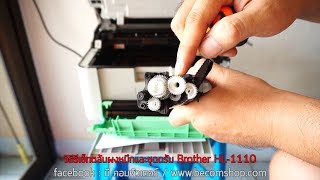
Remanufacturing and Reset Brother Drum Unit HL1110 DCP1510
Автор: viandant5
Загружено: 2016-03-13
Просмотров: 302700
How to remanufacture and reset Brother drum unit DR-1050 DR-1070 DR-1060 DR-1000 DR-1030 DR-1020 for use in printers and multifunction fax machine HL-1112 HL-1118 HL-1111 HL-1110 HL-1212 HL-1210, MFC-1813 MFC-1818 MFC-1810 MFC-1811 MFC-1815 MFC-1910WE DCP-1518 DCP-1510 DCP-1511 DCP-1512 DCP-1612
Things needed:
Screwdriver
New drum
For any question or suggestion leave a comment
RESET PROCEDURES:
The printer shuts the drum unit down when it reaches 10,000 pages
The reset procedure will reset the drum counter back to zero, so you can keep using your drum unit after the “Replace Drum” message appears and will allow you to keep printing beyond the set life of the drum unit.
Reset procedure for the Brother HL-1112 HL-1118 HL-1111 HL-1110 HL-1212 HL-1210 drum unit:
Make sure that the machine is turned on.
Open the cover.
Press power button 4 times.
Close the cover.
The drum is now reset.
Reset procedure for MFC-1813 MFC-1818 MFC-1810 MFC-1811 MFC-1815 MFC-1910WE DCP-1518 DCP-1510 DCP-1511 DCP-1512 DCP-1610
Press Menu button.
Press Up or Down arrow to choose “Machine Info”.
Press OK button.
Press Up or Down arrow to choose “Reset Drum”.
Press OK button for 3 seconds.
Press the Up arrow to reset the drum counter.
Press Stop/Exit.
--------------------------------------------
Link Accessori srl
Via Beverara 224/7
40131 BOLOGNA (Italy)
http://www.linkaccessori.it
email: [email protected]
other links:
http://www.emmegiricambi.it/
http://www.brother-usa.com/printer/#....
-------------------------------------------------------------------------

Доступные форматы для скачивания:
Скачать видео mp4
-
Информация по загрузке:




![EMOTIONAL VIBES [2025] – DEEP HOUSE, VOCAL HOUSE, NU DISCO & CHILLOUT MIX](https://ricktube.ru/thumbnail/T7I8ZrwQ1FA/mqdefault.jpg)

![[2025] Feeling Good Mix - English Deep House, Vocal House, Nu Disco | Emotional / Intimate Mood](https://ricktube.ru/thumbnail/cxLdtvzf2sI/mqdefault.jpg)




