User-Defined Data Types (UDTs) – Studio 5000 DCS Best Practices
Автор: AGEIN PRIVATE LIMITED
Загружено: 2026-01-09
Просмотров: 243
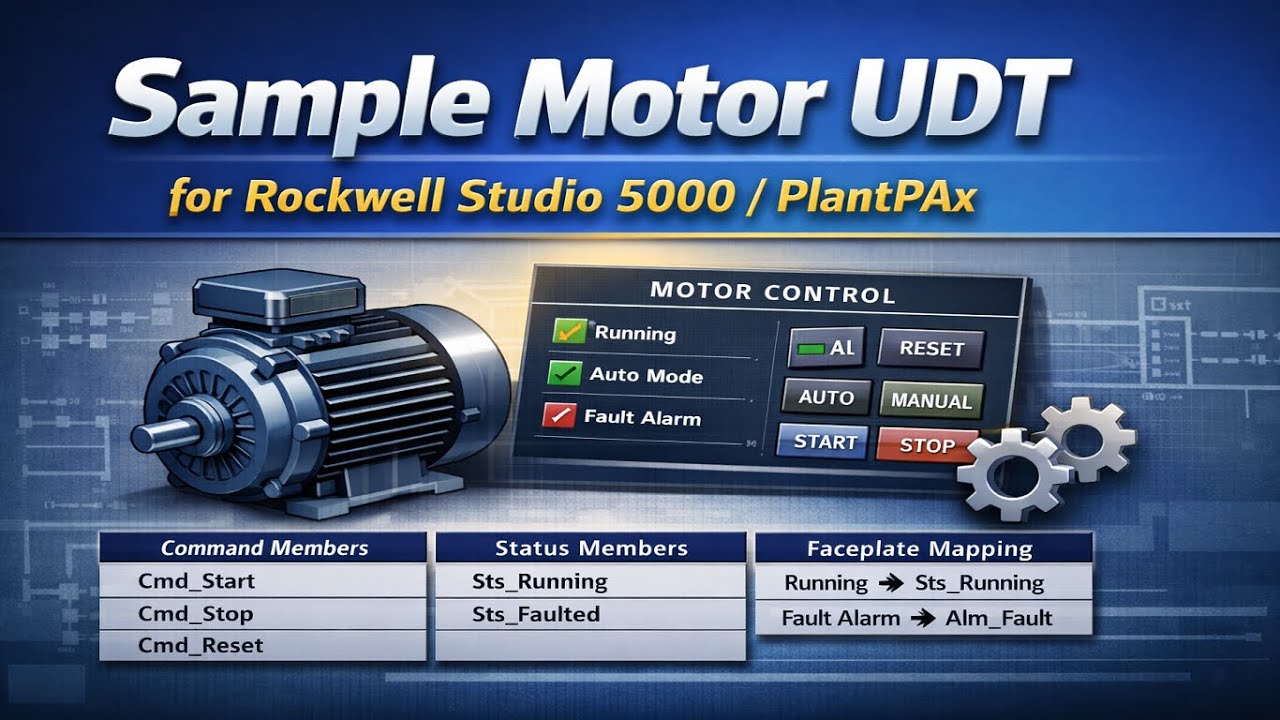
User-Defined Data Types (UDTs) are a fundamental programming construct in Rockwell Studio 5000 for Allen-Bradley Distributed Control Systems (DCS). UDTs enable the logical grouping of related data into standardized structures, supporting modular control strategies and consistent data modeling across the system.
The proper design and application of UDTs improves program readability, reduces configuration errors, simplifies maintenance and troubleshooting, and enhances system scalability. This section defines recommended best practices for creating, naming, and implementing UDTs to ensure long-term reliability, standardization, and maintainability of the DCS application.
Purpose
User-Defined Data Types (UDTs) are a fundamental programming construct in Rockwell Studio 5000 for Allen-Bradley Distributed Control Systems (DCS). UDTs provide standardized, structured data models that support modular control strategies, consistent naming conventions, and scalable system architectures.
Proper implementation of UDTs improves program readability, minimizes configuration errors, simplifies troubleshooting, and ensures long-term maintainability of the DCS application.
Mandatory Requirements
The following rules shall be applied when using UDTs in Studio 5000 DCS projects:
Standardization
All commonly reused equipment and instrument data shall be implemented using approved UDTs.
UDTs shall be defined in a centralized library and reused consistently across the project.
Naming Conventions
UDT names shall follow the project naming standard (e.g., UDT_Motor, UDT_Valve, UDT_AI).
Member names shall be clear, descriptive, and consistent across all UDTs.
Data Integrity
UDT structures shall not be modified after deployment without impact analysis and formal approval.
Changes to UDT definitions shall be version-controlled.
Documentation
Each UDT shall include a description defining its purpose and intended usage.
All members within the UDT shall be commented.
Recommended Best Practices
The following practices should be applied to improve system quality and maintainability:
Group related parameters logically (e.g., Commands, Status, Alarms, Configuration).
Avoid excessive nesting of UDTs to maintain performance and readability.
Separate configuration data from runtime status data where practical.
Align UDT design with ISA-88 / ISA-95 concepts for equipment and control modules.
Design UDTs to support HMI, alarm, and historian integration without additional mapping.
Typical UDT Categories
Standard UDTs typically include, but are not limited to:
Equipment UDTs
Motor
Valve
Pump
Drive (VFD)
Instrumentation UDTs
Analog Input (AI)
Analog Output (AO)
Digital Input (DI)
Digital Output (DO)
Control UDTs
PID
Interlocks
Sequences
Alarm & Diagnostic UDTs
Alarm status
Fault codes
Maintenance indicators
Benefits
Implementing UDTs in accordance with this standard ensures:
Consistent data modeling across the DCS
Reduced engineering and commissioning effort
Easier troubleshooting and future system expansion
Improved alignment between PLC logic, HMI, and plant standards
🔹 Subscribe for more PLC & Automation tutorials
🔹 Like 👍 | Comment 💬 | Share 🔁
🔹 Follow for more industrial automation learning content
#RockwellAutomation #Studio5000 #PLCProgramming #AllenBradley #PLCTutorial
#IndustrialAutomation #ControlLogix #CompactLogix #LadderLogic #AutomationEngineer
#UDT #UserDefinedDataType #PLCLearning #AutomationTraining #PLCProjects
Доступные форматы для скачивания:
Скачать видео mp4
-
Информация по загрузке:



![DELTA PLC [ ANALOG (DVP04AD-S2,DVP04DA-S2) ] PROGRAMMING](https://image.4k-video.ru/id-video/C9FCy4zCU4w)
![🔥 How JVM Internally Works | JVM Architecture in detail | Learn About JVM [Hindi]](https://image.4k-video.ru/id-video/48bHZPzCpGg)


