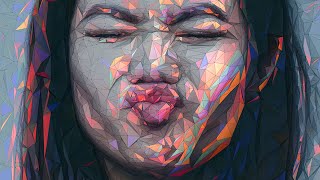
How to Create a Low Polygon Portrait in Photoshop
Автор: Nemanja Sekulic
Загружено: 2017-10-05
Просмотров: 146472
In this fun tutorial I will show you how to create a low poly portrait effect in Photoshop.
I like to call this a Paper mask effect, or Origami effect.
The basic thing is to cover your model with a bunch of triangles, not squares or any other polygon shapes, but triangles.
Smaller triangles are, higher resolution of a model you will get, and opposite.
It is really fun and easy process.
You can apply this effect on anything that you like!
I will not provide a tutorial files, because you can work on your own files.
Have fun!
➤➤➤ If you want to SUPPORT this project: / nemanjasekulic
GET IN TOUCH:
Website: http://nemanjasekulic.com/
Instagram: / ns_photography
Facebook: / nemanjasekulicphotography
Twitter: / sekulicnemanja
➤Here is the list of equipment that I use:
Tablet: http://amzn.to/2CI9nM0
Camera for tutorial recording: http://amzn.to/2ETBz4s
Microphone for tutorial recording: http://amzn.to/2FwAYmk
My MAIN camera: http://amzn.to/2HL5ObF
Second camera: http://amzn.to/2HL5XvJ
LENSES: http://amzn.to/2CHvPoN
http://amzn.to/2opbgJm
http://amzn.to/2FyhgXG
GoPro: http://amzn.to/2ET6mOX
My Everyday camera bag: http://amzn.to/2GF0LZ5

Доступные форматы для скачивания:
Скачать видео mp4
-
Информация по загрузке: