Cisco Automation: Use Zero Touch Provisioning/ZTP to Configure Cisco C8000v Basically (Day0)
Автор: NetworkLabRoom
Загружено: 2023-09-26
Просмотров: 1327
@NetworkLabRoom
, #cisco , #ciscotech #ciscosystems #automation
00:00 Start Video
02:11 Configure HTTP Server for Zero Touch
04:11 Create File to HTTP Server
06:42 Enable Downloadable feature for HTTP Server
08:35 Configure HTTP Pool at Legacy Router
09:16 Power on C8000v and checking
Configuration Steps:
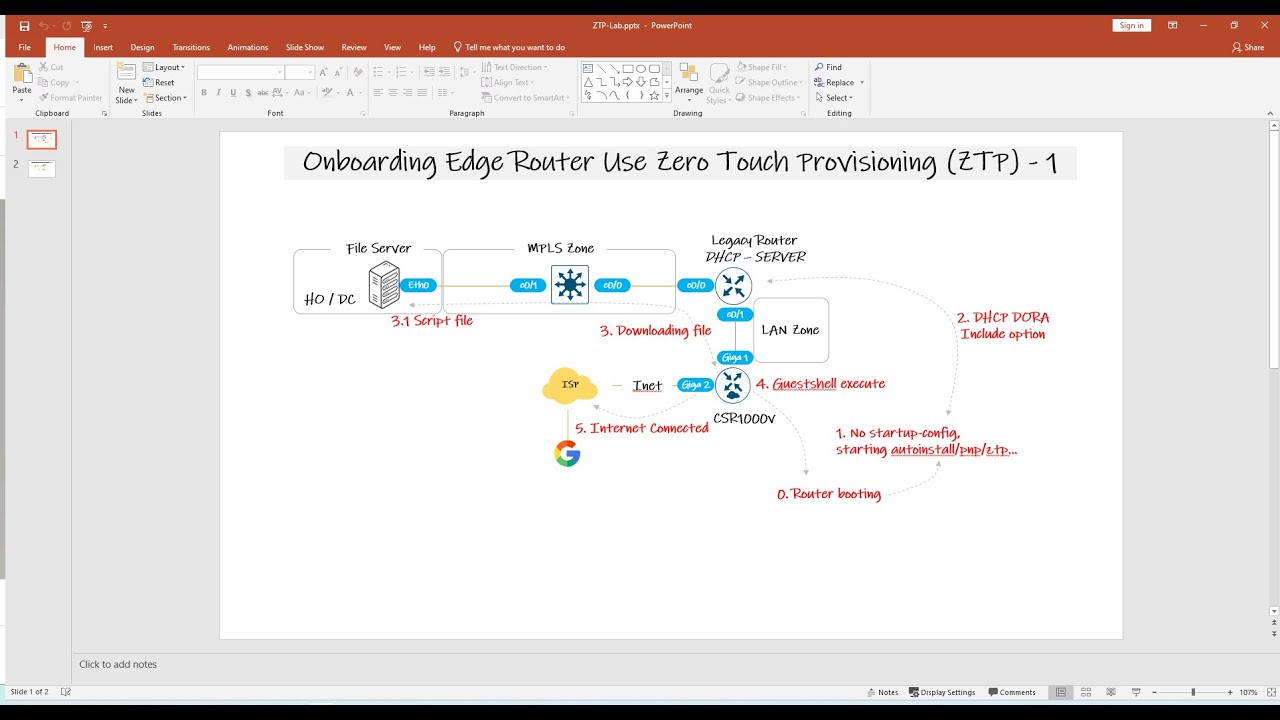
1. Configure HTTP server, then enable download file feature.
2. Configure LegacyRouter:
DHCP:
int e0/0
ip dhcp client request static-route
ip dh pool ZTP
network 10.10.10.0 255.255.255.0
default-router 10.10.10.1
bootfile http://192.168.1.1/ztp/zty.py
3. Power on C8000v
*********************************
Python code:
##########
import cli
cli.configurep(["int gi 2", "ip address 113.1.1.10 255.255.255.252", "no shut", "exit", "des To-Internet"])
cli.configurep(["ip route 0.0.0.0 0.0.0.0 113.1.1.2"])
cli.configurep(["ip route 192.168.1.0 255.255.255.252 10.10.10.1"])
cli.configurep(["interface lo0","ip address 100.100.100.100 255.255.255.255"])
cli_command = "sh ip int brief"
cli.executep(cli_command)
Доступные форматы для скачивания:
Скачать видео mp4
-
Информация по загрузке: