How to Return Value from Ext.Dialog in ExtJS?
Автор: vlogize
Загружено: 2025-10-10
Просмотров: 2
Learn how to effectively return values from ExtJS dialogs with custom events and structured code examples.
---
This video is based on the question https://stackoverflow.com/q/68137065/ asked by the user 'Sap1234' ( https://stackoverflow.com/u/15284098/ ) and on the answer https://stackoverflow.com/a/68137732/ provided by the user 'Arthur Rubens' ( https://stackoverflow.com/u/10196301/ ) at 'Stack Overflow' website. Thanks to these great users and Stackexchange community for their contributions.
Visit these links for original content and any more details, such as alternate solutions, latest updates/developments on topic, comments, revision history etc. For example, the original title of the Question was: How to return value from Ext.Dialog?
Also, Content (except music) licensed under CC BY-SA https://meta.stackexchange.com/help/l...
The original Question post is licensed under the 'CC BY-SA 4.0' ( https://creativecommons.org/licenses/... ) license, and the original Answer post is licensed under the 'CC BY-SA 4.0' ( https://creativecommons.org/licenses/... ) license.
If anything seems off to you, please feel free to write me at vlogize [AT] gmail [DOT] com.
---
How to Return Value from Ext.Dialog in ExtJS?
When working with ExtJS, one common challenge developers face is how to return a value from a dialog. This task can often become frustrating as there are multiple layers of complexity involved, such as managing the interaction between dialogs and ensuring you can retrieve the selected value asynchronously. In this post, we’ll explore a clear, step-by-step solution to this challenge by leveraging custom events within Ext.Dialog.
Understanding the Problem
The problem at hand consists of two main challenges:
Returning a value from a dialog: You want to capture the user’s selection from the dialog once it is closed.
Waiting for that value: You need to ensure that your code can handle this value instead of proceeding with further execution immediately after the dialog call.
To illustrate, consider the scenario where we need information from a dialog to determine the type of a new view to create. The user is presented with a choice among options A1, A2, A3, or A4, and based on their selection, a different view will be shown.
Example Code of the Scenario
Here’s a brief code snippet demonstrating how to create and display the dialog, but with some gaps on how to retrieve values:
[[See Video to Reveal this Text or Code Snippet]]
Solution Using Custom Events
To effectively manage user selections and retrieve them back from the dialog, we can implement custom events. Here’s how:
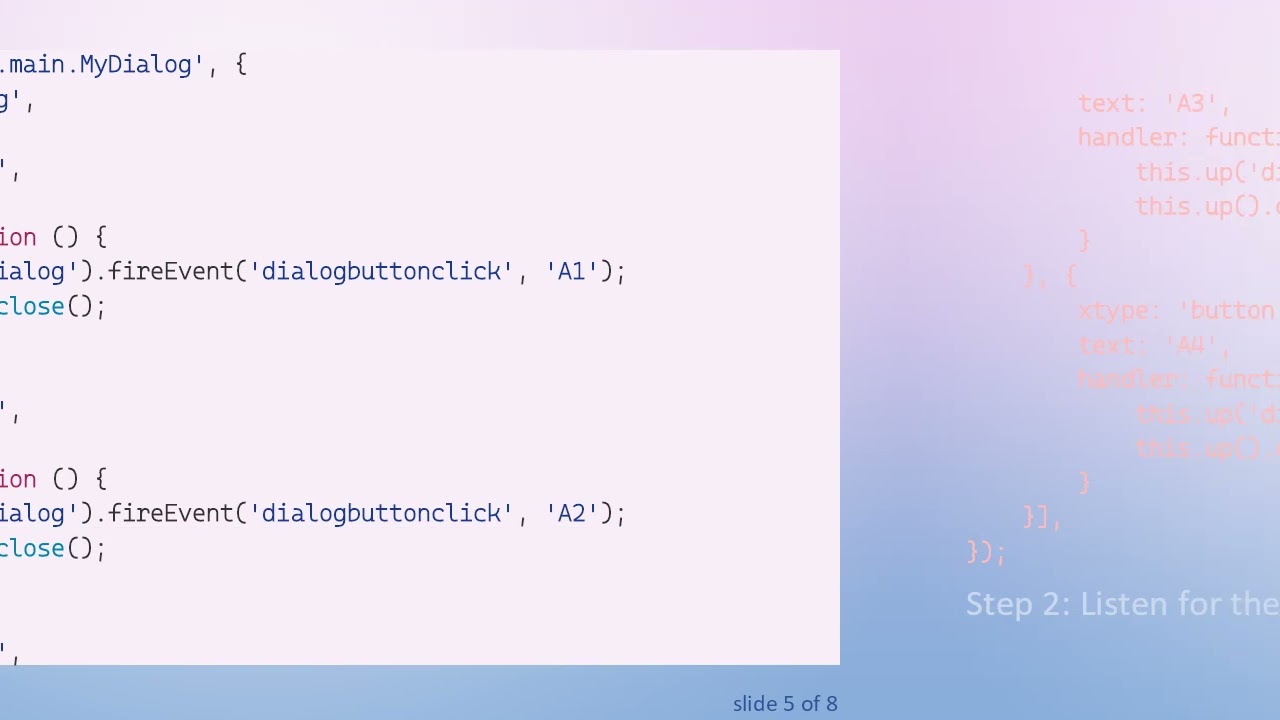
Step 1: Modify the Dialog to Use Events
You need to alter the dialog code by adding event listeners to your buttons. This way, when a button is clicked, it will fire a custom event carrying the button’s identifier back to the calling context:
[[See Video to Reveal this Text or Code Snippet]]
Step 2: Listen for the Custom Event on the Dialog Creation
Upon creating an instance of the dialog, set up a listener for the dialogbuttonclick event to handle the button click results appropriately:
[[See Video to Reveal this Text or Code Snippet]]
Conclusion
With the above implementation, you will effectively be able to capture the value selected in the dialog and use it to trigger the creation of new views accordingly. Using custom events not only streamlines the process but also keeps your codebase clean and manageable.
By incorporating these methodologies into your ExtJS applications, you can enhance user interactions while maintaining control of the application's flow. Try these steps in your project, and observe how seamless it becomes to retrieve values from dialogs effectively!
Доступные форматы для скачивания:
Скачать видео mp4
-
Информация по загрузке:

![[4K FULL HD] Relaxing Water Background | 1 HOUR | Calm Water Wallpaper (No Sound)](https://image.4k-video.ru/id-video/y9PTNTSpGJs)


