How to Fetch and Display Images from Firestore in Flutter Image URL for ListView Items
Автор: vlogize
Загружено: 2025-09-23
Просмотров: 0
Learn how to fetch and display images from Firestore in Flutter by integrating dynamic loading of image URLs into a ListView. Perfect for beginners!
---
This video is based on the question https://stackoverflow.com/q/62208497/ asked by the user 'Maddox Mania' ( https://stackoverflow.com/u/10616816/ ) and on the answer https://stackoverflow.com/a/62212014/ provided by the user 'Marci' ( https://stackoverflow.com/u/13681156/ ) at 'Stack Overflow' website. Thanks to these great users and Stackexchange community for their contributions.
Visit these links for original content and any more details, such as alternate solutions, latest updates/developments on topic, comments, revision history etc. For example, the original title of the Question was: Flutter, How to get Image URL from Firestore for respective Index Items and show in a list View
Also, Content (except music) licensed under CC BY-SA https://meta.stackexchange.com/help/l...
The original Question post is licensed under the 'CC BY-SA 4.0' ( https://creativecommons.org/licenses/... ) license, and the original Answer post is licensed under the 'CC BY-SA 4.0' ( https://creativecommons.org/licenses/... ) license.
If anything seems off to you, please feel free to write me at vlogize [AT] gmail [DOT] com.
---
How to Fetch and Display Images from Firestore in Flutter
Creating a dynamic app that displays information in a ListView is one of the exciting features of Flutter. However, if you're new to programming, you might encounter challenges in fetching and displaying images from Firestore. In this guide, we will tackle a common problem: how to get image URLs from Firestore for respective list items and display them in a ListView. Let's dive in!
The Problem
Imagine you are building an app that displays a list of offers. Each offer is a document stored in Firestore, and each document has a field containing the URL for an image (e.g., a logo or cover image). Your task is to fetch that URL from Firestore and display the corresponding image in the leading position of each ListTile in a ListView.
For example, if the document for Flipkart contains an image field with a URL to its logo, you want to dynamically fetch this URL and show it in your list. This requires an understanding of Flutter’s ListView, FutureBuilder, and how to efficiently retrieve data from Firestore.
The Solution
To solve this problem, we will break down the solution into clear steps. We will discuss how to modify your existing code to include an image in the ListTile by fetching the relevant URL from Firestore.
Step 1: Set up Firestore Data Fetching
You already have a function to fetch offers from Firestore. We'll slightly modify the code to also fetch the image URL for each document.
Here is your updated fetching function in the OfferScroll class:
[[See Video to Reveal this Text or Code Snippet]]
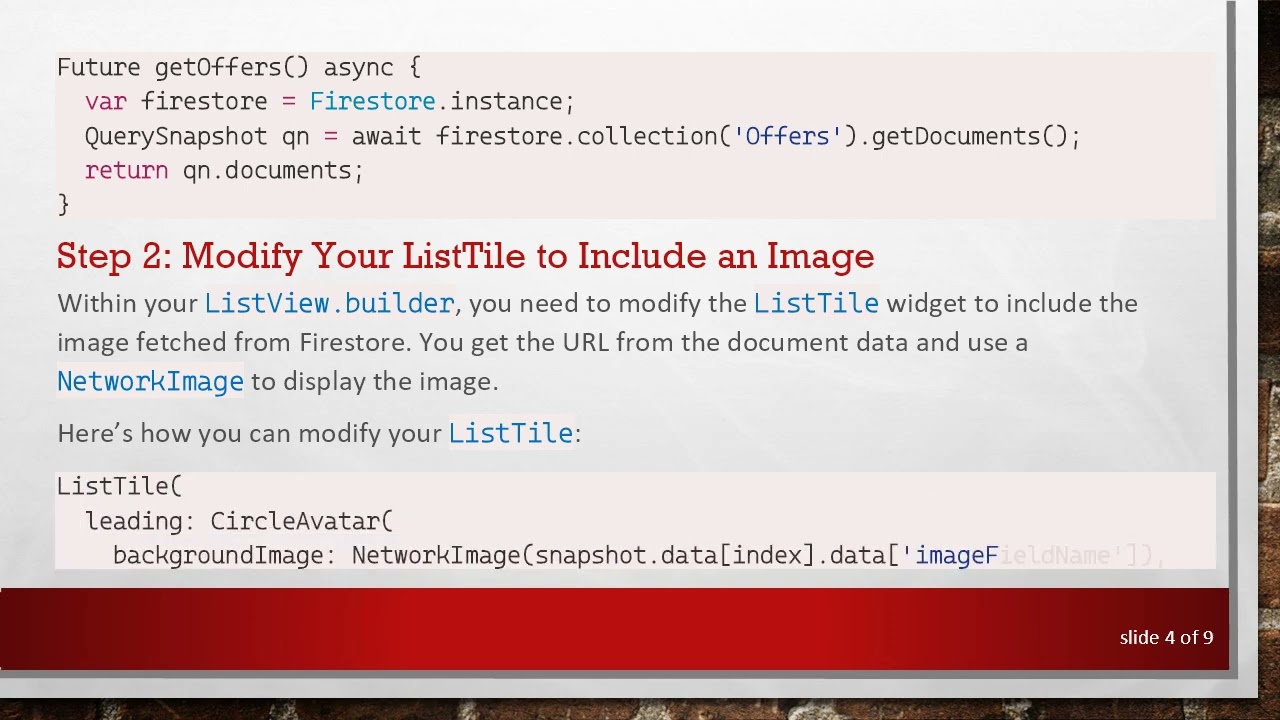
Step 2: Modify Your ListTile to Include an Image
Within your ListView.builder, you need to modify the ListTile widget to include the image fetched from Firestore. You get the URL from the document data and use a NetworkImage to display the image.
Here’s how you can modify your ListTile:
[[See Video to Reveal this Text or Code Snippet]]
Complete Code
Here’s the full code snippet including the image integration:
[[See Video to Reveal this Text or Code Snippet]]
Conclusion
By following the above steps, you can easily retrieve and display images from Firestore in your Flutter app. Just ensure that you replace 'imageFieldName' with the actual name of the field in your Firestore documents that contains the image URL. This solution enhances the visual appeal of your app, making it more engaging for users.
If you're new to programming, don't hesitate to experiment with this code and customize it as needed. Happy coding!
Доступные форматы для скачивания:
Скачать видео mp4
-
Информация по загрузке:



![Камеди клаб [НОВЫЙ 2026] [full HD] Сборник избранных смешных и юмористических эпизодов | часть 5](https://image.4k-video.ru/id-video/hFezUJlKMmM)


