Highline Excel 2016 Class 04: References: Relative, Absolute, Mixed, Sheet, Workbook, 3-D, Table…
Автор: excelisfun
Загружено: 2016-04-25
Просмотров: 83148
Download Files: https://people.highline.edu/mgirvin/A...
In this video learn about:
(00:04) Download Files
(00:30) Introduction to types of References
1. (01:38) Example 1: Not Copying Formula. Goal: Calculate Net Income.
2. (02:09) Example 2: Not Copying Formula. Goal: Estimate the Future Value of an Investment.
3. (07:52) (Example 3: Relative Cell Reference. Goal: Calculate Net Income for each Month.
4. (09:03) Example 4: Relative & Absolute Cell Reference. Goal: Estimate the Future Value of an Investment at different rates.
5. (11:33) Example 5: Relative & Absolute Cell Reference. Goal: Calculate each Expense as a % of Revenue (Expense Ratios) to use in next year's Budget. Also discussion of how to interpret Ratios.
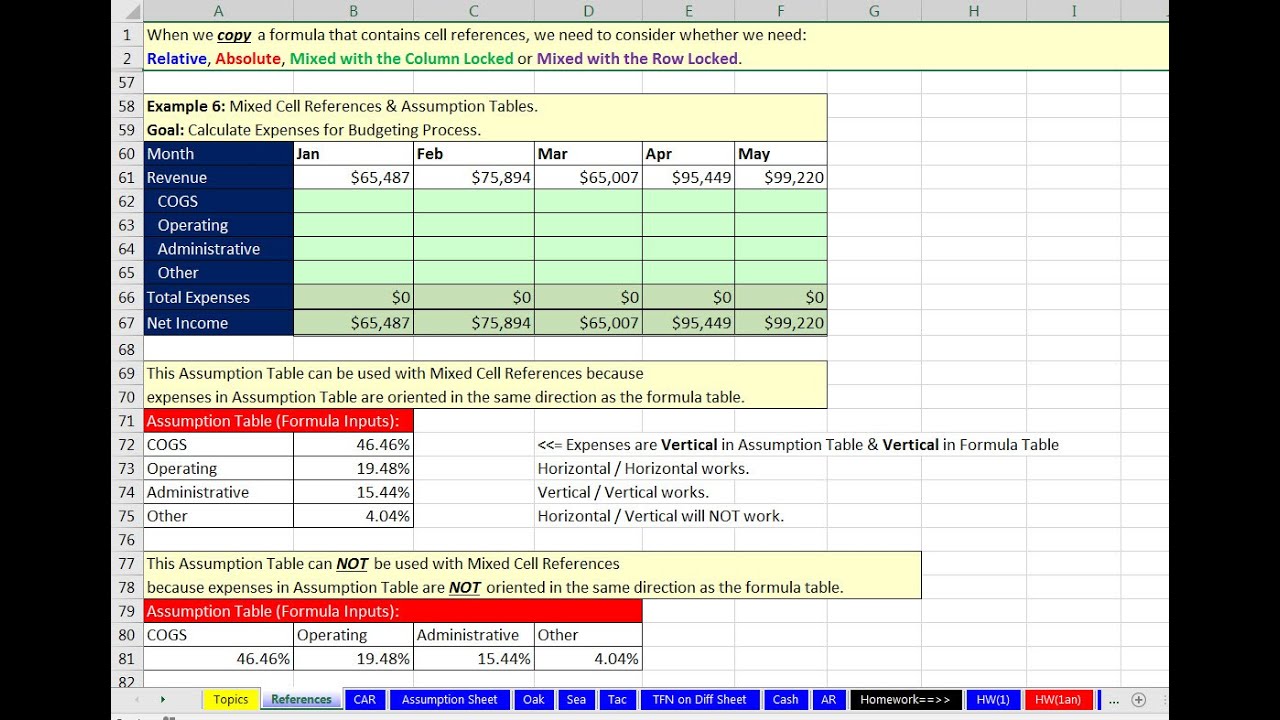
6. (15:41) Example 6: Mixed Cell References & Assumption Tables. Goal: Calculate Expenses for Budgeting Process.
7. (29:07) Example 7: Relative & Mixed Cell Reference. Goal: Create "Common Sized Income Statement" for Accounting Report.
8. (33:31) Example 8: Mixed Cell References & Absolute Cell References. Goal: Estimate the Future Value of an Investment at different rates & length of investment.
9. (38:00) Example 9: Mixed Cell References & Relative Cell References. Goal: Calculate Profit for each Markup Price Schedule
10. (41:05) Example 10: Mixed Cell References & Relative Cell References in Expandable Range. Goal: Calculate Selling Price and Profit Margin based on different
11. (46:57) Example 11: Saving Formula Inputs with Scenario feature. Goal: Create different sets of assumptions for budget.
12. (51:52) Example 12: Sheet Reference. Goal: Check if Schedule Of Accounts Receivable matches the AR Controlling Account.
13. (55:51) Example 13: Sheet Reference Entered with New Window Open with Second View of Workbook. Goal: Calculate Jan & Feb Commissions, when Commission Rates are on an Assumption Sheet.
14. (01:00:22) Example 14: Workbook Reference. Goal: Access Net Income Number from External Workbook.
15. (01:06:22) Example 15: 3-D References. Goal: Add numbers from across sheets that each contain an identical template for units.
16. (01:10:55) Example 16: Defined Names. Goal: Estimate the Future Value of an Investment. Name Formula Inputs so that reading formulas is easier.
17. (01:18:23) Example 17: Defined Names. Goal: Name Fields so that it is fast, easy and accurate to enter ranges into formulas.
18. (01:13:33) Example 18: Defined Names. Goal: Use Defined Names to jump to other places in Excel Workbook File.
19. (01:21:22) Example 19: Table Formula Nomenclature (Structured References). Goal: Add Sales. Add Sales for each Product.
20. (01:32:42) Example 20: Table Formula Nomenclature from Different Sheet. Goal: Add Sales for each Product. Count Fields in Table.
21. (01:24:25) Example 21: Add column to Excel Table. Relative Reference in Table Formula Nomenclature. Goal: Add column to Excel Table for Commission Calculation.
22. (01: 01:26:34) Example 22: Mixed Reference in Table Formula Nomenclature. Goal: Add Defects for each month.
23. (01:35:48) Example 23: Table Formula Nomenclature for VLOOKUP and Data Validation. Goal: Create Dynamic Lookup Table.
24. (01:28:35) Example 24: Mixed & Absolute Reference in Table Formula Nomenclature. Goal: Add Defects for each month.
(01:42:14) Summary
Types of References in Excel:
1. Relative Cell Reference
2. Absolute Cell Reference
3. Mixed Cell Reference with row locked cell reference (also known as row absolute, column relative)
4. Mixed Cell Reference with column locked cell reference (also known as column absolute, row relative)
5. Sheet Cell Reference
6. Workbook Cell Reference
7. 3-D cell reference
8. Defined Name
9. Table Formula Nomenclature (Structured References)
Доступные форматы для скачивания:
Скачать видео mp4
-
Информация по загрузке:


![Суть линейной алгебры: #14. Собственные векторы и собственные значения [3Blue1Brown]](https://image.4k-video.ru/id-video/khMBBxLJLcw)
