How to Run php artisan serve with Different PHP Versions in Laravel
Автор: vlogize
Загружено: 2025-10-09
Просмотров: 1
Learn how to efficiently manage multiple PHP versions for your Laravel projects without constantly changing environment variables.
---
This video is based on the question https://stackoverflow.com/q/64702504/ asked by the user 'Mustafa Poya' ( https://stackoverflow.com/u/5515287/ ) and on the answer https://stackoverflow.com/a/64702700/ provided by the user 'Mustafa Poya' ( https://stackoverflow.com/u/5515287/ ) at 'Stack Overflow' website. Thanks to these great users and Stackexchange community for their contributions.
Visit these links for original content and any more details, such as alternate solutions, latest updates/developments on topic, comments, revision history etc. For example, the original title of the Question was: Running php artisan serve command with different php versions
Also, Content (except music) licensed under CC BY-SA https://meta.stackexchange.com/help/l...
The original Question post is licensed under the 'CC BY-SA 4.0' ( https://creativecommons.org/licenses/... ) license, and the original Answer post is licensed under the 'CC BY-SA 4.0' ( https://creativecommons.org/licenses/... ) license.
If anything seems off to you, please feel free to write me at vlogize [AT] gmail [DOT] com.
---
Managing Multiple PHP Versions with Laravel Projects
As a developer working with Laravel, you might have experienced the hassle of running different projects that require different PHP versions. For instance, you may have one project running on PHP version 7.1 and another on 7.4. Constantly changing the PHP environment variable in Windows can be cumbersome and time-consuming. Is there a more efficient way to handle this situation? Yes, there is! In this guide, we'll explore how to run your Laravel projects using php artisan serve without the need to modify your environment variables every time.
The Problem
When you work with multiple Laravel projects that require different versions of PHP, updating the Environment Variable in Windows to point to the correct PHP installation can become a repetitive task. Each time you switch projects, you have to manually change this variable, which can lead to frustration and productivity loss. So, how can we avoid this redundancy and streamline our workflow?
The Solution
Method for Windows Users
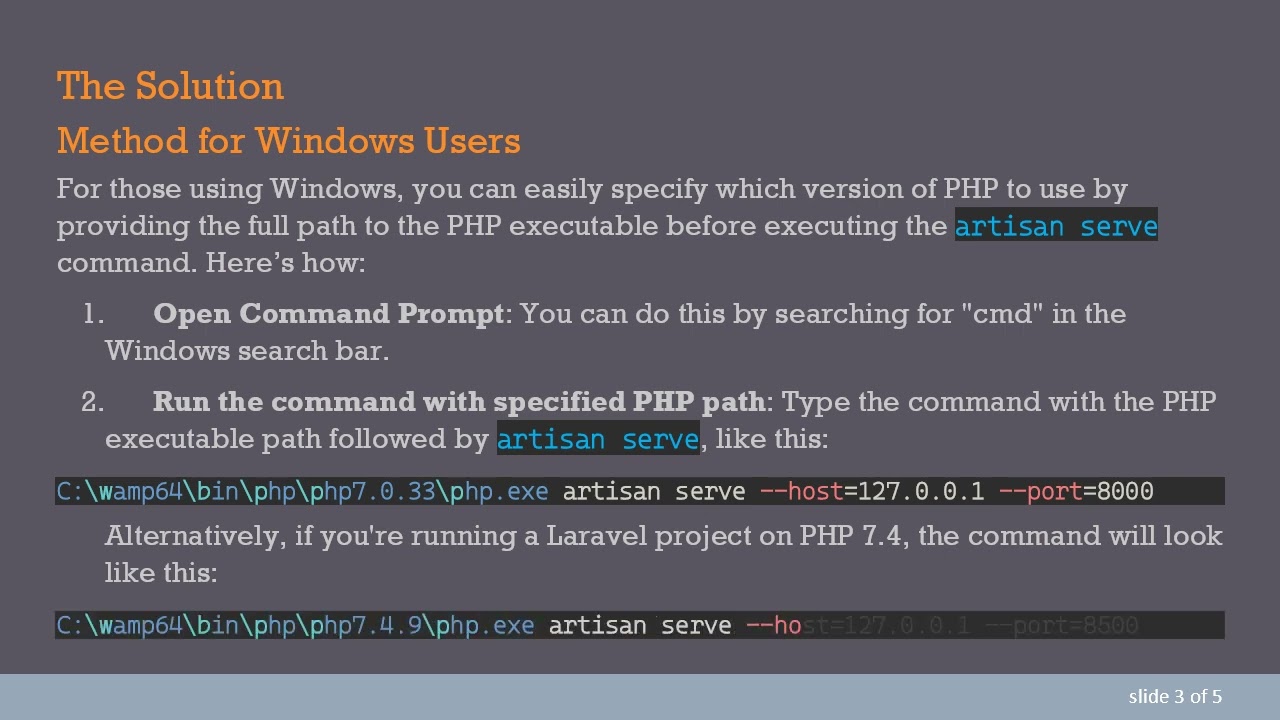
For those using Windows, you can easily specify which version of PHP to use by providing the full path to the PHP executable before executing the artisan serve command. Here’s how:
Open Command Prompt: You can do this by searching for "cmd" in the Windows search bar.
Run the command with specified PHP path: Type the command with the PHP executable path followed by artisan serve, like this:
[[See Video to Reveal this Text or Code Snippet]]
Alternatively, if you're running a Laravel project on PHP 7.4, the command will look like this:
[[See Video to Reveal this Text or Code Snippet]]
Access Your Project: You can then access your running project by visiting http://127.0.0.1:8000 or http://127.0.0.1:8500 in your web browser, depending on the port set in the command.
Method for Linux Users
If you're using Linux, particularly Ubuntu, the process is quite similar. Here's how to specify the PHP version when running artisan serve:
Open Terminal: You can do this by searching for "Terminal" in your applications.
Run the command with the PHP path: Here’s the command to specify PHP version 8.0:
[[See Video to Reveal this Text or Code Snippet]]
Access Your Project: Like in Windows, you can access the project via your web browser using the address http://127.0.0.1:8000.
Conclusion
Managing multiple PHP versions in a development environment can be a hassle, but it doesn't have to be. By specifying the full path to the corresponding PHP executable each time you run php artisan serve, you can save yourself the trouble of constantly changing environment variables. Whether you are on Windows or Linux, these methods ensure that you can effortlessly switch between different projects with different PHP requirements, allowing you to focus more on development and less on configuration.
Now that you know how to run your Laravel projects with the correct version of PHP, you can enhance your productivity and workflow. Happy coding!
Доступные форматы для скачивания:
Скачать видео mp4
-
Информация по загрузке:


![Learn Laravel from Scratch [FULL BOOTCAMP COURSE]](https://image.4k-video.ru/id-video/MOLZOXqaomM)

