Understanding the Output of Gensim's Word2vec: A Guide to Predicting Diseases from Symptoms
Автор: vlogize
Загружено: 2025-09-26
Просмотров: 1
Discover how to interpret the output of `Word2vec` in predicting diseases based on symptoms with practical insights and techniques.
---
This video is based on the question https://stackoverflow.com/q/63096909/ asked by the user 'Erich' ( https://stackoverflow.com/u/13982723/ ) and on the answer https://stackoverflow.com/a/63097133/ provided by the user 'Akshay Sehgal' ( https://stackoverflow.com/u/4755954/ ) at 'Stack Overflow' website. Thanks to these great users and Stackexchange community for their contributions.
Visit these links for original content and any more details, such as alternate solutions, latest updates/developments on topic, comments, revision history etc. For example, the original title of the Question was: How to interpret output from gensim's Word2vec most similar method and understand how it's coming up with the output values
Also, Content (except music) licensed under CC BY-SA https://meta.stackexchange.com/help/l...
The original Question post is licensed under the 'CC BY-SA 4.0' ( https://creativecommons.org/licenses/... ) license, and the original Answer post is licensed under the 'CC BY-SA 4.0' ( https://creativecommons.org/licenses/... ) license.
If anything seems off to you, please feel free to write me at vlogize [AT] gmail [DOT] com.
---
Understanding the Output of Gensim's Word2vec: A Guide to Predicting Diseases from Symptoms
In the realm of Natural Language Processing (NLP), one compelling approach to understanding relationships in data is through the use of Word2vec. This powerful model allows for the transformation of words into numerical vectors, and it can uncover hidden patterns. This guide aims to provide clarity on interpreting the output of Gensim's Word2vec, particularly in a clinical context where symptoms are used to predict diseases.
The Challenge: Clinical Data Prediction
Imagine a dataset populated with clinical data, representing patients along with their symptoms and diagnoses. For instance:
Patient1: ['fever', 'loss of appetite', 'cold', '# flu# ']
Patient2: ['hair loss', 'blood pressure', '# thyroid']
Patient3: ['hair loss', 'blood pressure', '# flu']
Patient30000: ['vomiting', 'nausea', '# diarrhoea']
Here, symptoms are simply listed, and those prefixed by # denote diagnoses. The goal is clear: to predict diseases based on a given set of symptoms.
However, the critical part comes in understanding how Word2vec generates this output and how you can leverage it effectively.
How Does Word2vec Work?
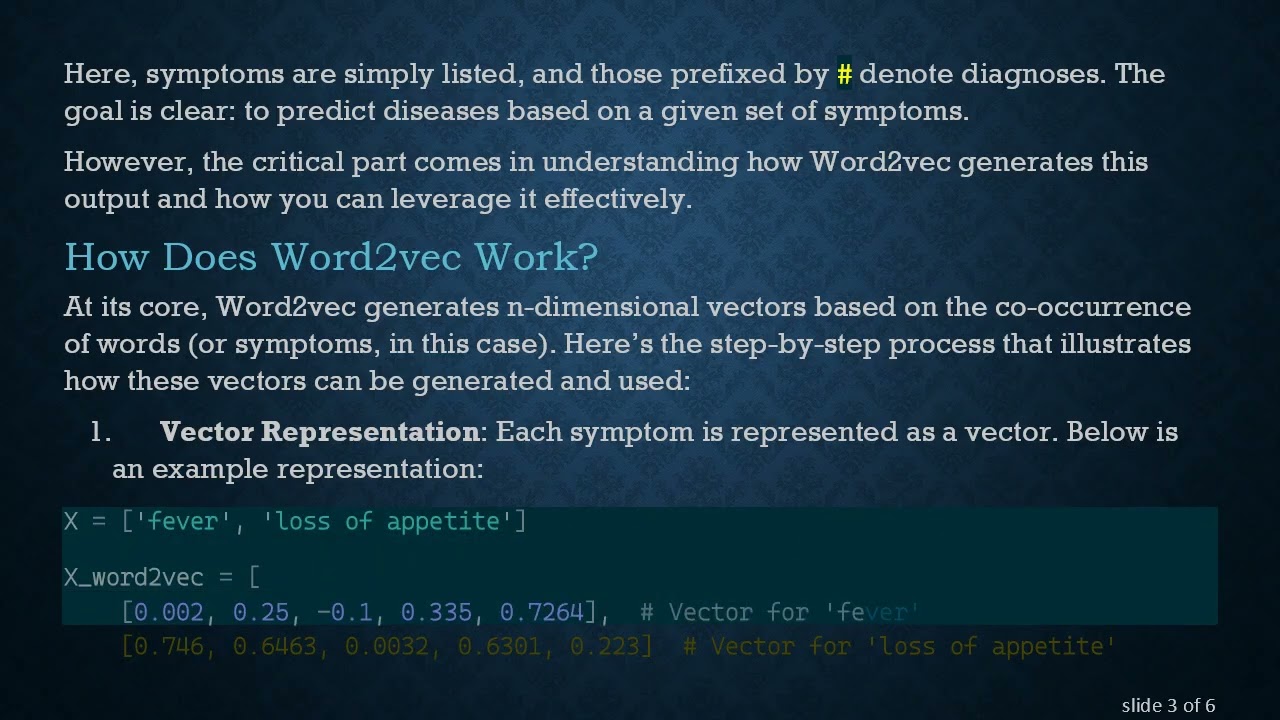
At its core, Word2vec generates n-dimensional vectors based on the co-occurrence of words (or symptoms, in this case). Here’s the step-by-step process that illustrates how these vectors can be generated and used:
Vector Representation: Each symptom is represented as a vector. Below is an example representation:
[[See Video to Reveal this Text or Code Snippet]]
Averaging Vectors: To predict diseases based on multiple symptoms, you can average the vectors to create a single representation for the symptom set:
[[See Video to Reveal this Text or Code Snippet]]
Here, X_avg becomes a feature vector that encapsulates the input symptoms.
Advancing to Predictive Modeling
Once you have your feature vectors, the next step involves treating the problem like a standard machine learning task.
Train and Test Split: Divide your dataset into training and testing sets to ensure your model's validity and performance are assessed accurately.
Classification Model: Implement a classification model using libraries like Scikit-learn or TensorFlow. The outcome here is the model’s ability to predict diseases based on the symptom input.
Understanding Cosine Similarity
An important point to note about using cosine similarity with Word2vec vectors:
Cosine Similarity for Similar Symptoms: While employing cosine similarity with Word2vec output can indicate similarity, it primarily yields insight into symptoms rather than diseases. Essentially, the model will be recommending symptoms based on other similar symptoms, not diagnosing diseases.
This highlights a limitation of simply using the cosine similarity approach for the construction of a recommendation model.
Conclusion
In summary, utilizing Gensim's Word2vec is a powerful method for analyzing clinical data. By transforming symptom data into vector space models and then averaging these representations, one can create a meaningful predictive model. However, it's crucial to recognize the distinction between symptom similarities and disease predictions.
With this understanding, you are better equipped to not only leverage Word2vec in your analysis but also to refine your models for improved accuracy in predicting diseases based on symptoms.
By effectively interpreting the output from Word2vec, you can unlock potential insights that may enhance clinical decision-making and ultimately improve patient outcomes.
Доступные форматы для скачивания:
Скачать видео mp4
-
Информация по загрузке:





