Sorting and filtering data in Calc part 1
Автор: openofficevideo
Загружено: 2011-09-05
Просмотров: 44386
http://openofficevideo.com
Transcript:
Welcome to OpenOffice video.
I am Maarten and today I will show you how to use the sorting and filter functions in Calc which is very useful if you want to find the data you need in large numbers, large datasheet or if you want, of course, to sort your data.
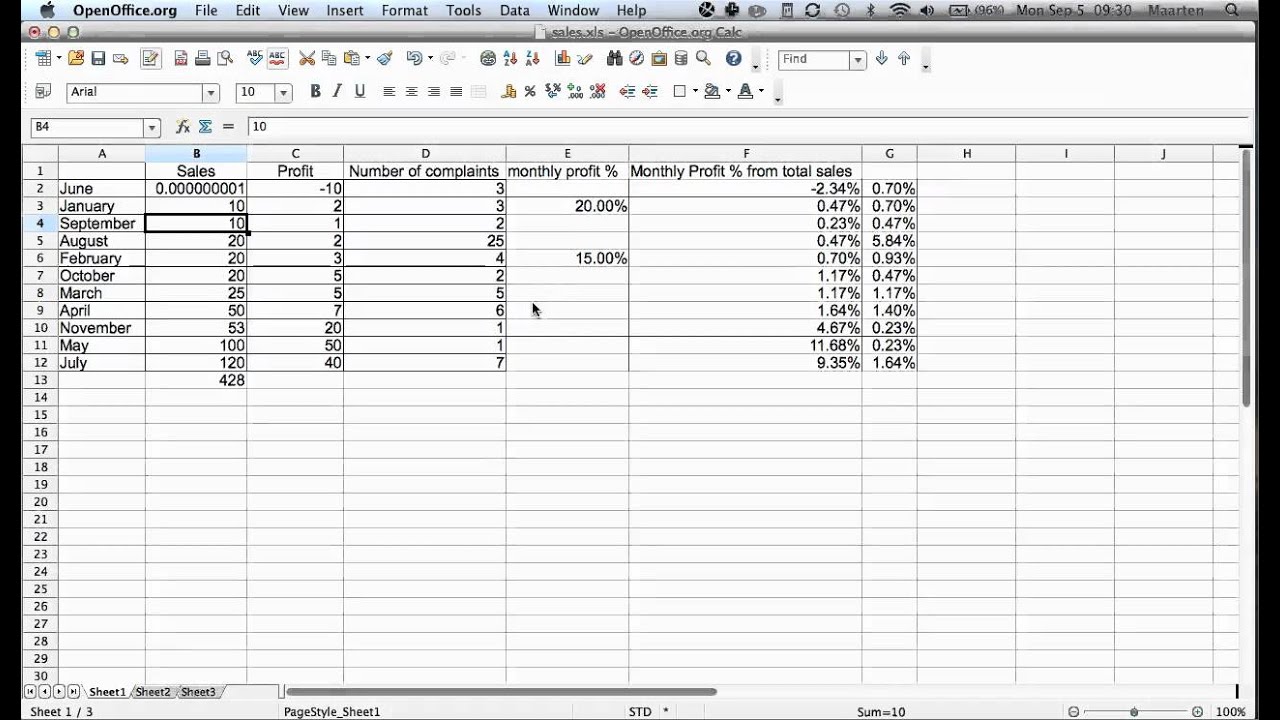
Now let's say we have here our Sales document.
Let's say we want to sort all this data by Sales.
So we want in ascending order, first we want with the month with lowest sales and then up and up and up.
This isn't currently the case, because currently it is sorted by month, so January first, then February, etc.
So we want to change this.
What we do is we go to Data, first we select, and this is incredibly important, first we select all data.
Then we go to Data, we go to Sort, now a menu comes up where you can select how you want to sort it.
Now you see you can sort it by Column.
So let's say we want it to sort by Sales which is column B, and here we are, Sales.
Then we can choose what we want -Ascending or Descending, well we want Ascending.
If it is the same, then we select by, let's say, column A, which is Month.
I should have actually put a heading in there.
But since I didn't, now I meant Column A.
So we click on OK, and now you see what happens, it has sorted our data.
June is first with our quarter under this,and then this, this.
And you see all the other data as well.
You can see something funny has happened with the formatting.
Actually January was on top, oh yeah, and we didn't have December in this calculation, November was down, so that's why the lines of the formatting are a bit funny, but that's of course easily adjusted.
Let's do that right now.
Let's do a bit of house-keeping and select here all the borders -fixed.
OK, so that's how sorting basically works, very useful.
Let's just go back a bit, click this formatting.
Now let me show you what happens if you say, OK, I just want to, what some people as a mistake make.
I want to sort Sales, you go to Data, Sort, and here this is an important box.
It says, "the cells next to the current selection also contain data", which is especially relevant, because here are the month names, and here are the other data.
So, Calc actually recognizes that you haven't selected everything.
If we go to "Extend selection", we see it automatically selects all your data.
This of course goes all right in this spreadsheet since there is nothing much else in there, but be wary of what Calc sorts, because if you haven't built up your data sheet in a way Calc expects, it might go wrong.
And you end up with wrongly sorted data, which is a bit of a disaster as I will show you.
If I just select this one, Sort, and I ignore this warning and I want to keep the selection as it is, and I am going to sort Sales in Ascending, then it nicely sorts this column but the figure that was previously from June is now from January and if you keep on working with this datasheet, your data is going to end up a mess and your result will be meaningless.
so we quickly undo this, select everything if you want to sort data, I recommend always doing this yourself and not waiting for the box.
Alright?
This was sorting and part 2 will show you how to use filters to sort through data.
I hope you find this video helpful.
If you have any suggestions, questions or remarks, please leave them in the comments.
If you want, you can subscribe to OpenOffice video by using our RSS feed,by Twitter, or by subscribing to our YouTube channel if you are watching YouTube.
Thanks for watching and until next time, bye.
Доступные форматы для скачивания:
Скачать видео mp4
-
Информация по загрузке: