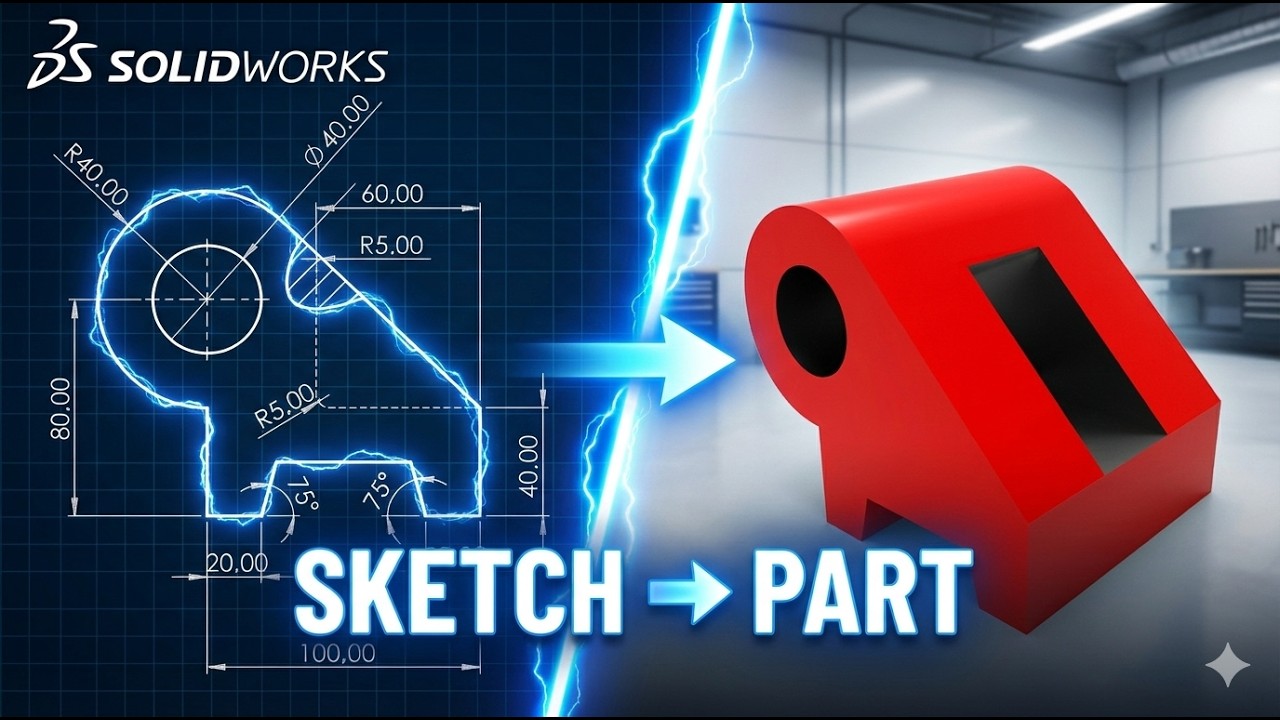
SolidWorks Challenge – Sketch to 3D Part Exercise 9
Загружено: 2026-01-17
Просмотров: 69
3D Sketch : https://www.3dmechanism.com/post/3d-e...
Donate PayPal: https://www.paypal.com/donate/?hosted...
In this CAD tutorial we'll use the features:
1. Extruded Boss/Base (Extrude)
This command adds material. It takes a 2D sketch and pulls it in a straight line to create a 3D solid object.
Function: Builds the main body of a part (like a block, cylinder, or plate).
Example: Drawing a square and extruding it to create a cube.
2. Extruded Cut
This command removes material. It works exactly like the Extruded Boss, but instead of adding a solid, it cuts through the existing material.
Function: Creates holes, pockets, or slots in a solid part.
Example: Drawing a circle on a face and cutting it to create a hole.
3. Fillet
This command creates a rounded internal or external face on the part. It replaces sharp edges with a smooth circular radius.
How it works: You select an edge (or multiple edges) and define a radius value (e.g., 5mm). The software adds material (for internal corners) or removes material (for external corners) to create the curve.
Function:
Reduce Stress: Sharp corners are weak points; fillets make parts stronger.
Safety: Removes sharp edges that could cut someone.
Manufacturing: CNC machines cannot cut perfectly sharp internal corners (because the tool is round), so fillets are often required.
All dimensions are in mm/g/s/ISO
---------------------------------------------------------------------------------------------
Rating, commenting, subscribing and sharing are always appreciated!!
----------------------------------------------------------------------------------------------
▬▬▬▬▬▬▬▬▬▬▬▬▬▬▬▬▬▬▬▬▬▬▬▬▬▬▬▬▬▬
Follow Us On:
Instagram : / engbcruz
#Education
#solidworks
#cad
#cam
Доступные форматы для скачивания:
Скачать видео mp4
-
Информация по загрузке:


