Introduction to FPGA Part 12 - RISC-V Custom Peripheral | Digi-Key Electronics
Автор: DigiKey
Загружено: 2022-01-31
Просмотров: 23032
A field-programmable gate array (FPGA) is an integrated circuit (IC) that lets you implement custom digital circuits. You can use an FPGA to create optimized digital logic for things like digital signal processing (DSP), machine learning, and cryptocurrency mining. Because of the FPGA’s flexibility, you can often implement entire processors using its digital logic. You can find FPGAs in consumer electronics, satellites, and in servers used to perform specialized calculations.
In this series, we will see how an FPGA works and demonstrate how to create custom digital logic using the Verilog hardware description language (HDL).
Previously, we saw how to build an existing RISC-V softcore processor for the iCEstick and write a C test program for it. This time, we design a custom pulse-width modulation (PWM) hardware peripheral with Verilog and integrate it into the FemtoRV processor.
Note: you will need Linux to follow along! I did everything on a Raspberry Pi 4, but any Debian-based flavor (e.g. Ubuntu) should work.
The steps in this video can be found in written form here: https://www.digikey.com/en/maker/proj...
All code examples and solutions for this series can be found here: https://github.com/ShawnHymel/introdu...
Bruno Levy’s learn-fpga FemtoRV repository: https://github.com/BrunoLevy/learn-fpga
RISC-V is an open source instruction set architecture (ISA) that can be used to design processors without paying a licensing fee. As a result, it is a great way to implement a softcore processor in an FPGA to learn about how CPUs work.
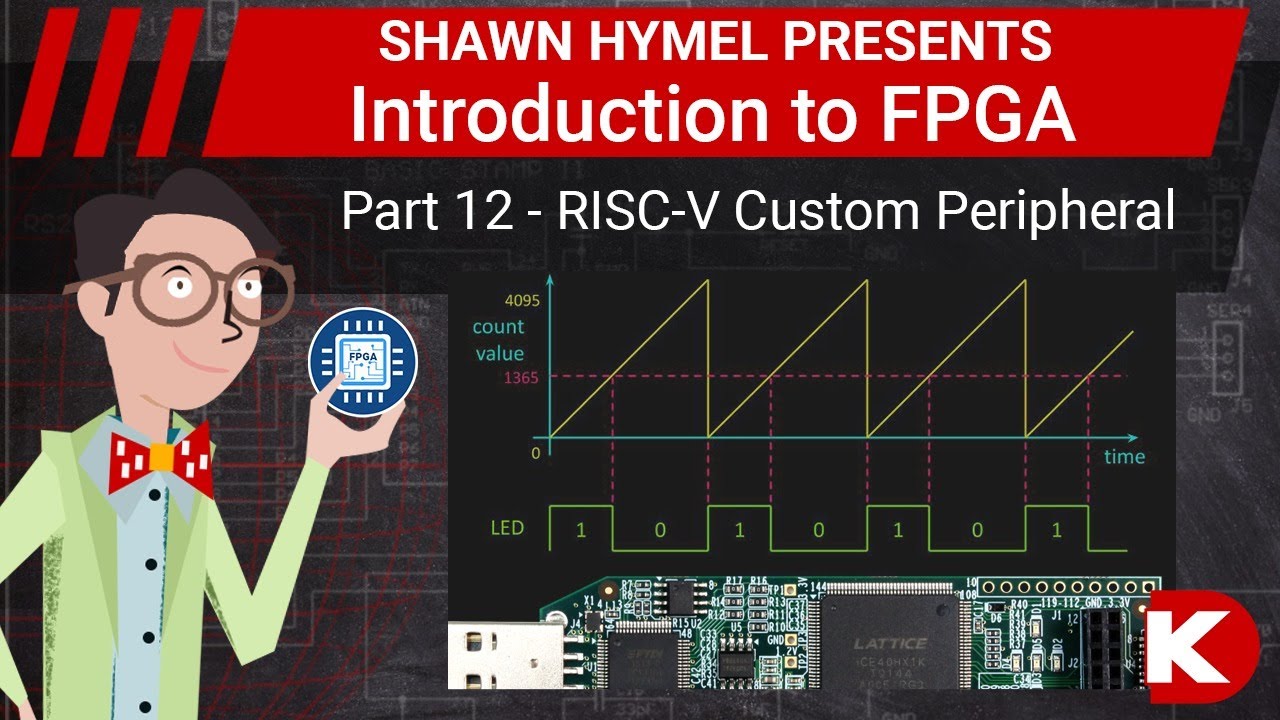
Building on what we learned last time, we will use our Verilog skills to design a custom PWM peripheral for the system-on-a-chip (SOC). The peripheral will contain a PWM register that can be written to from the CPU via code. A counter in the peripheral continuously counts up. Whenever the counter value is less than the value in the PWM register, the associated pin (e.g. LED) will be on. Whenever the value is greater than or equal to the PWM register, the pin will be off. With a fast enough clock speed, this should produce a dimmable LED that is constant to our eyes.
To control the PWM register, we must access it through a particular memory address in code. Two bits in the memory address space for the FemtoRV control the memory “page.” One page allows access to RAM (implemented in block RAM). Another page gives access to the “I/O” peripherals that control things like LEDs, buttons, OLED driver, etc. In our case, we will use the I/O bus to control the PWM peripheral. The final page gives access to program memory (allocated on the SPI flash chip).
While there is no challenge for this episode, you are encouraged to try making a peripheral of your own design and integrate it into the FemtoRV. Let us know in the comments or on Twitter (@DigiKey, @MakerIO, @ShawnHymel, @BrunoLevy01, #FemtoRV) if you make something cool!
Product Links:
https://www.digikey.com/en/products/d...
Related Videos:
• Видео
• Видео
• Видео
Related Project Links:
https://www.digikey.com/en/maker/proj...
Related Articles:
https://www.digikey.com/en/pdf/r/rene...
https://www.digikey.com/en/videos/d/d...
Learn more:
Maker.io - https://www.digikey.com/en/maker
Digi-Key’s Blog – TheCircuit https://www.digikey.com/en/blog
Connect with Digi-Key on Facebook / digikey.electronics
And follow us on Twitter / digikey
Доступные форматы для скачивания:
Скачать видео mp4
-
Информация по загрузке: