💎 How To Scan Free To Air Satellite Tv Channels On Qsat Decoder | Pbteck
Автор: Pbteck Info
Загружено: 2025-05-23
Просмотров: 4503
How To Scan Free To Air Satellite Channels On Qsat Decoder | Pbteck
To scan *Free-To-Air (FTA) satellite channels* on a **Qsat decoder**, follow these general steps. Qsat decoders may differ slightly depending on the model (e.g., Q11g, Q13g, Q26g, etc.), but the procedure is generally similar.
📡 Steps to Scan Free-To-Air Channels on Qsat Decoder:
---
1. *Connect the Satellite Dish*
Ensure the dish is properly aligned and connected to the LNB input on your Qsat decoder. Make sure the satellite dish is pointing to a satellite that broadcasts FTA channels, like **Astra 28.2E**, **Eutelsat 36B**, **Nilesat 7W**, etc.
---
2. *Turn On the Decoder*
Power on the decoder and your TV, and ensure the decoder is connected via HDMI or AV cables.
---
3. *Access the Installation Menu*
Press the *Menu* button on your Qsat remote.
Navigate to *Installation* or *Satellite Setup* and press **OK**.
---
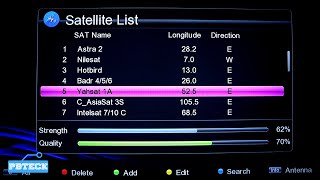
4. *Select Satellite*
Choose the satellite you want to scan (e.g., Nilesat, Astra, etc.)
If it's not in the list, you may need to **add a new satellite manually**.
---
5. *Check or Set the LNB Settings*
Set LNB type: Usually *Universal (9750 – 10600)*
Confirm LNB frequency and other parameters are correct
Ensure *DiSEqC* settings match your dish setup (if using multiple LNBs)
---
6. *Scan for Channels*
Choose *Blind Scan* or *Auto Scan* for a full channel search
**Blind Scan**: Finds all frequencies automatically (recommended)
**Auto Scan**: Scans preloaded transponders
Select *FTA only* if available to skip encrypted channels
Start the scan by pressing *OK* or *Green Button*
---
7. *Save Channels*
Once scanning is complete, the decoder will list found channels.
Save them when prompted.
---
8. *Watch Channels*
Exit to the main menu or channel list and start enjoying your FTA channels.
---
Optional: Update Transponders
If you're not finding channels:
Go to *TP List* in the installation menu
Add or edit transponders with current frequency, symbol rate, and polarization
---
Troubleshooting Tips:
*No Signal?* Recheck satellite alignment or LNB connection.
*Few Channels?* Use Blind Scan instead of Auto.
*Encrypted Channels Showing?* Filter to show only FTA channels.
If you let me know the specific Qsat model and satellite you're using, I can give you more targeted instructions.
__________________________________
LINKS
WEBSITE:
https://www.pbteck.com
INSTAGRAM;
/ pbtecknology
FACEBOOK;
/ pbtecknology
TWITTER
/ pbtecknology
TELEGRAM:
https://t.me/pbtecknology
#pbteckinfo #lnb #gotvinstallation #multitv #dishtv #directtv #dstv #satellitetv #dish #satellitedish #satellitereceiver #pbteck #pbtecknology #canalsat #canal+ #freefire

Доступные форматы для скачивания:
Скачать видео mp4
-
Информация по загрузке: