How to Randomly Change Foreground Color in Tkinter Text Box
Автор: vlogize
Загружено: 2025-09-26
Просмотров: 0
Discover how to alternately change text color in a Tkinter Text Box to enhance your GUI applications with vibrant designs.
---
This video is based on the question https://stackoverflow.com/q/63062847/ asked by the user 'Sakar Subedi' ( https://stackoverflow.com/u/13566402/ ) and on the answer https://stackoverflow.com/a/63070437/ provided by the user 'Sakar Subedi' ( https://stackoverflow.com/u/13566402/ ) at 'Stack Overflow' website. Thanks to these great users and Stackexchange community for their contributions.
Visit these links for original content and any more details, such as alternate solutions, latest updates/developments on topic, comments, revision history etc. For example, the original title of the Question was: Tkinter Text Box (Randomly/Alternatively Change Foreground Color of text box of Tkinter)
Also, Content (except music) licensed under CC BY-SA https://meta.stackexchange.com/help/l...
The original Question post is licensed under the 'CC BY-SA 4.0' ( https://creativecommons.org/licenses/... ) license, and the original Answer post is licensed under the 'CC BY-SA 4.0' ( https://creativecommons.org/licenses/... ) license.
If anything seems off to you, please feel free to write me at vlogize [AT] gmail [DOT] com.
---
How to Randomly Change Foreground Color in Tkinter Text Box
Tkinter is one of the most popular libraries for creating graphical user interfaces (GUIs) in Python. One of the common requests when developing applications is to make text elements more visually appealing. A popular approach is to change the foreground (text) color of a Text Box randomly or alternatively. In this guide, we will explore how to accomplish this using Tkinter and Python.
Understanding the Problem
You might have a text box in your Tkinter application and want to display entered text with diverse foreground colors. By default, most text elements display a single color, which may limit the visual impact of your application. The aim is to alter the text color of individual characters (or a series of them) randomly for a more engaging experience.
The Solution
To achieve randomly changing colors in the text box, we will use the following key elements:
Tkinter Text Widget: This is where we will input and display the text.
Color List: A list that holds the colors we want to randomly choose from.
Tag Configuration: This allows us to change the foreground color dynamically during text insertion.
Let's break down the solution into organized sections.
Step 1: Set Up Your Tkinter Window
The first step is creating a basic Tkinter window with a text box.
[[See Video to Reveal this Text or Code Snippet]]
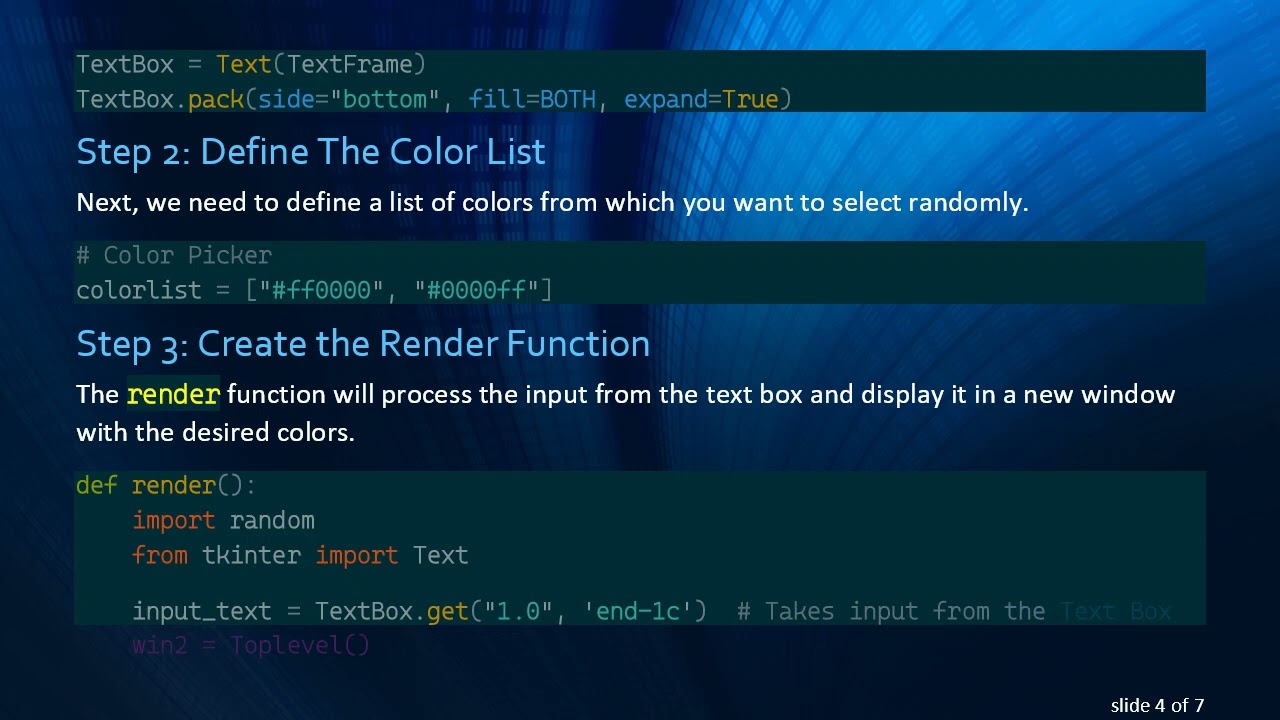
Step 2: Define The Color List
Next, we need to define a list of colors from which you want to select randomly.
[[See Video to Reveal this Text or Code Snippet]]
Step 3: Create the Render Function
The render function will process the input from the text box and display it in a new window with the desired colors.
[[See Video to Reveal this Text or Code Snippet]]
Step 4: Trigger the Function with a Button
To make your application interactive, attach this function to a button. Whenever the button is clicked, it will invoke the render function.
[[See Video to Reveal this Text or Code Snippet]]
Wrapping Up
Now you have everything you need to create a Tkinter application that randomly changes the foreground color of text as it is displayed in a new window. By using the tag_configure method in Tkinter, we can effectively apply various styles, including colors, while inserting text, making your GUI more dynamic and engaging.
This solution not only enhances the aesthetic appeal of the application but also improves the user experience through colorful text displays. You can experiment with different colors and even extend this approach to work with other UI elements in your Tkinter applications.
If you implement this solution and have any questions or additional features you’d like to explore, feel free to share them in the comments below! Happy coding!
Доступные форматы для скачивания:
Скачать видео mp4
-
Информация по загрузке:


![Criação de Chatbot com IA em Tempo Real | Jornada Python [Aula 4]](https://image.4k-video.ru/id-video/x9us47urjcQ)