Популярное

Музыка Кино и Анимация Автомобили Животные Спорт Путешествия Игры Юмор

Интересные видео

2025 Сериалы Трейлеры Новости Как сделать Видеоуроки Diy своими руками

Топ запросов

смотреть а4 schoolboy runaway турецкий сериал смотреть мультфильмы эдисон
dTub
Скачать

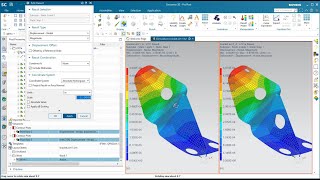
HOW TO | How to midsurface and mesh in Simcenter 3D with Teamcenter | Tutorial

Автор: Siemens Software

Загружено: 2022-08-09

Просмотров: 5379

Описание:

Video description:
Most people working in large organizations engineering organizations are familiar with using data management tools for tracking the deign and release process for various components and assemblies. Data management tools are also valuable for connect the right simulation models with the right CAD geometry and for tracking the different analyses and their resulting decisions to all of the different part variants.

Analysts can greatly benefit from the seamless connection between Simcenter 3D and Teamcenter for tracking when a part has changed and by quickly re-analyzing the part with minimal effort due to the analysis to design associativity in Simcenter 3D.

Watch this demo to see how you can use Teamcenter in connection with Simcenter 3D to midsurface and mesh an aerospace sheet metal bracket. The video includes a linear static solution, xy plotting results along a path, free body results and exporting results to a spreadsheet. You will also see what happens when an engineer makes a change to the geometry and how easy it is for the analyst to re-simulate the part.

For further help you can visit our support page at https://support.sw.siemens.com or our community site at https://community.sw.siemens.com/s/

Simcenter 3D version used in demo = prior to 2206

#HowToSimcenter3D #HowToTeamcenter #finiteelementanalysis #performancesimulation

▶️ About Simcenter:
Engineering departments today must develop smart products that integrate mechanical functions with electronics and controls, utilize new materials and manufacturing methods and deliver new designs within ever shorter design cycles. This requires current engineering practices for product performance verification to evolve into a Digital Twin approach, which enables to follow a more predictive process for systems driven product development.

Simcenter software uniquely combines system simulation, 3D CAE and test to help you predict performance across all critical attributes earlier and throughout the entire product lifecycle. By combining physics-based simulations with insights gained from data analytics, Simcenter helps you optimize design and deliver innovations faster and with greater confidence.

HOW TO | How to midsurface and mesh in Simcenter 3D with Teamcenter | Tutorial

Поделиться в:

Доступные форматы для скачивания:

Скачать видео mp4

  • Информация по загрузке:

Скачать аудио mp3

Похожие видео

Базовая пошаговая инструкция по созданию вычислительной гидродинамики для внутренних потоков в NX...

Базовая пошаговая инструкция по созданию вычислительной гидродинамики для внутренних потоков в NX...

Setting up an Assembly FEM in Simcenter 3D

Setting up an Assembly FEM in Simcenter 3D

Искусственный интеллект для CAM-систем: обзор рынка, проблем и перспектив

Искусственный интеллект для CAM-систем: обзор рынка, проблем и перспектив

Siemens NX CAD Tutorial

Siemens NX CAD Tutorial

Simcenter 3D

Simcenter 3D

Simcenter 3D (NX CAE): Нелинейные материалы

Simcenter 3D (NX CAE): Нелинейные материалы

Путин объявил о победе / Конец спецоперации / Судьба оккупированных земель / Итоги 2025

Путин объявил о победе / Конец спецоперации / Судьба оккупированных земель / Итоги 2025

Simcenter 3D Topology Optimization

Simcenter 3D Topology Optimization

ЭТОТ ЗАКОН СДЕЛАЕТ НЕВЫГОДНЫМ ПРОИЗВОДСТВО ПЕЧАТНЫХ ПЛАТ В КИТАЕ

ЭТОТ ЗАКОН СДЕЛАЕТ НЕВЫГОДНЫМ ПРОИЗВОДСТВО ПЕЧАТНЫХ ПЛАТ В КИТАЕ

How To Optimize The Shape Of A Gear With Nastran SOL 200

How To Optimize The Shape Of A Gear With Nastran SOL 200

Simcenter 3D Assembly FEM and Response Dynamics Demonstration Under Teamcenter

Simcenter 3D Assembly FEM and Response Dynamics Demonstration Under Teamcenter

Siemens Simcenter Fundamentals of FEA Tutorial

Siemens Simcenter Fundamentals of FEA Tutorial

Simcenter 3D Hex Meshing a Blisk

Simcenter 3D Hex Meshing a Blisk

Как Сделать Настольный ЭЛЕКТРОЭРОЗИОННЫЙ Станок?

Как Сделать Настольный ЭЛЕКТРОЭРОЗИОННЫЙ Станок?

Functionality in Simcenter 3D Space Systems Thermal to Streamline Simulation Processes

Functionality in Simcenter 3D Space Systems Thermal to Streamline Simulation Processes

Дом 250 м² за $250 000: каркас ЛСТК + пенобетон | Почему это выгодно

Дом 250 м² за $250 000: каркас ЛСТК + пенобетон | Почему это выгодно

Spacecraft thermal simulation process and file management in Simcenter 3D

Spacecraft thermal simulation process and file management in Simcenter 3D

Результат попытки числового управления с шаговым двигателем...

Результат попытки числового управления с шаговым двигателем...

Simcenter 3D midsurfacing and shell meshing an aerospace sheet metal bracket under Teamcenter

Simcenter 3D midsurfacing and shell meshing an aerospace sheet metal bracket under Teamcenter

Механизмы, которые должен знать КАЖДЫЙ инженер-механик

Механизмы, которые должен знать КАЖДЫЙ инженер-механик

© 2025 dtub. Все права защищены.


  • Контакты
  • О нас
  • Политика конфиденциальности


Контакты для правообладателей: [email protected]