How to Check if an iPhone Screen is Original
Автор: Ezra's Tech Tips
Загружено: 2024-10-20
Просмотров: 22322
Learn how to check if your iPhone screen is original with this quick and easy guide!
Timestamp Sections :
00:00 Intro
00:08 Settings
00:32 Shine a Flashlight On The Screen
00:48 Maximum Brightness
01:24 Outro
------------------------------------------------
How to Check if Your iPhone Screen is Original
------------------------------------------------
In this video, we’ll walk through a simple way to check if your iPhone screen is original. If you own an iPhone 11 or later, it’s easy to verify your screen’s authenticity using the built-in iOS settings. Head to Settings, tap General, then scroll down and select About. In the Parts and Service History section, you’ll find the status of your display. If your screen is an original Apple part, it will be marked as “Genuine Apple Part.” If not, you’ll see “Unknown Part” under the display section.
------------------------------------------------
Additional Ways to Identify a Fake Screen
------------------------------------------------
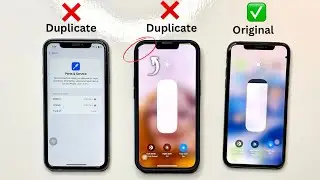
If you want to double-check visually, use a flashlight and shine it on your iPhone screen. Fake screens will show grid lines when the light is directed at them, while original screens remain solid black with no visible grid. Another method is to adjust your iPhone’s brightness to the maximum, then view a solid black image. With an authentic display, the screen will appear completely black, whereas fake screens may show subtle color mismatches, like grey or white spots.
------------------------------------------------
Common Issues with Fake iPhone Screens
------------------------------------------------
Fake iPhone screens often come with several noticeable issues. You might experience problems with multi-touch functionality, color inconsistencies, or even problems with your phone not turning on. The home button may also become unresponsive. These problems can disrupt your daily use and might even cause additional damage over time. Always make sure to choose the right screen to avoid these issues and keep your iPhone functioning smoothly.
Hope you enjoyed my How to Check if an iPhone Screen is Original Video.
Доступные форматы для скачивания:
Скачать видео mp4
-
Информация по загрузке: