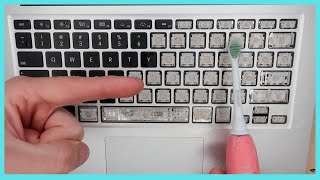
How to remove and clean Macbook Pro keyboard keys
Автор: Autumn Valenta
Загружено: 2012-08-25
Просмотров: 1896759
(EXPAND FOR MORE DETAILS) This video is long: I wanted to show the entire process up close. It goes through each type of key, including the mechanism on the insides of those keys. (I didn't do the Shift key, but that's because I had previously found that it was extremely similar to Cmd, albeit a little wider. Check out the Cmd and Space keys and you should understand what you're doing with it.)
This is a Macbook Pro with Retina from 2012. The key mechanisms across models sometimes vary a little, but the idea is typically the same, with two interlocking white pieces that fold together.
If you have a Macbook Pro from the 2010 era, it looks like the white plastic insides will attach with their pegs on the left instead of the bottom. The 2012's two metal catches on the top (see around 3:24 of the video) are instead a 2010's single wide catch on the right. If you have such a model, you should easily see what I mean. I used a toothpick in my video to knock the white pegs out of their catches, but in a 2010's keyboard, you can't do it quite that way. Instead, you should squeeze the left side of the white plastic to compress it enough to allow you to duck the pegs out of their holes. Concerning the disassembly of the two white interlocking pieces: the pegs will fit together slightly differently, but many of the important facts are the same: flat smooth surfaces face upward, bumped and textured surfaces face down; there's only one correct way for the two white pieces to connect and still be able to lay flat; they will hinge at the center, and all peg-like shapes should be on the left; the inner white plastic piece should hinge such that it raises up (as opposed to down) when it's oriented correctly. To get the plastic hooked back into the keyboard frame: Hook the key into the metal catch on the right-hand side first, and then you'll have to struggle to get the left-hand side's pegs into their holes. I seemed to have my best luck with doing the right-hand catch, then the bottom peg, then the top peg.
I spilled copious amounts of root beer onto my Macbook Pro Retina keyboard, and after salvaging the internal hardware itself, I documented my attempt to clean the keys, which stuck extremely hard after 2 days had passed. I thought this would be a beneficial video for others to see.
Things to note, not explicitly covered in the video:
• You can probably have some luck pulling the main keys off FROM THE BOTTOM first, but alternatively, many people suggest doing it as I did in the video, from the top left.
• The TAB, CAPSLOCK, and SHIFT keys have metal bars in them, like CMD and SPACE, but while CMD and SPACE have two bars, the others have only one, which should rest on the bottom half of the key's area.
• CAPSLOCK has a light in it, but don't be afraid about breaking it if you pull the key off. It works exactly like the others of its approximate size. The light is a little tiny volcano shape with black molding around it for protection.
• I haven't pulled out the RETURN/ENTER key, but I did pry it up a little to try to tell what kind of mechanism it is. It looked to me to be exactly like the TAB key, with a metal bar along the bottom and a wide plastic hinge.
Thanks for watching as I clean up my mess. Best of luck to you.
Some extra notes, several months after the video upload:
If you have liquid damage on your laptop, even if it ends up still working (like mine), your warranty will be voided, regardless of any Apple Care policy you may have purchased. If the laptop truly is lost to the damage, your best option (short of outright buying a new computer) is to take it to an Apple Store where they can offer to basically refurbish it and send it back to you. They basically rip open the computer and replace the internal parts, such as the entire motherboard. Especially with the MBP Retina, where all the pieces are not individually serviceable, this means they'll replaced everything.
For my 15" MBP Retina, the cost was approximately $1100. You'll have to decide if its worth it. You shouldn't consider the option unless the computer just flat out doesn't work or is unusable. The Apple employees themselves won't encourage you to use this service unless it's really your only option. If you do need to have the computer stripped and replaced, it should come back like a new machine.

Доступные форматы для скачивания:
Скачать видео mp4
-
Информация по загрузке:

![Реставрация клещей [Очень ржавая реставрация]](https://ricktube.ru/thumbnail/BaHs_s0fbIA/mqdefault.jpg)