LT Spice Demo: Voltage Divider -- Transient and DC Sweep Analysis
Автор: Thomas Blum
Загружено: 2026-01-13
Просмотров: 9
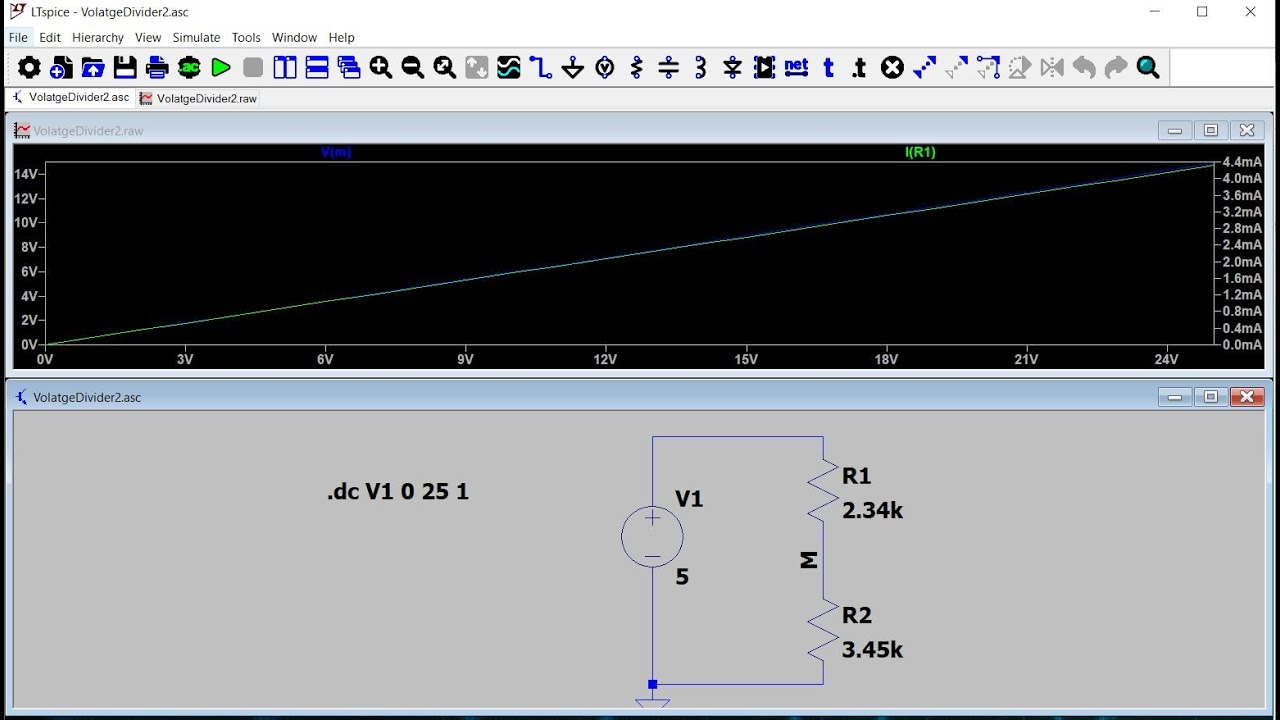
In this video we perform a simple voltage-divider (two resistors in series connected to a DC Voltage Source) in order to introduce the use of the LT Spice software. We show how to add the circuit elements (voltage source, resistors and ground), how to connect the circuit elements, and how to assign values to the resistors and voltage source. We also labeled a junction between the two resistors R1 and R2. Then we showed how to configure a transient analysis, that is to run the circuit for a set amount of time (we chose 1 second). When we run the analysis we get a blank graph with the horizontal axis displaying times. As we click on a resistor, the current through it is added to the graph. As we click on the junction, the voltage level at that junction is added to the graph. There are two vertical axes, one on the right, one on the left, to accommodate having different physical quantities (currents and voltages) on the same graph. Next we switched to a DC Sweep analysis. This time the resulting graph has the voltage-source voltage varying across the horizontal axis. We can again choose to display the current through a resistor and voltage at a junction. Finally we showed how to export this data and open it up in a Microsoft Excel spreadsheet.
Доступные форматы для скачивания:
Скачать видео mp4
-
Информация по загрузке:





