How to Append Access Table Based on Presence of a Character
Автор: vlogize
Загружено: 2025-09-15
Просмотров: 1
A comprehensive guide on how to append an Access table by changing specific values based on the presence of certain characters, ensuring data consistency in your results_final table.
---
This video is based on the question https://stackoverflow.com/q/62635291/ asked by the user 'Spooked' ( https://stackoverflow.com/u/3614197/ ) and on the answer https://stackoverflow.com/a/62647972/ provided by the user 'June7' ( https://stackoverflow.com/u/7607190/ ) at 'Stack Overflow' website. Thanks to these great users and Stackexchange community for their contributions.
Visit these links for original content and any more details, such as alternate solutions, latest updates/developments on topic, comments, revision history etc. For example, the original title of the Question was: append access table based on presence of a character
Also, Content (except music) licensed under CC BY-SA https://meta.stackexchange.com/help/l...
The original Question post is licensed under the 'CC BY-SA 4.0' ( https://creativecommons.org/licenses/... ) license, and the original Answer post is licensed under the 'CC BY-SA 4.0' ( https://creativecommons.org/licenses/... ) license.
If anything seems off to you, please feel free to write me at vlogize [AT] gmail [DOT] com.
---
How to Append Access Table Based on Presence of a Character
Managing data in Microsoft Access can sometimes present unique challenges, particularly when it comes to cleaning up datasets. If you’re dealing with laboratory results that come in varying formats, you might find yourself needing to append a table based on the presence of specific characters in your data entries. In this guide, we will explore how to tackle this problem and ensure your results are consistent and useful for further analysis.
Understanding the Problem
In your scenario, you have two tables: results which contains raw assay lab results and results_final which is intended to store cleaned up values. Different labs may provide results in various formats, leading to inconsistencies. For example, results might be represented as <0.0001, an X, or other non-numeric values when an analyte is not detected. You need to standardize these values in results_final by converting them to a placeholder value of -999999 for non-detected analytes while keeping detected results intact.
To summarize, your goals are to:
Identify specific values in the results table.
Append entries to the results_final table, changing non-detected results to -999999.
Automate this process for ease in future instances.
The Solution Strategy
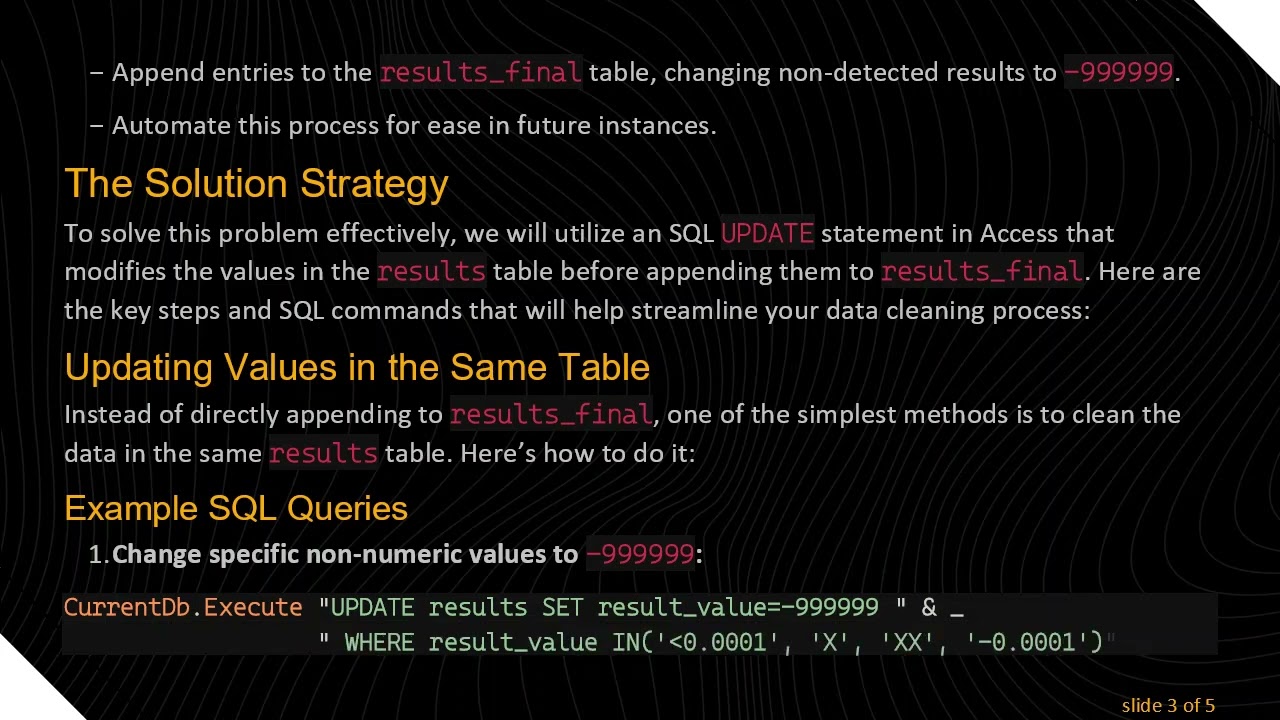
To solve this problem effectively, we will utilize an SQL UPDATE statement in Access that modifies the values in the results table before appending them to results_final. Here are the key steps and SQL commands that will help streamline your data cleaning process:
Updating Values in the Same Table
Instead of directly appending to results_final, one of the simplest methods is to clean the data in the same results table. Here’s how to do it:
Example SQL Queries
Change specific non-numeric values to -999999:
[[See Video to Reveal this Text or Code Snippet]]
Identify and update any non-numeric values:
[[See Video to Reveal this Text or Code Snippet]]
Use conditional logic to update values:
[[See Video to Reveal this Text or Code Snippet]]
Automating the Process
To ensure that this data cleaning is repeatable and can be executed easily in the future, consider automating the SQL commands. You could create a VBA function in Access that runs these commands in sequence whenever you need to clean your data. Here's a simplistic view of what that might look like in your VBA module:
[[See Video to Reveal this Text or Code Snippet]]
By encapsulating your SQL commands into a single subroutine, you can eliminate repetitive actions and reduce the risk of human error during data entry.
Conclusion
Cleaning laboratory result data can be daunting, especially when faced with various formats and inconsistencies. By employing the SQL update and conditional statements provided in this guide, you can create a consistent dataset in your results_final table. Automating this process will help you manage ongoing requirements efficiently.
Now, you’re ready to tackle data cleaning in Access like a pro!
Доступные форматы для скачивания:
Скачать видео mp4
-
Информация по загрузке:


![Python - Полный Курс по Python [15 ЧАСОВ]](https://image.4k-video.ru/id-video/cfJrtx-k96U)


![Курс Python с Абсолютного нуля! [12 часов из 80] Python курс - качественный старт для начинающих!](https://image.4k-video.ru/id-video/lYMLLI-MJek)