24.12 Time Constraint
Автор: Asprova Official Global Channel
Загружено: 2014-04-14
Просмотров: 2015
It describes the time constraints and the time delay between the operations.
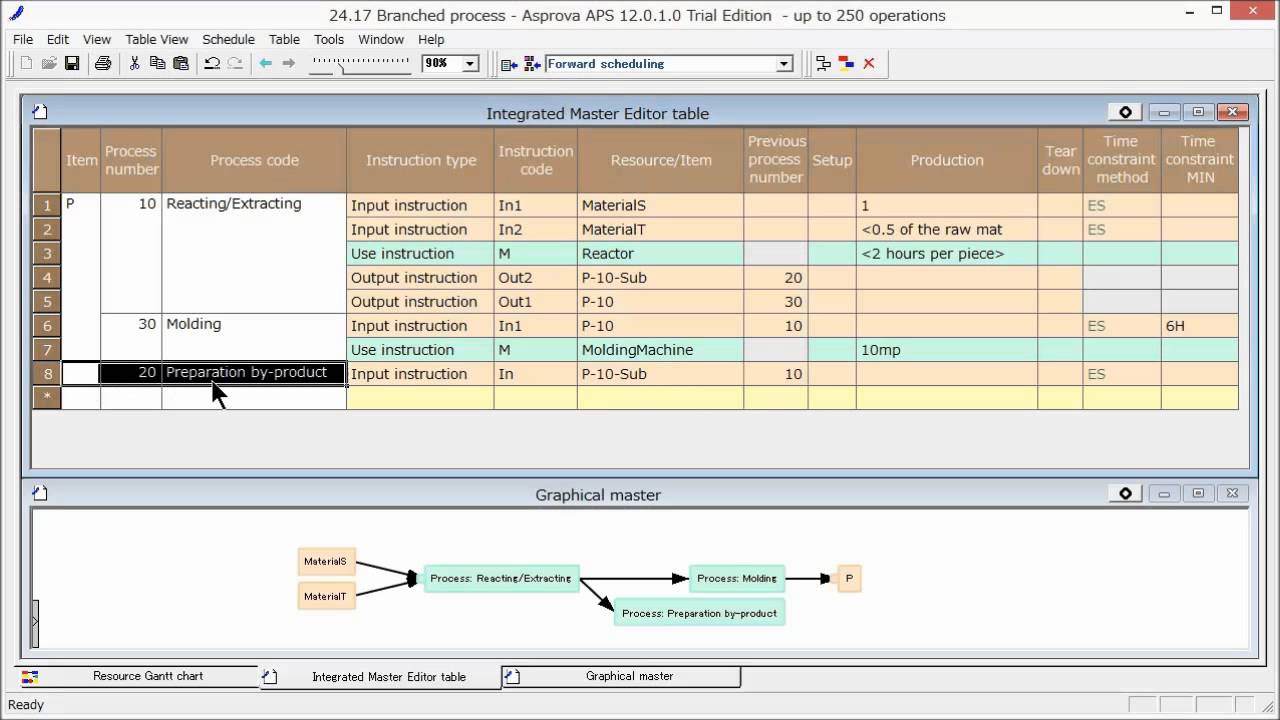
Let's study the [Time constraint], by which we can specify how to connect the previous operation with the current operation and register the time delays for each resource and item.
In the case where the next operation starts after completing the previous operation, we can set "ES" as the [Time constraint method], which means "End-Start".
Let's set the time delay between the operations at the [Time constraint MIN].
Press the [Reschedule] button, and the operation will be assigned after the end of the interpretational time delay as set at the [Time constraint MIN].
Since the interpretational time delays for resources are different, the transfer of the operations can lead to delivery delays, which will also be displayed.
In the case where the previous process and the next process operates at the same time, we can set "SS" as the [Time constraint method], which means "Start-Start".
By setting "SS" as the [Time constraint method] for the "Injection" process, we can get a schedule so that the "Press" and "Injection" operate side by side.
But, we can see that the next process will be completed earlier, so actually it cannot be operated.
In order to finish the next process after the previous process has been finished, please select the "SSEE".
By doing this, after the previous process ends, the next process will be finished.
Next, let me explain how to register different times between operations for each item.
In this case, let's register the [Time constraint method] and [Time constraint MIN] for "Input instruction".
By setting it like this, taking the end time of the previous process for each item and time constraints into consideration, we can calculate the operation's start time (or end time in the case of a backward operation) and generate the schedule.

Доступные форматы для скачивания:
Скачать видео mp4
-
Информация по загрузке: