Hide Shipping Methods in WooCommerce Based on Product Quantity from Specific Shipping Class
Автор: vlogize
Загружено: 2025-09-23
Просмотров: 0
Discover how to selectively disable certain shipping methods in WooCommerce when customers add five or more items from a specific shipping class to their cart. Follow our step-by-step guide to implement this feature.
---
This video is based on the question https://stackoverflow.com/q/63494835/ asked by the user 'Wanderlust Consulting' ( https://stackoverflow.com/u/13607873/ ) and on the answer https://stackoverflow.com/a/63505353/ provided by the user 'LoicTheAztec' ( https://stackoverflow.com/u/3730754/ ) at 'Stack Overflow' website. Thanks to these great users and Stackexchange community for their contributions.
Visit these links for original content and any more details, such as alternate solutions, latest updates/developments on topic, comments, revision history etc. For example, the original title of the Question was: Hide some shipping methods if cart has more than 4 items from specific shipping class
Also, Content (except music) licensed under CC BY-SA https://meta.stackexchange.com/help/l...
The original Question post is licensed under the 'CC BY-SA 4.0' ( https://creativecommons.org/licenses/... ) license, and the original Answer post is licensed under the 'CC BY-SA 4.0' ( https://creativecommons.org/licenses/... ) license.
If anything seems off to you, please feel free to write me at vlogize [AT] gmail [DOT] com.
---
Hide Shipping Methods in WooCommerce Based on Product Quantity from Specific Shipping Class
In the world of eCommerce, managing shipping methods effectively can sometimes pose unexpected challenges. If you're running a WooCommerce store that ships bulk items, such as trays of drinks, you may encounter difficulties with specific shipping services when orders exceed a certain quantity. In this guide, we will guide you through a practical solution to hide certain shipping methods based on the number of items in your cart belonging to a specific shipping class.
The Scenario
Imagine you offer different shipping methods, but certain options, like UPS, become unmanageable when a customer tries to order five or more trays of drinks. To streamline your shipping process, it would be ideal to disable UPS and offer only a Flat Rate Shipping option for larger orders.
Key Requirements
Shipping Class: Assign products to a specific shipping class for better management.
Quantity-Based Condition: Hide shipping methods if the cart contains five or more items in that class.
The Solution
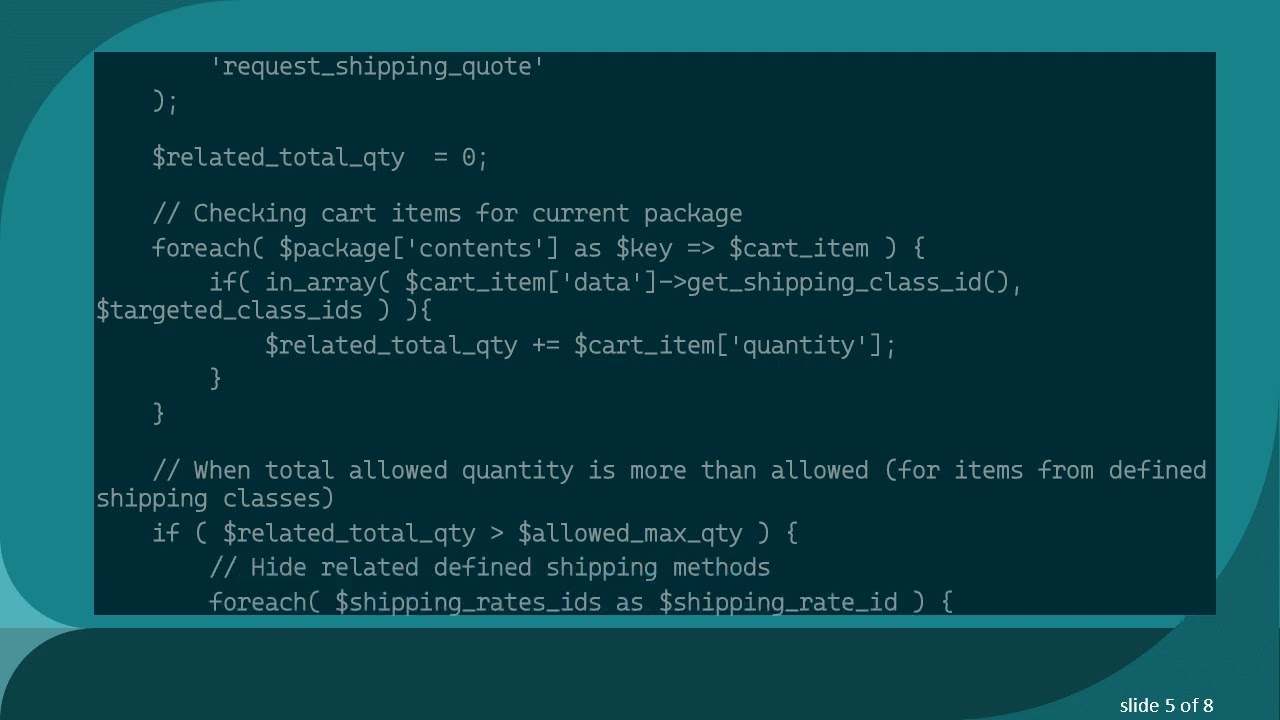
To achieve this, we will leverage a custom function within WooCommerce. Below is the code snippet that you can easily integrate into your site's functionality.
Code Snippet
You need to insert the following code into the functions.php file of your active theme or child theme.
[[See Video to Reveal this Text or Code Snippet]]
Important Considerations
Test the Code: After placement in the functions.php file, add items to your cart to ensure it behaves as expected.
Refresh Shipping Caches: To see the changes:
Save the edited functions.php file.
In your shipping zone settings, disable and then re-enable any shipping method before saving.
Alternative Method: Counting Items Instead of Quantity
If you want to hide shipping methods based on the number of items (regardless of their quantity), modify the line in the code that increases the $related_total_qty variable:
Code Modification
Change:
[[See Video to Reveal this Text or Code Snippet]]
To:
[[See Video to Reveal this Text or Code Snippet]]
This adjustment counts each item in the targeted shipping class as a single instance.
Conclusion
By following this guide, you can streamline your WooCommerce shipping methods to adapt to the needs of your product types and quantities. Limiting shipping options based on cart contents not only helps in efficient packaging but also enhances the customer experience.
Remember, always test your settings thoroughly to ensure smooth operations. Happy selling!
Доступные форматы для скачивания:
Скачать видео mp4
-
Информация по загрузке:








![Курс Python с Абсолютного нуля! [12 часов из 80] Python курс - качественный старт для начинающих!](https://image.4k-video.ru/id-video/lYMLLI-MJek)
