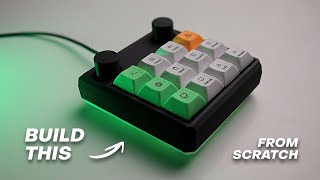
Tutorial - Custom DIY Keyboard Design and Build: Schematic + PCB + Case | Part 1 - RP2040
Автор: Robert Feranec
Загружено: 2024-11-07
Просмотров: 30023
In this tutorial you will design and build your own keyboard. You will also learn all the essentials to design and build any electronics. Enjoy!
Links:
Do you have any questions? Ask them on our Discord here: / discord
Learn Schematic design and PCB layout from FEDEVEL Online courses: https://fedevel.com/courses
The case is 3D printed at @JLC3DP and PCB is manufactured by @JLCPCB
Downloads:
Finished project (EasyEDA): https://oshwlab.com/robertferanec/cus...
Github (HW + 3D + SW): https://github.com/FEDEVEL/custom-key...
Thingiverse (3D): https://www.thingiverse.com/thing:678...
Other parts of this tutorial:
Part 1: Schematic - RP2040 (this video) • Tutorial - Custom DIY Keyboard Design and ...
Part 2: Schematic - Keyboard • Tutorial - Custom DIY Keyboard Design and ...
Part 3: PCB - Component Placement • Tutorial - Custom DIY Keyboard Design and ...
Part 4: PCB Layout • Tutorial - Custom DIY Keyboard Design and ...
Part 5: PCB Layout improvement • Tutorial - Custom DIY Keyboard Design and ...
Part 6: Case / Box design • Tutorial - Custom DIY Keyboard Design and ...
Part 7: Manufacturing • Tutorial - Custom DIY Keyboard Design and ...
Part 8: Building • Tutorial - Custom DIY Keyboard Design and ...
Link to the complete playlist: • How to Design and Build Custom Keyboard | ...
CONGRATULATIONS! You designed and built your own keyboard. Well done!
Follow up / BONUS videos:
The follow up videos are not needed to build your keyboard. However I still would like to create them as they can be helpful. So when I have time or if this tutorial gets more views I will record them.
BONUS: Customizing software for your QMK keyboard
BONUS: How to add a custom image on your case / box
BONUS: More details about 3D design (if enough people are interested I can make additional videos about how to design a nice enclosure, keycaps, knobs, etc ...)
If you would like to see the BONUS videos, please let me know in comments.
Chapters:
00:00 What is this tutorial about
03:34 Starting a new project
08:42 Adding RP2040
14:43 Adding 100nF
20:12 Adding 2.2uF
23:14 Adding 200R
25:43 Adding 27R
27:40 Adding USB-C connector
31:25 Adding ESD protection
34:03 Adding 1uF
36:10 Connecting USB CC pins
36:46 Adding 5.1k
38:21 Voltage regulator 5V to 3V3
42:27 Adding 47uF
45:49 Crystal ABM8-272-T3
47:22 Adding 1k
48:32 Adding 15pF
49:48 Adding 1M
52:52 Flash W25Q128JVS
58:20 Boot Select Button
1:01:09 Adding 100k
1:03:10 Reset Button
1:04:28 Adding 10k
1:08:23 Adding 1x3 Header
1:11:50 User LED
1:15:06 Power LED
1:16:38 Thank you for watching
------------------------------------------------------
Would you like to support me? It's simple:
Sign up for online courses hosted on our platform: https://fedevel.com/
You can also support me through Patreon: / robertferanec
It is much appreciated. Thank you,
Robert

Доступные форматы для скачивания:
Скачать видео mp4
-
Информация по загрузке: