Exponential Smoothing Forecast In Excel
Автор: LearnexcelwithT
Загружено: 2023-01-29
Просмотров: 274
Learn: The Quick & easy way of Exponential Smoothing Forecast In Excel
In this video, you will learn:
1. Exponential Smoothing Forecast In Excel
2. Moving Average in Excel
Exponential Smoothing in Excel is an inbuilt smoothing method used for Forecasting, Smoothing the data, and trend projection. However, to access Exponential Smoothing in Excel, go to the Data menu tab and, from the Data Analysis option, choose Exponential Smoothing. Select the input range which you want to smooth and then choose the dumping factor, which should be between 0 and 1, and then select the output range cell. This will smoothen the selected input range number by the percentage of the dumping factor we choose.
Where is the Exponential Smoothing found in Excel
It is found under Analysis ToolPak in Excel. The Analysis ToolPak is a Microsoft Excel data analysis add-in. This add-in is not loaded automatically on excel. Before using this first, we need to load it.
Steps to load the Analysis ToolPak add-in:
We need to add this feature in Excel for analyzing business by using Excel Add-Ins. To add this feature in Excel, follow the below steps:
• Go to the FILE tab. Click on the OPTIONS tab in the left pane window. It will open a dialog box for Excel Options. Click on the Add-Ins tab, as
• It will again display some options.
• Select the Excel Add-Ins options under Manage Box and click on the Go button. However, Excel Add-Ins is by default selected
• It will open an Add-Ins dialog box.
• Tick on the Analysis Toolpak checkbox and then click on OK.
The steps will add the Data Analysis section for statistical analysis under the DATA tab.
How to Use Exponential Smoothing in Excel
Exponential Smoothing in Excel is very simple and easy to use. Let’s understand the working of forecasting Exponential Smoothing in Excel with some examples.
In the table here, I have Sales Person, product, unit, and Actual Price per Unit. I have assigned the name to the respective salesperson by the product sold.
To perform Exponential Smoothing to this series of data, just follow the steps I am going to show you here:
• Go to the Data tab. Click on the Data Analysis option under the Analysis section.
• It will open a dialog box with Data Analysis options.
• Click on the Exponential Smoothing option from the list of options and then click on Ok.
• A dialog box appears for the Exponential Smoothing method.
• Under the Input Range box select, the Actual Price values range from D2:D12, which is where I have the price range in my own here.
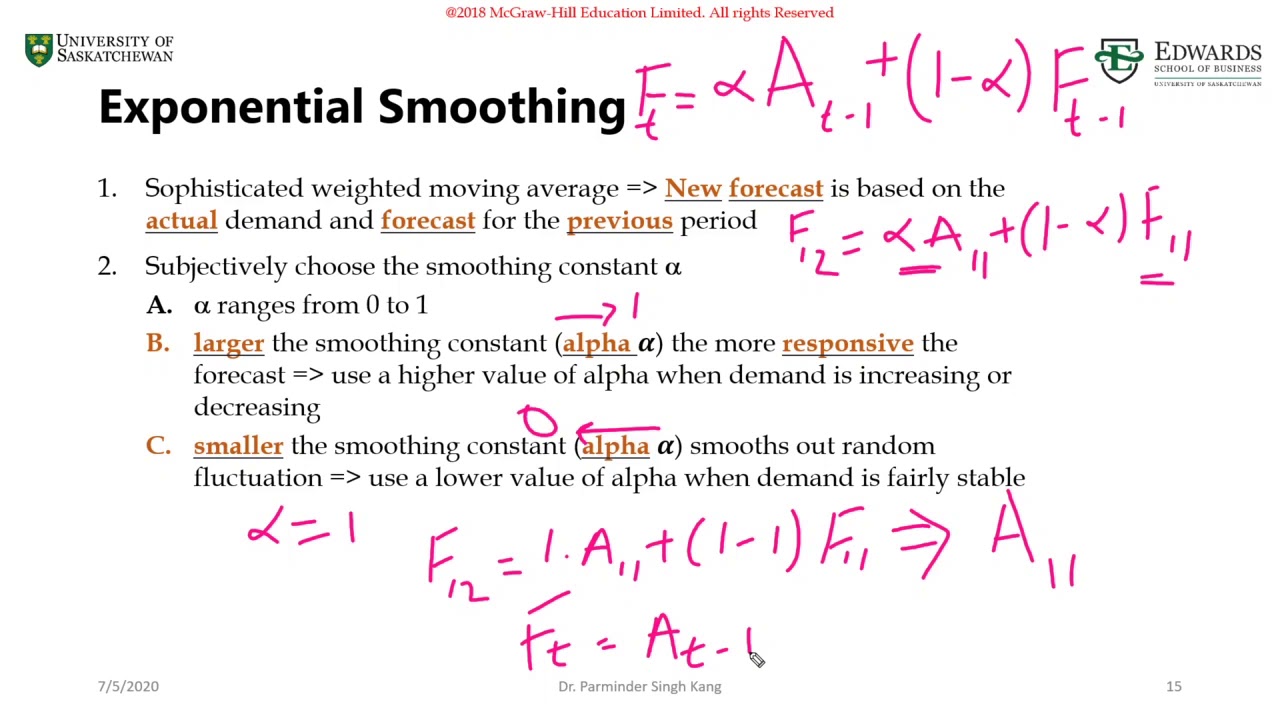
• In the Damping Factor box, enter the value 0.9. This 0.9 is called the damping factor, which is equal to the 1- α. Here α (alpha) is the smoothing factor.
• Under the Output Range box, select the cell where you want to see the result. Here I am going to select Cell F2 so that my result will display in the cell F2:F12
• Tick on the Chart Output box for displaying the values in the chart and then click on OK.
• It will insert the damping values in the F column with the Exponential Smoothing chart, as shown in the below screenshot.
Please Note:
• Here α=0.2, the previous data point is given a relatively small weight, whereas the previous smoothed value is given a large weight (0.9).
• The above graph is showing an increasing trend in the data points.
• The graph doesn’t calculate the smoothed value for the first data point because there is no data point before that.
Let’s consider another example at α=0.3 for the above-given data values so enter the value 0.8 in the Damping Factor box and again repeat the Exponential Smoothing method.
The result is shown below:
Let’s consider another example at α=0.4 for the above-given data values so enter the value 0.7 in the Damping Factor box and again repeat the Exponential Smoothing method.
Here is the result again
Now, if we compare the results of all the above 3 Excel Exponential Smoothing examples, then we can come up with the conclusion that when:
• The Alpha α value is smaller; the damping factor is higher than the Resultant in more peaks and valleys being smoothed out.
• The Alpha α value is higher; the damping factor is smaller. Resultant the smoothed values are closer to the actual data points.
When working with Excel Exponential Smoothing, always remember that:
• The more value of the dumping factor smoothing out the peak and valleys in the dataset.
• Excel Exponential Smoothing is a very flexible method to use and easy calculation.
……………………………………………………………………………………………………………………….
Share this video: • Exponential Smoothing Forecast In Excel
For more simple and easy to follow How to videos,
Click the Link Below to subscribe:
/ @learnexcelwitht
Join this channel to get access to the perks:
/ @learnexcelwitht
#movingaverage #exponetial #statistics
LearnexcelwithT

Доступные форматы для скачивания:
Скачать видео mp4
-
Информация по загрузке: