DCS | Tobii Game Hub v4.1.1 | Settings | Tobii Eye Tracker 5
Автор: azayomi
Загружено: 2024-11-17
Просмотров: 10564
Tobii Game Hub v4.1.1 Settings 00:02:30
Released November 6, 2024
https://gaming.tobii.com/getstarted/
Tobii Experience On
DCS World
Settings Advanced
Head Tracking Settings On
Head Rotation Yaw Limit 138.89
Head Rotation Yaw Sensitivity 2.00
Head Rotation Yaw Curve 0.30
Head Rotation Yaw Up Midpoint 0.50
Head Rotation Yaw Up Deadzone 0.00
Head Rotation Pitch Limit 90.00
Head Rotation Pitch Sensitivity 2.00
Head Rotation Pitch Curve 0.80
Head Rotation Pitch Up Midpoint 0.50
Head Rotation Pitch Up Deadzone 0.00
Head Rotation Roll Enable head roll OFF
Head position On
Relative Head Position On
Head Position settings follow current camera orientation OFF
Head position X Axis Limit 300.00mm
Head position X Axis Sensitivity 1.25
Head position X Axis Curve 0.30
Head position X Axis Midpoint 0.50
Head position X Axis Deadzone 0.00
Head position Y Axis Limit 300.00mm
Head position Y Axis Sensitivity 0.75
Head position Y Axis Curve 0.30
Head position Y Axis Midpoint 0.50
Head position Y Axis Deadzone 0.00
Head position Z Axis Limit 300.00mm
Head position Z Axis Sensitivity 0.00
Head position Z Axis Curve 0.00
Head position Z Axis Midpoint 0.50
Head position Z Axis Deadzone 0.00
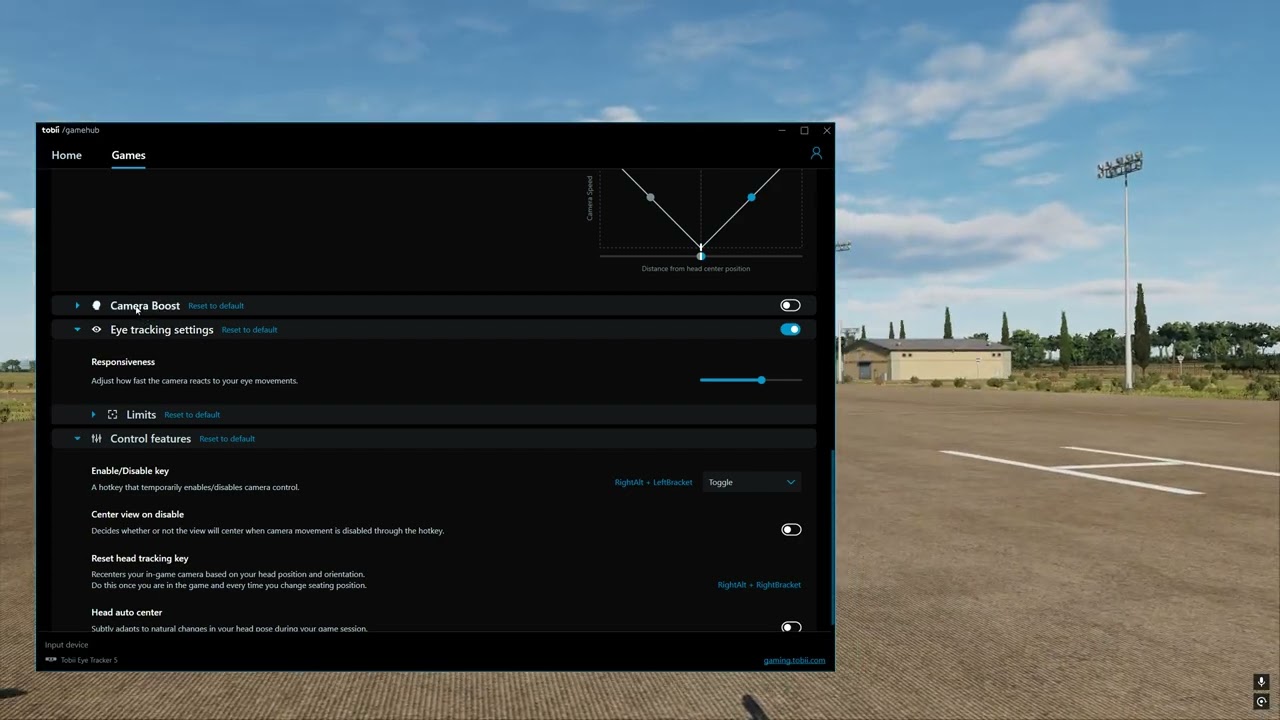
Camera Boost OFF
Eye tracking settings
Eye tracking Responsiveness 0.60
Eye tracking Limits Yaw 130.34
Eye tracking Limits Pitch 90.00
Control features
Enable/Disable key RightAlt + LeftBracket
Centre view on disable OFF
Reset head tracking key RightAlt + RightBracket
Instructions
Just install Tobii Game Hub v4.1.1
Run Tobii Experience
Turn on Tobii Experience
Run Tobii Game Hub
Click Games DCS World
Enter the settings as shown above
DCS in game settings. https://imgur.com/a/Q83VqTO
Video released 18th November 2024
Доступные форматы для скачивания:
Скачать видео mp4
-
Информация по загрузке: