Популярное

Музыка Кино и Анимация Автомобили Животные Спорт Путешествия Игры Юмор

Интересные видео

2025 Сериалы Трейлеры Новости Как сделать Видеоуроки Diy своими руками

Топ запросов

смотреть а4 schoolboy runaway турецкий сериал смотреть мультфильмы эдисон
dTub
Скачать

How to Build a Cheap Arcade Spinner for MAME

Автор: Joe W

Загружено: 2018-11-23

Просмотров: 8512

Описание:

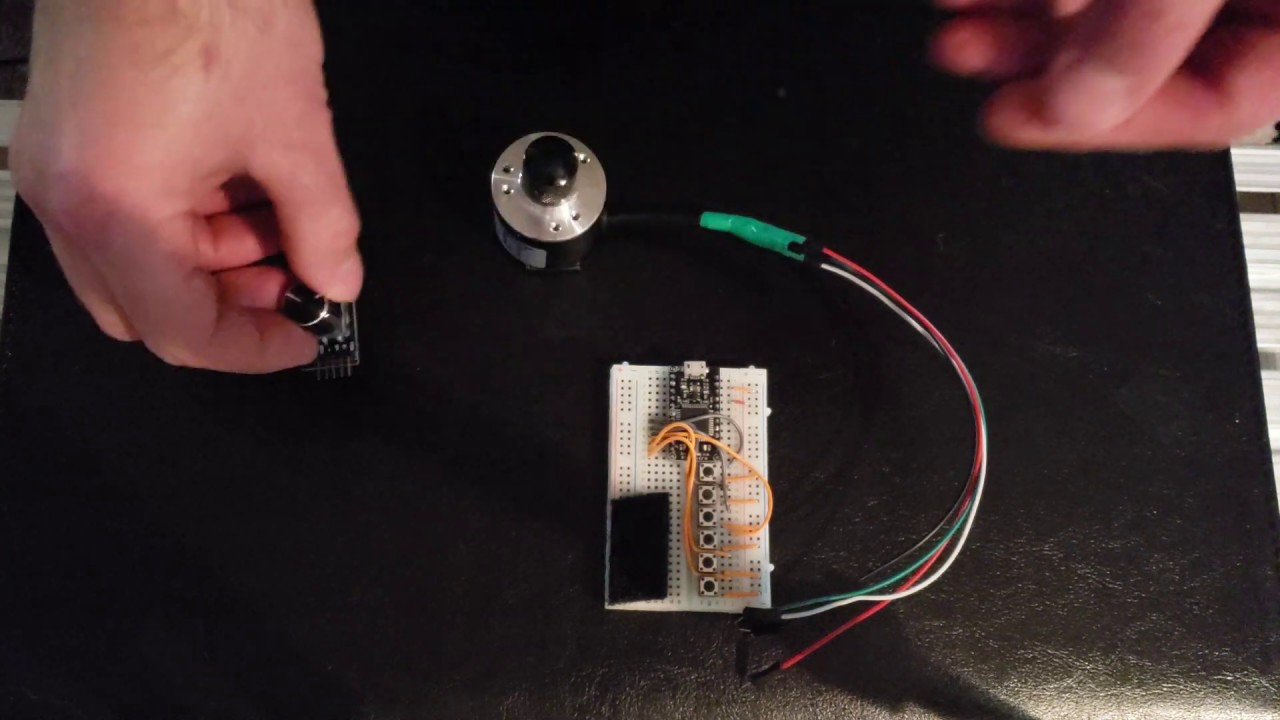
I show you how to build a cheap acade spinner for MAME and other emulators using an Arduino Micro or a clone with the Atmega32u4 chip. You will need to install the Arduino Joystick Library available at: https://github.com/MHeironimus/Arduin...

The Arduino code for the spinner is here: https://github.com/jmtw000/Arcade-Spi...

You will need a breadboard, and Arduino Micro (or clone), some momentary switch buttons, some breadboard jumper wires, and a 2 phase rotary encoder. In the video I say any 2 phase encoder will work. That's not exactly true. It needs to support an operating voltage of 5v DC. Most support a range of voltages, e.g. 5-24v. Another thing I said in the video which is partially incorrect is that you can reverse the +/- on the buttons, so that when a button is pushed it will read HIGH instead of LOW, but that you'd have to change the code. You can do that, but not only do you have to change the code, you also have to wire on pulldown resistors. The Arduino Micro has internal pullup resistors, but not internal pulldown ones.

This device will be detected as both a mouse and a joystick/gamepad. The joystick only has an X axis which we don't use. It was needed by the library to declare the joystick. We just center that x axis in setup() and forget about it. The spinner controls the mouse X axis which is by default mapped to the analog dial in MAME (don't forget to enable the mouse in MAME under advanced options!). The buttons will work as regular gamepad/joystick buttons. The 2400 different positions that can be detected on the 600ppr encoder I'm using are way too many for our purposes. The "mouse" is only polled every 1ms. This means at max we can only send 1000 move mouse commands per second, not even enough to get halfway around the encoder in 1 second. So, we only move the mouse for every 2 transitions. I find this works OK, but you may want to adjust it depending on the rotary encoder you're using. In the code I'm moving the mouse by 1 pixel at a time. If you want to speed it up you can move it by more. The code uses the Atmega32u4 ports directly because that's faster than using digitalRead/Write. I'm not a great programmer, so if you see a way to make this work better let me know.
How to Build a Cheap Arcade Spinner for MAME

Поделиться в:

Доступные форматы для скачивания:

Скачать видео mp4

  • Информация по загрузке:
Скачать аудио mp3

Похожие видео

HOW TO BUILD A JOGWHEEL ( DIY ARDUINO )

HOW TO BUILD A JOGWHEEL ( DIY ARDUINO )

Creating a Spinner for 10$

Creating a Spinner for 10$

Maquina Arcade con volante, pistola, trackball, spinner...

Maquina Arcade con volante, pistola, trackball, spinner...

DIY ARCADE SPINNER KNOB TUTORIAL: HOW TO MAKE YOUR OWN CLASSIC RETRO ARCADE SPINNER KNOB CONTROL.

DIY ARCADE SPINNER KNOB TUTORIAL: HOW TO MAKE YOUR OWN CLASSIC RETRO ARCADE SPINNER KNOB CONTROL.

MAME homemade mouse spinner

MAME homemade mouse spinner

Что такое аркадные энкодеры и как они работают?

Что такое аркадные энкодеры и как они работают?

Я протестировал все «запрещенные» школьные гаджеты

Я протестировал все «запрещенные» школьные гаджеты

DIY Illuminated Arcade Spinner - Build Instructions

DIY Illuminated Arcade Spinner - Build Instructions

Configure a USB Spinner in RetroPie on Your Raspberry Pi

Configure a USB Spinner in RetroPie on Your Raspberry Pi

MAME Spinner/360 Degree Wheel Games with TurboTwist 2 - 1/6

MAME Spinner/360 Degree Wheel Games with TurboTwist 2 - 1/6

Retro Arcade Controller Mapping and MAME Defaults

Retro Arcade Controller Mapping and MAME Defaults

How I Built My Dream Arcade! Custom Sega Blast City

How I Built My Dream Arcade! Custom Sega Blast City

Atari Single Player USB Fight Stick - Review and Test - Joystick, Trackball, Spinner

Atari Single Player USB Fight Stick - Review and Test - Joystick, Trackball, Spinner

🕹️ D.I.Y Button Box - Step One - What Hardware To Use - 🔘

🕹️ D.I.Y Button Box - Step One - What Hardware To Use - 🔘

Как Сделать Настольный ЭЛЕКТРОЭРОЗИОННЫЙ Станок?

Как Сделать Настольный ЭЛЕКТРОЭРОЗИОННЫЙ Станок?

Mame — используйте управление мышью для игр с трекболом, световым пистолетом и циферблатом

Mame — используйте управление мышью для игр с трекболом, световым пистолетом и циферблатом

Программирование GPIO-контроллеров на самодельном аркадном автомате на базе Raspberry Pi! ПРОСТОЙ...

Программирование GPIO-контроллеров на самодельном аркадном автомате на базе Raspberry Pi! ПРОСТОЙ...

This $60 Trackball & Spinner Transforms the Taito Egret II Mini!

This $60 Trackball & Spinner Transforms the Taito Egret II Mini!

Atari USB Paddle Controller Build Version 2

Atari USB Paddle Controller Build Version 2

Настройка USB-трекбола в RetroPie на вашем Raspberry Pi

Настройка USB-трекбола в RetroPie на вашем Raspberry Pi

© 2025 dtub. Все права защищены.


  • Контакты
  • О нас
  • Политика конфиденциальности


Контакты для правообладателей: infodtube@gmail.com