Easily Build a Custom Telegram bot for your website/project using
Автор: Talking with AI
Загружено: 2025-06-14
Просмотров: 554
Dialogue:
1) Create a Telegram bot script. My bot token is (place your bot token provided by botfather in telegram)
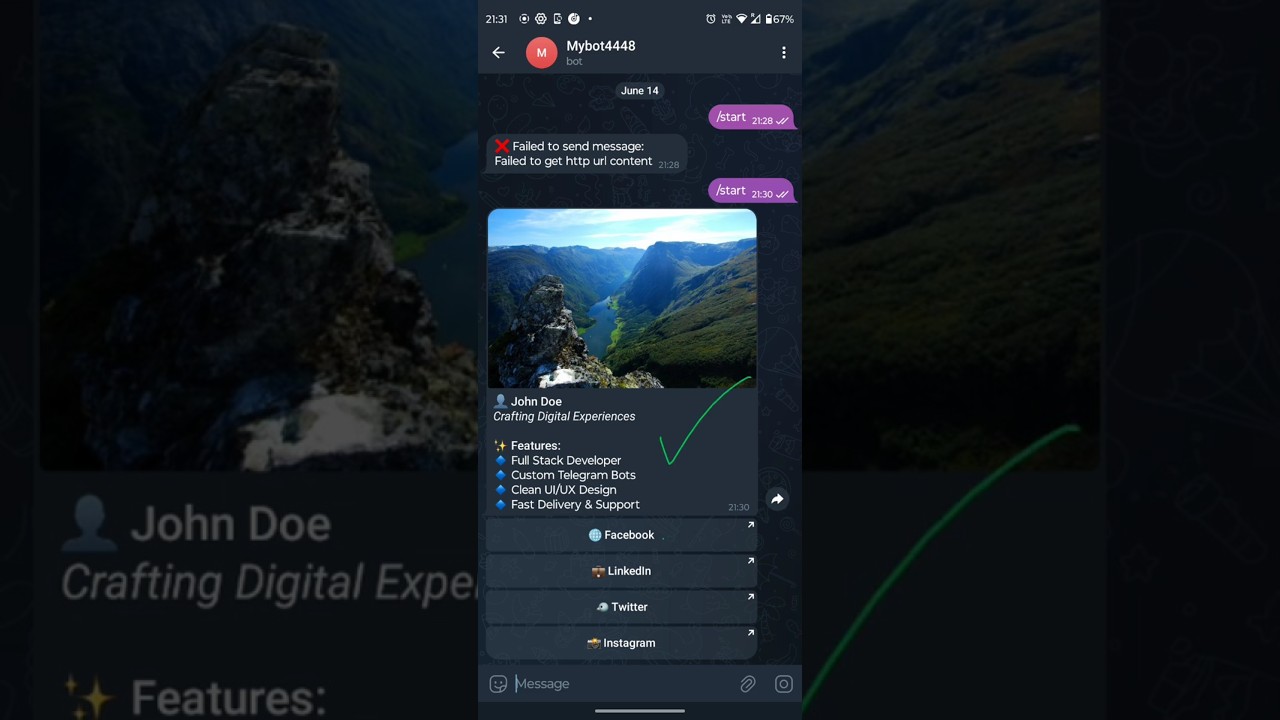
Design the following template: A profile pic at the top. Title, Heading and then A features section. Four buttons linked to my social networks facebook, linkedin, twitter, instagram.
Build inline with pic, content and buttons all in one forwardable message. I am using termux. Put sample content in placeholders for now. Put any actual image url available online for now. Give me the script to copy at once. Check for any errors and rectify before final outcome.
2) Fix the error ❌ Failed to send message:Failed to get http url content
Platform: Chatgpt
Literally anyone without any coding knowledge can build a telegram bot with forwardable buttons linked to your project socials in just 2 minutes. It's that easy with AI.
Forwardable design that you can use for marketing your website, projects etc on telegram with your friends, groups.
Very useful for marketing your crypto, meme projects, e-commerce business etc
Change the Dialogues as per your needs. For images , upload your valid image on free platform like imgur, imgbb and provide the link of this image to chatgpt.
Follow the video carefully and do as the steps suggest.
Steps for reference:
🗣️ Narration Script: How to Build a Telegram Bot in Termux with Profile Picture, Title, Features & Social Buttons
---
🔐 STEP 1: Create the Bot Using BotFather
1. Open Telegram and search for the official @BotFather bot.
2. Start a chat and issue the command to create a new bot.
3. Choose a display name and a unique username for your bot.
4. Once complete, BotFather will give you a bot token. Copy and save it securely.
---
📲 STEP 2: Set Up Your Environment in Termux
1. Launch Termux on your Android phone.
2. Update the package manager to ensure you're using the latest repositories. (see the video)
3. Install Python, which is required to run the bot script.
4. Install the Telegram bot library that allows Python to interact with Telegram’s API.
---
🧾 STEP 3: Create Your Bot Script
1. Create a new Python script file inside Termux using a text editor like nano.
2. Inside this file, paste the code/script generated by chatgpt.
3. Save the file and exit the editor.
---
▶️ STEP 4: Run the Bot
1. In Termux, execute the Python script to launch your bot.
2. You should see a message indicating the bot is running and listening for commands.
---
📱 STEP 5: Test Your Bot on Telegram
1. Open Telegram and find your bot by its username.
2. Start a conversation with it by typing /start.
3. You’ll receive a single, beautiful message with:
An image displayed at the top.
Text containing your title and features.
Social buttons that open your profiles in the browser.
The entire message can be forwarded as-is to others.
(ps: to keep the bot sending the custom message every time you send /start command, keep the bot script running on termux i.e do not close the termux app, or alternatively termux will show you an option to use to keep the bot script running) It's easy with little research 😉
Доступные форматы для скачивания:
Скачать видео mp4
-
Информация по загрузке: