New Perspectives Excel 365 | Module 12: SAM Project A Crest Financial
Автор: Excel Tutor
Загружено: 2026-01-18
Просмотров: 0
If you directly want to get the project from us then contact us on our Whatsapp. Link is given below,
https://wa.me/message/PPXGSJS2TLWUA1
Whatsapp Contact Number:
+91 8114420233
Email ID:
excelprojectshelp@gmail.com
New Perspectives Excel 365 | Module 12: SAM Project A Crest Financial
PROJECT STEPS
Minho Jung is in charge of public relations for Crest Financial, an investment bank in San Francisco, California. Minho is coordinating a community-service program that provides employees from Crest Financial to serve as instructors for seminars on financial topics. He is developing an Excel workbook to track and record the seminar information, and asks for your help in automating the workbook.
Go to the Seminars worksheet and then unprotect it so you can edit the contents.
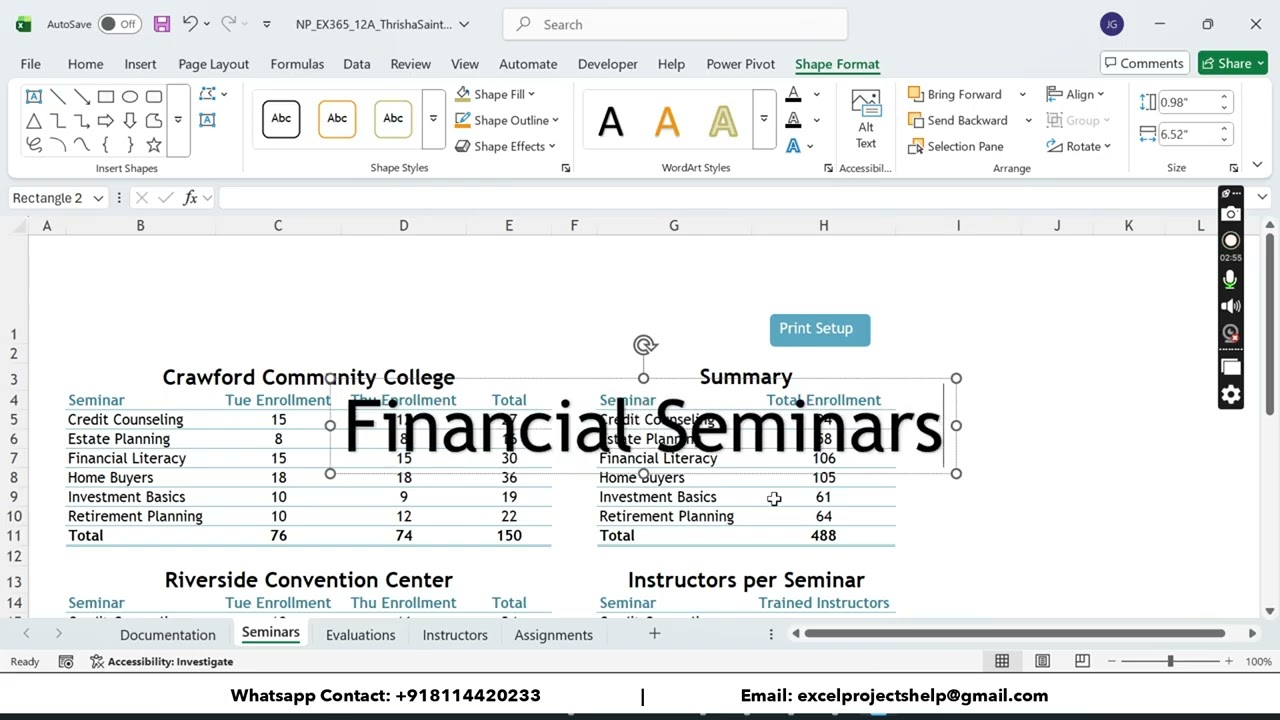
Minho wants to include an eye-catching title on the worksheet, which he shares with the seminar instructors.
Insert and format WordArt as follows:
Insert WordArt using the Fill: Black, Text color 1; Shadow style.
Type Financial Seminars as the worksheet title.
Change the text fill of the WordArt to Aqua, Accent 4.
Move the WordArt to row 1 so that it spans columns B:G.
Minho created the Print Setup button on this worksheet using a Rounded Rectangle shape. He asks you to make it possible to click the shape to run the Print_Setup macro.
Assign the Print_Setup macro to the Print Setup shape.
The range G13:H21 is designed to list the number of instructors trained to conduct each seminar. The average number of instructors from the range H15:H20 should be displayed in cell H21. However, that cell displays an error because no data has been entered in the range H15:H20. Minho asks you to display a message instead of an error when the range does not contain any Trained Instructors data.
Add an IFERROR function to the formula in cell H21 to display the message "No data is available" if the formula returns an error.
Go to the Evaluations worksheet, which lists the instructors of the top three most popular seminars and the ratings each instructor received from participant evaluations. Minho asks you to assign a Performance rating of Excellent for instructors who average ratings greater than 8, a rating of Good for instructors who average ratings greater than 6, and a rating of Needs Improvement for all other instructors. Provide this information for Minho as follows:
In cell F4, enter a formula using the LET function.
Use avg as the name of the variable.
For the name_value1 argument, use the AVERAGE function to average the values in the range C4:E4.
For the calculation argument, enter an IF function that displays "Excellent" if avg is greater than 8 and a second IF function that displays "Good" if the avg is greater than 6.
Display "Needs improvement" for any other avg value.
Fill the range F5:F13 with the formula in cell F4.
Go to the Instructors worksheet, where Minho and his staff list instructors, the seminars they conduct, and the size of the instructor's polo shirt, which the bank provides to instructors. Because seminars start on September 12, 2029 and end on November 14, 2029, he wants you to make sure users enter a correct date in the Seminar Start Date column. Create a data validation rule as follows:
In the range D4:D17, create a data validation rule that accepts only date values between 9/12/29 and 11/14/29.
Create an input message that uses Seminar Start Date as the title and the following text as the input message: Enter the date to start instruction.
Create a Stop style error alert that uses Invalid Date as the title and the following text as the error message: Enter a date between September 12 and November 14.
Minho wants to make sure all of the dates entered in the Seminar State Date column are valid. Identify and correct any invalid values as follows:
In the range D4:D17, circle invalid data.
Change the first invalid date to 9/26/29 and change the second invalid date to 9/12/29 to correct the errors.
Go to the Assignments worksheet. Once a week, Minho and his staff assign instructors to seminars using the form on this worksheet. Minho has created two macros to automate the form, but they are not working correctly.
View and edit the macros as follows:
Open the Clear_Form macro in the Visual Basic Editor. The macro should delete the values in the range D4:D8, but specifies the range C4:C8.
In the Clear_Form macro VBA code, change the statement between the "'Edit the code below" and "'Edit the code above" comments to the following statem
#samproject1a #samprojects #cengageassignments #NP_EX365_12a #NP_EXCEL #excel_assignments #excel_sam_projects #Module12SamProjecta #crest_financial #new_perspectives_excel #NP_EX365_12a_FirstLastName_1.xlsx #NP_EX365_12a_FirstLastName_2.xlsx
Доступные форматы для скачивания:
Скачать видео mp4
-
Информация по загрузке:


