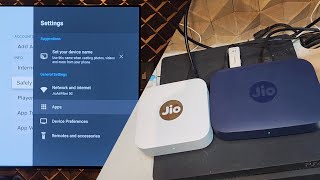
Install MI-BOX firmware in Jio Fiber Set top Box # Install 3rd Party Apps in Jio STB 101% Working
Автор: Ethical Hacker
Загружено: 2022-07-27
Просмотров: 66183
Download Link for C200:
https://mega.nz/file/0clFRDCC#PZxFmuQ...
Download Link for D200:(Password: mishraaajeee )
Amlogic tools All version:
https://mega.nz/#!wQ0AlQYC!PF7rkiWFO-...
How to Install
Flashing Instructions:
Step1 : Copy all the files from downloaded zip file to amlogic bin folder.
Step2 : Connect the box in Worldcup mode and execute flash_atv.bat from amlogic bin folder. (please dont ask me how to install amlogic tools and bring it to worldcup mode . Simple google search will do)
It will take 5 minutes to flash both system and vendor images. It wil Restart automatically and first boot takes some time so be patient.
Connect usb keyboard or Android Tv Remote in mobile to skip the initial setup screen and pair the jio remote from Remotes & Accessories tab in settings.
New Android Ui will come only after you update the google apps in playstore
Update All apps from google store on first boot (must before trying anything) and enjoy the ATV experience..
Credit Goes to
Contributors
Englishpatient,GemsEngineer ,Techsavyy ,Vikas (Telegram Group)
Supported by
Srikant nagar,AR,Vikas Mahajan,Alcapone,Mr.Robot & Notavailable (Telegram Group)

Доступные форматы для скачивания:
Скачать видео mp4
-
Информация по загрузке: