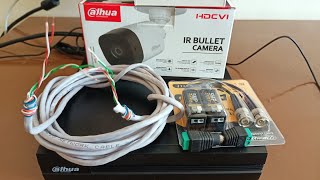
How to Connect CCTV Cameras to Cat 6 Cable Using Passive Video Baluns | Easy & Low-Cost Installation
Автор: Laya Bro
Загружено: 2024-07-17
Просмотров: 3002
Learn how to connect your analog CCTV cameras to a DVR using Cat 6 cable and passive video baluns. This method is cost-effective, easy to install, and helps save space. Follow our step-by-step guide to ensure a seamless setup for your security system.
🔹 Advantages:
Low Cost: Save money by using Cat 6 cables and passive baluns.
Easy Installation: Simple steps make the setup process quick and hassle-free.
Space Saving: Efficient cable management with Cat 6 cables.
🔧 What You'll Need:
Analog CCTV Camera
Passive Video Baluns
Cat 6 Cable
DVR
BNC Connectors
📌 Steps:
Connect the CCTV camera’s video output to the video balun using a BNC connector.
Attach the video balun to one end of the Cat 6 cable.
Run the Cat 6 cable from the camera location to the DVR location.
Connect the other end of the Cat 6 cable to another video balun.
Connect the second video balun to the DVR’s video input using a BNC connector.
🔗 Don't forget to like, share, and subscribe for more tutorials on CCTV installations and other tech tips!
#CCTV #SecuritySystem #VideoBalun #Cat6Cable #DIYInstallation #AnalogCCTV

Доступные форматы для скачивания:
Скачать видео mp4
-
Информация по загрузке: