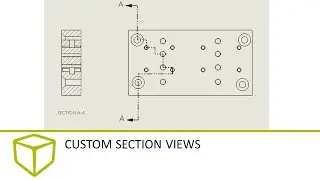
Removed Section & Alternate position & Broken out section| SolidWorks Drawing Tutorial بالعربي
Автор: Astro
Загружено: 2025-07-05
Просмотров: 146
Model View, Projected View, Auxiliary View, Section View, Aligned Section View, Broken-Out Section, Detail View, Broken View, Crop View, Alternate Position View, Relative View, Exploded View, Predefined View, Empty View, Isometric View, Flat Pattern View, Drawing View Wizard, Insert Model Items, Drawing Templates, Sheet Templates, Save Sheet Format, Save As Template, Drawing Compare, Drawing Explorer, Drawing Cleanup, Drawing Sheets, Sheet Format, Edit Sheet Format, Title Block Table, Sheet Properties, Sheet Background, Customize Sheet, Sheet Scale, Sheet Size, Drawing Properties, Drawing Standards, ANSI, ISO, DIN, JIS, BSI, GB, GOST, Custom Standards, FeatureManager, Configuration Manager, Display Manager, View Layout, View Palette, View Orientation, Named Views, Custom Views, Drawing View Style, Hidden Lines Visible, Hidden Lines Removed, Shaded With Edges, Shaded Without Edges, Wireframe, Display State, View Lock, Lock View Focus, Lock Sheet, View Alignment, Add Section Line, Add Detail Circle, Add Alignment Break, Add Break View, Section Line Properties, Detail Circle Properties, Drawing Borders, Sheet Zones, Zone Labels, Zone Markers, Drawing Title Border, Drawing Title Block Text, Drawing Tree Filter, Annotation, Insert Annotation, Format Painter, Layer Properties, Annotation Layer, Display Annotations, Hide/Show Annotations, Rapid Dimension, Auto Arrange Dimensions, Align Dimensions, Move Dimension, Reattach Dimension, Smart Dimension, Ordinate Dimension, Chain Dimension, Baseline Dimension, Angular Dimension, Linear Dimension, Diameter Dimension, Radius Dimension, Driven Dimension, Manual Dimension, Dimension Properties, Tolerance, Precision, Dual Dimensioning, Primary Units, Secondary Units, Text Font, Text Position, Balloon, Auto Balloon, Magnetic Line, Note, Flag Note, Area Hatch, Hatch Region, Center Mark, Centerline, Centerline Slot, Datum Feature Symbol, Datum Target Symbol, Surface Finish Symbol, Weld Symbol, Cosmetic Thread, Hole Callout, Hole Table, Bend Table, Punch Table, Gauge Table, General Table, Bill of Materials, BOM, Revision Table, Design Table, Cut List Table, Title Block Table, Weldment Cut List Table, Bend Lines, Drawing Notes, Notes Library, Blocks Library, Design Library, Annotation Library, Feature Library, Standard Views, Rebuild Drawing, Rebuild View, Update View, Insert Object, Insert Sketch Picture, Insert Sketch Entities, Line, Centerline, Construction Line, Rectangle, Center Rectangle, 3 Point Center Rectangle, Circle, Perimeter Circle, Arc, Centerpoint Arc, 3 Point Arc, Spline, Style Spline, Ellipse, Partial Ellipse, Polygon, Slot, Straight Slot, Centerpoint Slot, 3 Point Arc Slot, Point, Fillet, Chamfer, Mirror Entities, Convert Entities, Offset Entities, Trim Entities, Extend Entities, Dimension Tool, Sketch Relations, Fix, Coincident, Concentric, Tangent, Equal, Parallel, Perpendicular, Collinear, Midpoint, Intersection, Horizontal, Vertical, Pierce, Merge, Intersection Curve, Split Entities, Segment Entities, Join Entities, Virtual Sharps, Intersection Point, Block, Group Entities, Sketch Pattern, Linear Sketch Pattern, Circular Sketch Pattern, Drawing Pack and Go, Drawing Task Scheduler, Drawing Validation Tools, Print Preview, Print to PDF, Export to DWG, Export to DXF, Export to STEP, Export to IGES, Export to Parasolid, Export Options, Export Layers, Export Fonts, Export Views, Export Annotation, Export BOM, Export Tables, Export Balloons, Export Sheet Format, Print Settings, Paper Size, Orientation, Print Range, Scale to Fit, Print Quality, DPI, Monochrome, Grayscale, Color, View Arrows, Hide Edge, Show Hidden Edges, Drawing Visualization, Curvature Combs, Curvature Plot, Contour Plot, Zebra Stripes, Draft Analysis, Lightweight Drawing, Resolved Drawing, Detached Drawing, Reference Geometry, Drawing Macros, Drawing Health Check, View Update, Model Break View, Partial Section View, Interference Detection View, Transparency View, Drawing Color Settings, Drawing Line Thickness, Line Font, Line Style, Hidden Line Style, Centerline Style, Phantom Line Style, Layer Manager, Line Color, Layer Visibility, By Layer, Per Component, Per View, Auto Insert Views, Insert BOM Table, Update BOM, Align Balloons, Reorder Balloons, Add Balloon Stack, Balloon Fit, Balloon Style, Custom Balloon Shape, Hole Wizard Annotation, Custom Properties, Link to Property, Link to Excel, Title Block Fields, Drawing Variables, Drawing Title Property, Drawing Revision, Drawing Number, Drawn By, Checked By, Approved By, Drawn Date, Material Field, Finish Field, Weight Field, Drawing Description, Drawing Notes Custom Text, Predefined Notes, Engineering Symbols, GD\&T, Surface Symbols, Welding Symbols, Feature Control Frame, Basic Dimension Frame, Datum Identifier, Feature of Size Symbol, Projected Tolerance Zone, Continuous Feature Symbol, Free State Symbol, Statistical Tolerance, All Around Symbol, Between Symbol, Circularity Symbol, Cylindricity Symbol, Flatness Symbol, Parallelism Symbol,
Доступные форматы для скачивания:
Скачать видео mp4
-
Информация по загрузке: