Creating a Winter Fashion Scene with AI + Studio Lighting with Lindsay Adler
Автор: Adorama
Загружено: 2025-11-25
Просмотров: 5436
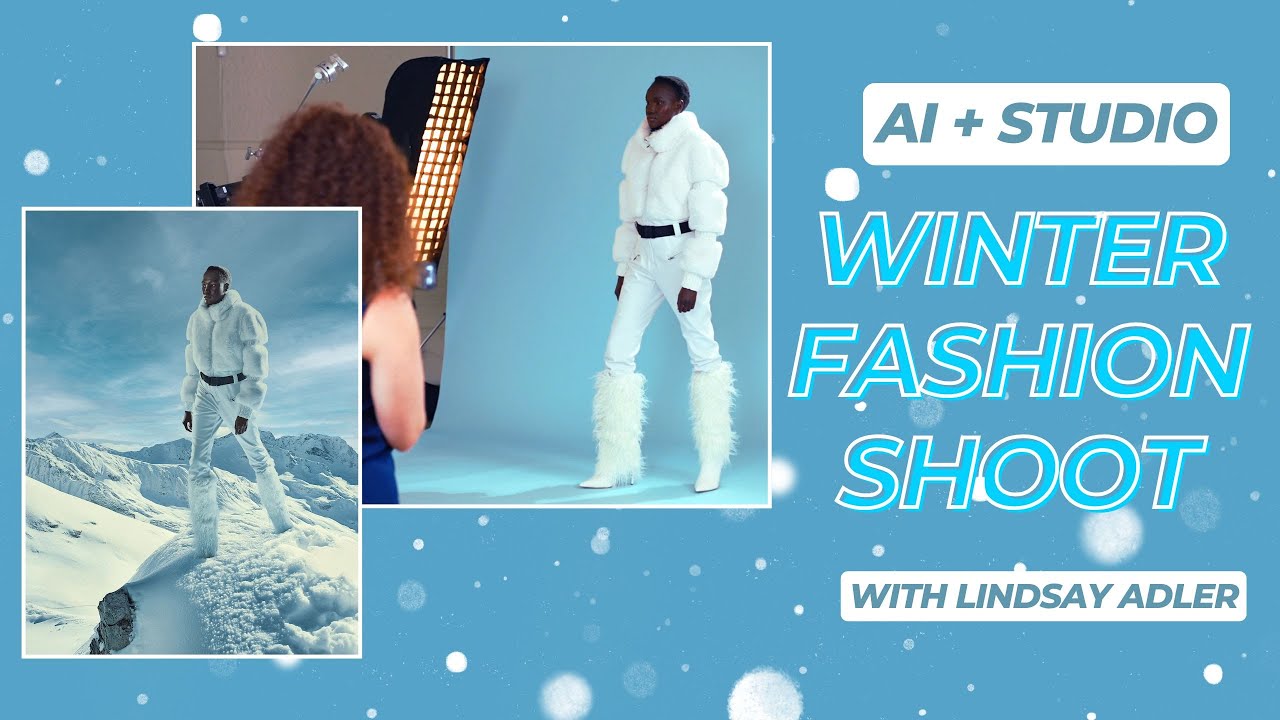
Tools for creativity continue to evolve, becoming increasingly effective ways to support our visual storytelling. In this shoot, my vision was to create a winter fashion story set on a snowy mountaintop, but without the budget or logistics of actually traveling there. So instead, I used AI to build the environment, analyzed its lighting, recreated that light in my studio, and then composited the two together in Photoshop.
This video showcases my process of merging imagination with technique by utilizing the precision of studio lighting and the flexibility of AI to transport my subject anywhere my creativity can envision.
Here’s a quick overview of the process, and watch the video for full details!
Step-by-step overview:
1) Create the environment in AI
• Generate a snowy alpine scene in MidJourney, using a reference image to control color and atmosphere.
• Upscale the selected visual in Topaz Photo AI to create a higher-resolution plate for compositing.
2) Analyze the lighting in the AI reference
• Hard “sunlight” from the top right, creating a bright, defined rim.
• Softer rim from camera left, simulating snow bounce.
• Cool cyan and blue ambient fill in the shadows from the reflected sky.
• Subtle upward bounce on the face, adapted for the model’s skin tone and wardrobe.
3) Recreate the light in the studio (tethered)
• Build lights one at a time while comparing live tethered captures to the AI reference.
• Adjust white balance, contrast, and shadow color to emulate the cold outdoor atmosphere.
Lighting setup
• Background — Savage Universal Blue Mist (so that bounced light will have a subtle blue to the shadows)
• Sun key – Profoto strobe with zoom reflector high camera-right for a hard, crisp, directional “sun.”
• Right rim – 1×4 strip softbox + grid to continue the highlight down the body.
• Left rim (snow bounce) – 1×4 strip softbox + grid at lower power for softer reflection.
• Face accent – 5° grid softened with diffusion paper, placed low to mimic upward fill.
• Capture – Tethered workflow to compare images directly against the AI reference for precision.
Compositing in Photoshop
• Clean the AI plate: Remove the generated figure using Generative Fill.
• Add Subject: Cut out the subject from your image using Select Subject → refine edges (boots, fur, hair).
• Match tone and contrast
• Unify color
• Final grade: Apply a light global color grade to make the subject and environment feel cohesive.
If you enjoyed this process, be sure to check out my other AI composite videos!
👉 Model in AI environment: • Create Stunning AI Environments & Composit...
👉 AI-inspired headpiece: • Photographing a Stunning AI-Inspired Headp...
SUBSCRIBE AND BE PART OF THE ADORAMA FAMILY:
➥ / adoramatv
__________________________________
Be the first to shop our great deals and sales by signing up for emails from Adorama! https://www.adorama.com/MyAccount/Login
🔷
Save 5% Every Day† or Special Financing* On purchases of $199+ with the Adorama Edge Credit Card. Learn More: https://www.adorama.com/g/adorama-credit.
__________________________________
✘ GEAR USED:
Canon R5 II: https://prf.hn/l/w94R48j/
Canon RF 24-105mm 2.8 https://prf.hn/l/55AEzkR/
Capture One: https://prf.hn/l/W4xbnOX/
Profoto Pro D3 https://prf.hn/l/K9ENnmk/
Profoto 5 Degree Grid https://prf.hn/l/aWPNNYl/
Profoto 1x4f Strip Softbox https://prf.hn/l/7gzpRAa/
Savage Universal Blue Mist https://prf.hn/l/DLkgDda/
#fashionshoot #studiophotography #adorama
__________________________________
❐ LET'S GET SOCIAL ❏
➥ TikTok / adoramanyc
➥ Facebook / adorama
➥ Instagram / adorama
➥ X https://x.com/adorama
➥ Discord https://www.adorama.com/discord
❐ MORE ADORAMA ❏
➥ Shop https://www.adorama.com/
➥ Blog https://www.adorama.com/alc/
➥ Adorama Events / @adoramaevents
__________________________________
Photographer: Lindsay Adler
Model: Nyalit
Hair: Linh Nguyen
Makeup: Grant Karpin
Video: Samuel Bouret
__________________________________
THANKS SO MUCH FOR WATCHING!
Доступные форматы для скачивания:
Скачать видео mp4
-
Информация по загрузке:


