Популярное

Музыка Кино и Анимация Автомобили Животные Спорт Путешествия Игры Юмор

Интересные видео

2025 Сериалы Трейлеры Новости Как сделать Видеоуроки Diy своими руками

Топ запросов

смотреть а4 schoolboy runaway турецкий сериал смотреть мультфильмы эдисон
dTub
Скачать

How-to Separate Network IP Camera Traffic from Main Network

Автор: CCTV Camera Pros

Загружено: 2024-08-06

Просмотров: 5506

Описание:

Are you considering installing an IP camera system for your home or business but worried about the impact it might have on your network traffic? In this informative video, Mike Haldas from CCTV Camera Pros explains how you can set up an IP camera system without burdening your main network with video traffic.

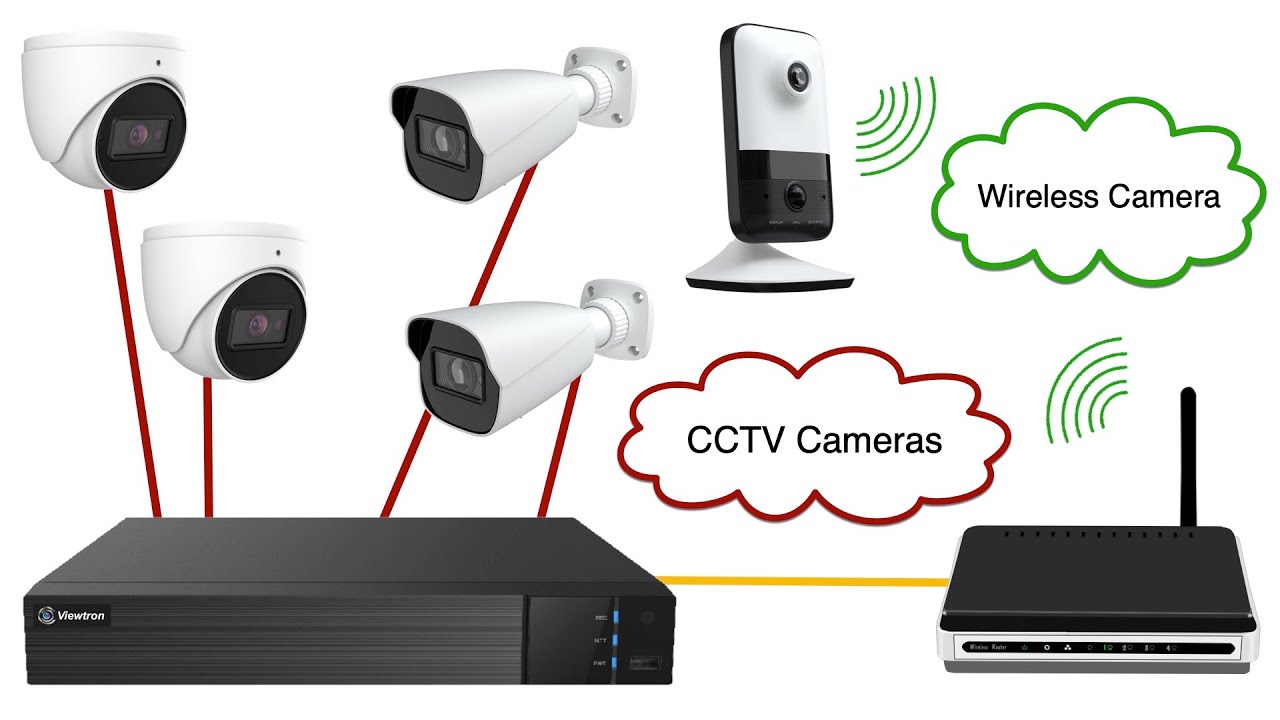
Many people assume that the only way to avoid network congestion is by using a closed-circuit television (CCTV) system with coaxial cables and BNC connectors. However, this is not entirely true. IP camera systems can be configured to keep their traffic separate from your primary local area network (LAN).

Mike discusses how Viewtron IP camera NVRs (Network Video Recorders) come equipped with built-in Power over Ethernet (PoE) connections, allowing you to hardwire your IP cameras directly to the NVR using Cat5e or Cat6 network cables.

You can learn about Viewtron IP camera NVRs here.
https://www.cctvcamerapros.com/IP-Cam...

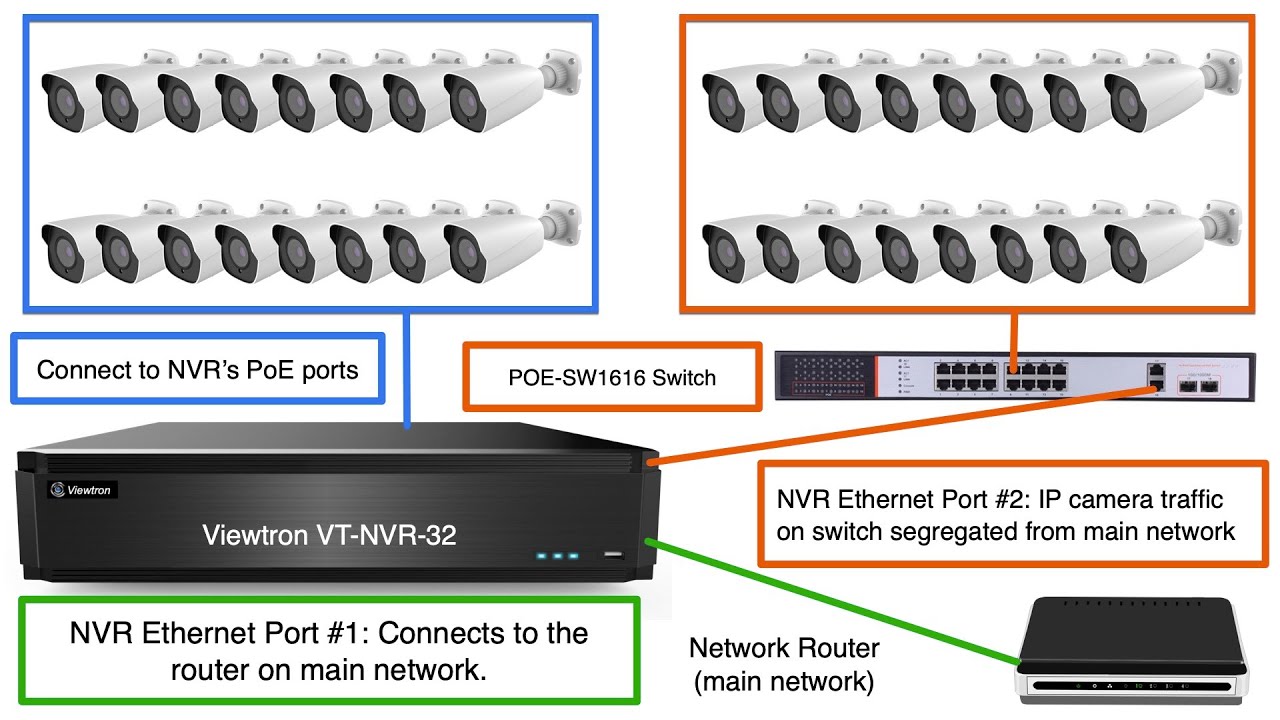
This setup creates a separate, dedicated network for your IP cameras, ensuring that the video recording traffic does not interfere with your main network. You can still connect the NVR to your LAN for remote access via mobile apps and desktop software, but the bandwidth used for live viewing and playback is significantly less than the recording traffic.

Another option is to connect your IP cameras to a network switch that is isolated from your main LAN. This method also effectively segregates the IP camera traffic. For larger systems, Viewtron offers 32-channel IP camera NVRs and 64-channel IP camera NVRs with two network interface cards (NICs). One NIC can be connected to an external PoE switch for the cameras, while the other NIC can be connected to your LAN for remote access. Connecting your IP camera NVR to your router is optional and only needed if you want to access your camera system on the LAN or remotely over the Internet.

The key takeaway from this video is that you can enjoy the benefits of an IP camera system without compromising your network's performance. By keeping the IP camera traffic separate from your main LAN, you can essentially create a closed-circuit IP camera system that won't impact your day-to-day network usage.

Don't let concerns about network traffic deter you from implementing a state-of-the-art IP camera system. With the right configuration and equipment, you can ensure that your security camera system operates seamlessly without affecting your primary network.

If you have any questions about IP camera systems, closed-circuit TV systems, or need advice on upgrading your existing setup, feel free to reach out to Mike Haldas at mike@cctvcamerapros.net.

For more information on Viewtron's IP camera systems and BNC systems, visit https://www.viewtron.com.
How-to Separate Network IP Camera Traffic from Main Network

Поделиться в:

Доступные форматы для скачивания:

Скачать видео mp4

  • Информация по загрузке:

Скачать аудио mp3

Похожие видео

PoE NVR vs. PoE Switch: Which is Right for Your Surveillance System?

PoE NVR vs. PoE Switch: Which is Right for Your Surveillance System?

Взлом WiFi за 60 секунд | Как взламывают Ваш роутер будьте осторожны!

Взлом WiFi за 60 секунд | Как взламывают Ваш роутер будьте осторожны!

How-to Connect IP Camera to TV without DVR for Live View

How-to Connect IP Camera to TV without DVR for Live View

LPR Camera for Home Use: Great Test Results from Viewtron System

LPR Camera for Home Use: Great Test Results from Viewtron System

Multi-building Security Camera System Setup | How to Install CCTV Cameras in a Multi-Building Unit

Multi-building Security Camera System Setup | How to Install CCTV Cameras in a Multi-Building Unit

Чем ОПАСЕН МАХ? Разбор приложения специалистом по кибер безопасности

Чем ОПАСЕН МАХ? Разбор приложения специалистом по кибер безопасности

How to link multiple IP camera networks together using multiple switches.

How to link multiple IP camera networks together using multiple switches.

What is the Difference Between DVR and NVR Security Camera Recorders?

What is the Difference Between DVR and NVR Security Camera Recorders?

Не используй DNS провайдера! Защищённые DOT, DOH DNS + VPN + Keenetic

Не используй DNS провайдера! Защищённые DOT, DOH DNS + VPN + Keenetic

Starlink Mini ПЕРВОЕ подключение. Сколько ПЛАТИТЬ? Замер СКОРОСТИ интернета.

Starlink Mini ПЕРВОЕ подключение. Сколько ПЛАТИТЬ? Замер СКОРОСТИ интернета.

Как работает LIN шина автомобиля. K-Line L-Line шины данных. Лин шина автомобиля. Lin-bus network

Как работает LIN шина автомобиля. K-Line L-Line шины данных. Лин шина автомобиля. Lin-bus network

Add A PoE Switch to IP Camera NVR System

Add A PoE Switch to IP Camera NVR System

IP Cameras - Preventing Unauthorized Internet Access

IP Cameras - Preventing Unauthorized Internet Access

Как поменять gpon роутер ростелеком на любой другой. Пошаговая инструкция для новичка

Как поменять gpon роутер ростелеком на любой другой. Пошаговая инструкция для новичка

Wireless Camera for CCTV DVR Solution

Wireless Camera for CCTV DVR Solution

Настройка VLAN, правил брандмауэра и сетей Wi-Fi — приложение UniFi Network

Настройка VLAN, правил брандмауэра и сетей Wi-Fi — приложение UniFi Network

Правда о клонировании SIM-карт

Правда о клонировании SIM-карт

HDMI Distribution over your Home Network? Low-Cost HDMI Matrix using IP-Based Hardware

HDMI Distribution over your Home Network? Low-Cost HDMI Matrix using IP-Based Hardware

Building a Budget DIY Home Surveillance System

Building a Budget DIY Home Surveillance System

Подключение двух роутеров в одной сети по WiFi между собой

Подключение двух роутеров в одной сети по WiFi между собой

© 2025 dtub. Все права защищены.


  • Контакты
  • О нас
  • Политика конфиденциальности


Контакты для правообладателей: infodtube@gmail.com