How to display a conditional Age Restriction pop-up in Flutter
Автор: vlogize
Загружено: 2025-10-08
Просмотров: 9
Learn how to effectively show a pop-up in Flutter based on user age, utilizing shared preferences to manage conditions efficiently.
---
This video is based on the question https://stackoverflow.com/q/64589480/ asked by the user 'Rock' ( https://stackoverflow.com/u/9165895/ ) and on the answer https://stackoverflow.com/a/64624996/ provided by the user 'Mehmet Yaz' ( https://stackoverflow.com/u/14551620/ ) at 'Stack Overflow' website. Thanks to these great users and Stackexchange community for their contributions.
Visit these links for original content and any more details, such as alternate solutions, latest updates/developments on topic, comments, revision history etc. For example, the original title of the Question was: Flutter display pop-up with condition
Also, Content (except music) licensed under CC BY-SA https://meta.stackexchange.com/help/l...
The original Question post is licensed under the 'CC BY-SA 4.0' ( https://creativecommons.org/licenses/... ) license, and the original Answer post is licensed under the 'CC BY-SA 4.0' ( https://creativecommons.org/licenses/... ) license.
If anything seems off to you, please feel free to write me at vlogize [AT] gmail [DOT] com.
---
Implementing a Conditional Age Restriction Pop-up in Flutter
As developers, we often face challenges when it comes to displaying user-specific messages or pop-ups in our applications. A common scenario is to prompt users about age restrictions, ensuring that they receive the message only when necessary. This guide will guide you through implementing an Age Restriction pop-up in Flutter that appears based on the value of a stored age variable, using shared preferences to manage state effectively.
The Problem
You want to create a pop-up in your Flutter app that informs users of age restrictions. The condition for displaying this pop-up is based on the value of a string variable called ageRestriction. If the ageRestriction changes — for example, from "18" to "20" — the pop-up should show again. However, when the ageRestriction returns to "18", it should not display the pop-up a second time, if it has already been shown. You attempted to manage this with shared preferences but faced challenges in implementing the logic successfully.
The Proposed Solution
Here's how to resolve the pop-up display issue by properly managing the age restrictions stored in shared preferences. Follow the organized steps below to implement the solution effectively.
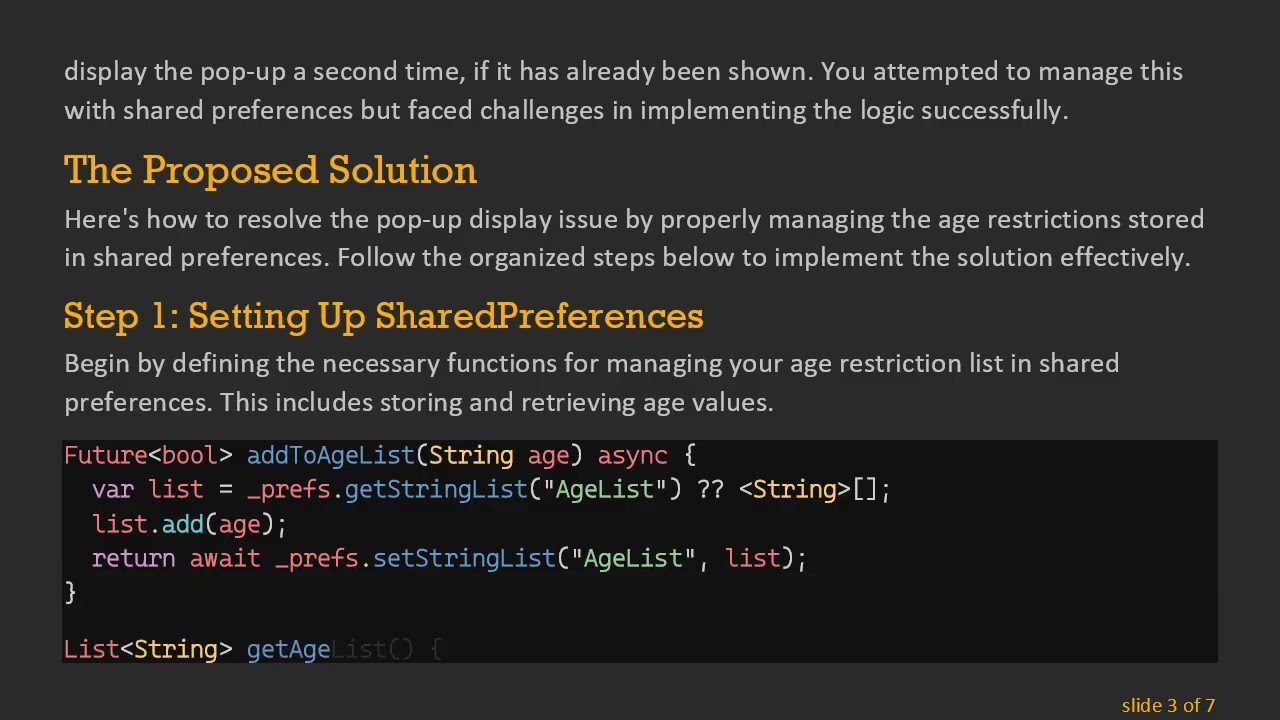
Step 1: Setting Up SharedPreferences
Begin by defining the necessary functions for managing your age restriction list in shared preferences. This includes storing and retrieving age values.
[[See Video to Reveal this Text or Code Snippet]]
Step 2: Creating the Pop-up Functionality
To manage the pop-up display, modify your button's onTap function. This function should check if the ageRestriction has already been shown before deciding whether to display the pop-up.
[[See Video to Reveal this Text or Code Snippet]]
Conclusion
By following these steps, you can successfully implement a conditional Age Restriction pop-up in your Flutter application. Throughout this process, we utilized shared preferences to effectively manage the display conditions, ensuring that the pop-up appears only under the correct circumstances. This approach not only enhances user experience but also reinforces the application’s age policies.
Feel free to adjust the code snippets to fit your specific application needs. Happy coding!
Доступные форматы для скачивания:
Скачать видео mp4
-
Информация по загрузке:

![[2026] Feeling Good Mix - English Deep House, Vocal House, Nu Disco | Emotional / Intimate Mood](https://image.4k-video.ru/id-video/cxLdtvzf2sI)


![Divine Music - The Year Mix Vol.10 [Chill & Ethnic Deep 2025]](https://image.4k-video.ru/id-video/Q3XBH_FhuKY)