Deploy Flask App with AWS S3 and RDS MySQL | File Upload Full Walkthrough
Автор: Path For IT
Загружено: 2025-06-18
Просмотров: 278
🎓 Learn how to build and deploy a complete *Flask web app* that uploads files to *AWS S3* and stores file metadata in *AWS RDS (MySQL)* using **PyMySQL**.
🔧 In this project, you’ll learn how to:
Create a file upload form using Flask
Upload files to AWS S3 with Boto3
Connect to AWS RDS MySQL with PyMySQL
Store and retrieve S3 object links from the database
Display uploaded file data in a web UI
📌 Project Name: *CloudFileBridge*
✅ Duration: 23 minutes
🎯 Level: Beginner to Intermediate (Python + AWS)
---
🔗 *Get the Source Code*
📁https://github.com/RahulU19CN312
🧠 *Chapters / Timestamps*
0:00 - Intro
1:22 - Project Overview and Requirements
3:10 - Setting up AWS S3 Bucket
5:45 - Creating AWS RDS MySQL DB
8:30 - Flask App Setup & Dependencies
11:00 - Upload Form HTML & File Handling
14:15 - Uploading Files to S3
16:00 - Saving Metadata in RDS
18:30 - Fetching and Displaying Uploaded Files
21:00 - Final Test and Output
22:30 - Conclusion and Next Steps
---
📦 *Tech Stack*
Flask (Python Web Framework)
AWS S3 (Object Storage)
AWS RDS MySQL (Database)
PyMySQL (MySQL client)
Boto3 (AWS SDK)
HTML/CSS (Web Form)
---
🚀 *Next Steps*
Dockerize this app
Deploy on AWS EC2 or Elastic Beanstalk
Add authentication and security checks
---
🔔 *Subscribe for More AWS + Python Projects*
📌 / @pathforit
👍 Like | 💬 Comment | 🔗 Share | 🔔 Subscribe
#AWS #FlaskProject #S3Upload #RDSMySQL #PythonWebApp #PyMySQL #Boto3 #CloudProjects #FileUploadApp #FullStackPython
🎥 *Complete Flask Project with AWS RDS and S3 Integration | Upload Files and Store Metadata | Step-by-Step Tutorial*
Welcome to this detailed tutorial where we build a *Flask-based web application* that allows users to *upload files to AWS S3* and **store metadata in AWS RDS (MySQL)**. Whether you’re a student, beginner in cloud computing, or someone looking to build a cloud-integrated Python app, this project will give you real-world experience with Python, Flask, and Amazon Web Services.
---
🌐 What is This Project About?
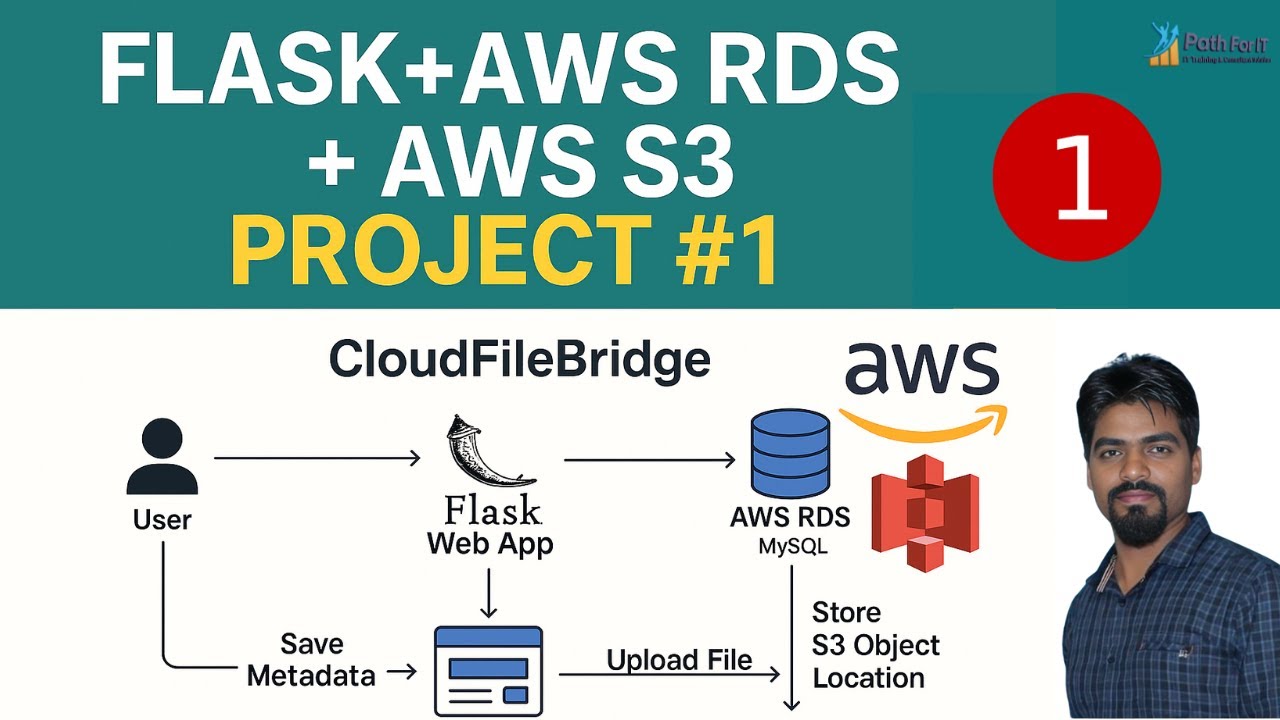
In this project, you will create a web app called *CloudFileBridge**. Users can upload files through a web interface created using **Flask**. The files are then uploaded and stored in **Amazon S3**, and the metadata — including file name, upload time, and S3 object URL — is stored in an **AWS RDS MySQL* database using the *PyMySQL* connector.
This project demonstrates *real-world integration* of cloud services using Python and provides a strong foundation in using AWS for file storage and database connectivity.
---
🧠 Why Should You Learn This?
✅ Flask is one of the most popular web frameworks in Python
✅ AWS S3 and RDS are essential cloud services for scalable applications
✅ PyMySQL is a simple and powerful connector for Python to MySQL
✅ You’ll learn how to store files and metadata cleanly in a real cloud system
✅ Builds your resume, portfolio, and interview preparation skills
---
📁 What Will You Learn?
Here is a breakdown of what you'll learn by the end of this video:
1. How to set up a basic Flask project from scratch
2. Creating a file upload form using HTML and Flask
3. Setting up an AWS S3 bucket for storing user-uploaded files
4. Creating an AWS RDS instance using MySQL
5. Connecting to the RDS instance using PyMySQL
6. Uploading files from Flask to S3 using Boto3
7. Saving file metadata (like filename, S3 URL, and upload timestamp) into the RDS MySQL table
8. Displaying uploaded files and their metadata in the web UI
9. Best practices for environment variables and security
10. What’s next? Deployment, Docker, authentication, and more
---
🖥️ Project Architecture Diagram
📌 We also included a *flowchart* in the video for better visualization.
---
📦 Project Name: CloudFileBridge
This project name reflects its functionality: a *bridge between user input, cloud file storage (S3), and relational data storage (RDS)* using Flask.
---
📚 Prerequisites
Before starting this project, make sure you are familiar with:
Python Basics
HTML Forms
Flask Routing & Templating
AWS Basics (S3 and RDS)
MySQL CRUD Queries
Boto3 and PyMySQL installation
---
🛠️ Tools and Technologies Used
| Tool | Purpose |
|----------------|---------------------------------------|
| Flask | Web app development |
| AWS S3 | Store uploaded files |
| AWS RDS MySQL | Store metadata |
| PyMySQL | Connect Flask to RDS |
| Boto3 | AWS SDK for Python |
| HTML/CSS | Frontend Form |
---
🧑💻 About the Author
Rahul Verma & Durga Prasad
AWS | Python | Cloud | AI Trainer
🎥 Educator on YouTube | 📊 AI & Cloud Enthusiast
🔗 LinkedIn / durgaprasadyadavg
Доступные форматы для скачивания:
Скачать видео mp4
-
Информация по загрузке: