Automate PDF to Text Conversion in Python: Create .txt Files for Multiple PDF Documents
Автор: vlogize
Загружено: 2025-09-21
Просмотров: 4
Learn how to automate the process of converting multiple PDF files to text format in Python, using `pdfplumber` for batch file conversion.
---
This video is based on the question https://stackoverflow.com/q/62773712/ asked by the user 'LVA' ( https://stackoverflow.com/u/7424774/ ) and on the answer https://stackoverflow.com/a/62774188/ provided by the user 'Vishal Singh' ( https://stackoverflow.com/u/7865368/ ) at 'Stack Overflow' website. Thanks to these great users and Stackexchange community for their contributions.
Visit these links for original content and any more details, such as alternate solutions, latest updates/developments on topic, comments, revision history etc. For example, the original title of the Question was: Create multiple text files corresponding to its pdf file names from directory in Python
Also, Content (except music) licensed under CC BY-SA https://meta.stackexchange.com/help/l...
The original Question post is licensed under the 'CC BY-SA 4.0' ( https://creativecommons.org/licenses/... ) license, and the original Answer post is licensed under the 'CC BY-SA 4.0' ( https://creativecommons.org/licenses/... ) license.
If anything seems off to you, please feel free to write me at vlogize [AT] gmail [DOT] com.
---
Automate PDF to Text Conversion in Python: Create .txt Files for Multiple PDF Documents
Are you looking to automate the conversion of multiple PDF files into text format using Python? If you're starting your journey in programming, particularly in working with file conversions, this task can seem daunting at first. But don't worry, it's quite straightforward once you get the hang of it! In this guide, we will walk you through a simple solution to convert a batch of PDF files into text files, ensuring each text file retains the name of its corresponding PDF.
The Challenge
The task is quite clear: you want to convert multiple PDF files located in a specific directory into .TXT files. You also want each text file to have the same name as the corresponding PDF. While you can easily convert a single PDF to a text file with a few lines of code, automating the process for multiple files requires a bit more effort. Let’s dive into how you can achieve this efficiently.
The Solution
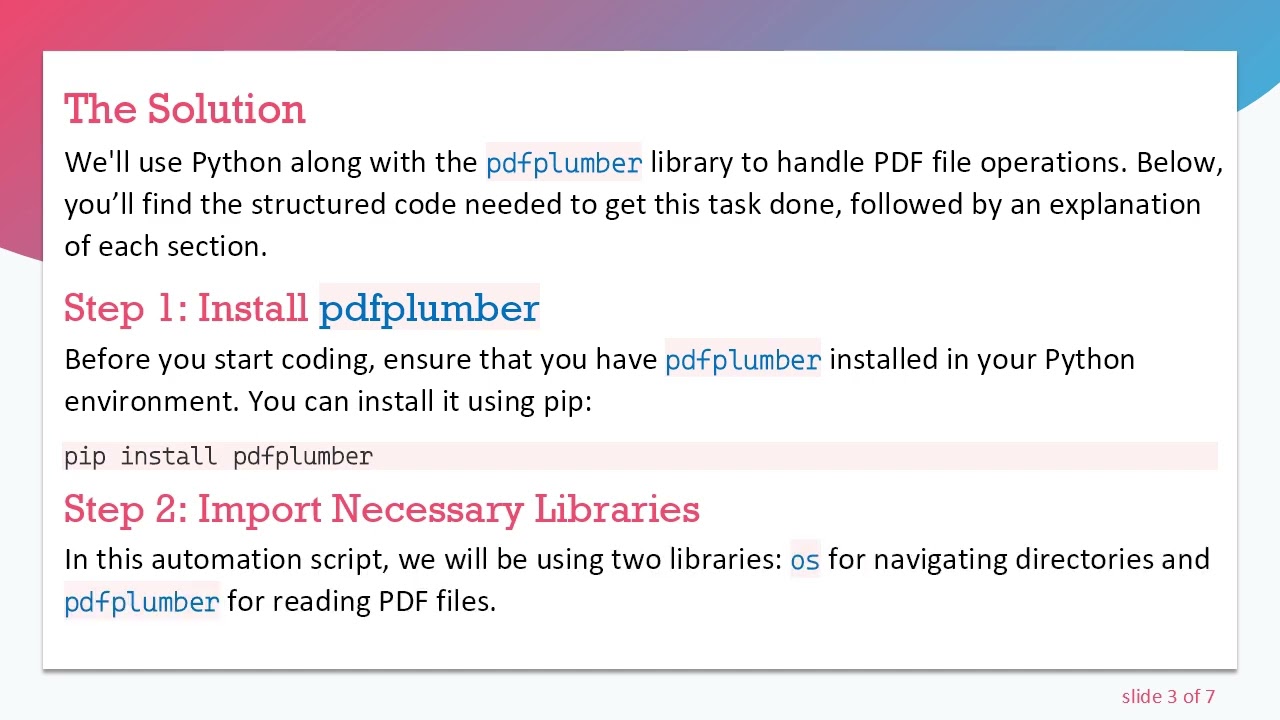
We'll use Python along with the pdfplumber library to handle PDF file operations. Below, you’ll find the structured code needed to get this task done, followed by an explanation of each section.
Step 1: Install pdfplumber
Before you start coding, ensure that you have pdfplumber installed in your Python environment. You can install it using pip:
[[See Video to Reveal this Text or Code Snippet]]
Step 2: Import Necessary Libraries
In this automation script, we will be using two libraries: os for navigating directories and pdfplumber for reading PDF files.
Step 3: Coding the Automation
Here’s the code that will automate the PDF to text conversion:
[[See Video to Reveal this Text or Code Snippet]]
Explanation of the Code
Setup Path: First, we define the path to the PDF files (path_to_your_files). Update this to the directory where your PDF documents are stored.
Looping through Files: The os.listdir() function retrieves all files in the specified directory. We then loop through each file.
Check File Type: We check if the current file ends with .pdf to ensure we're only processing PDF files.
Extract Text: Using pdfplumber.open(), we open each PDF file and iterate through its pages to extract the text.
Create Text Files: For each page's text, we create a new .txt file using the same name as the original PDF, ensuring that the process is repeated for all pages.
Final Thoughts
Automating the conversion of PDF files to text format can significantly improve your productivity, especially if you frequently handle documents. With this script in hand, you can easily convert multiple PDFs to text files with similar names.
Feel free to customize the script further to suit your specific needs, whether that's adding error-handling features or adjusting the output format!
Happy Coding!
Доступные форматы для скачивания:
Скачать видео mp4
-
Информация по загрузке:




![Курс Python с Абсолютного нуля! [12 часов из 80] Python курс - качественный старт для начинающих!](https://image.4k-video.ru/id-video/lYMLLI-MJek)

![Python - Полный Курс по Python [15 ЧАСОВ]](https://image.4k-video.ru/id-video/cfJrtx-k96U)


