Reverting Code to a Specific Commit in Git Without Losing Log History
Автор: vlogize
Загружено: 2025-10-11
Просмотров: 2
Learn how to undo changes in your Git project to a specific commit while retaining all of your commit log history using Git Bash.
---
This video is based on the question https://stackoverflow.com/q/68614907/ asked by the user 'Muhammad Umer' ( https://stackoverflow.com/u/16487370/ ) and on the answer https://stackoverflow.com/a/68616143/ provided by the user 'Sherman Chen' ( https://stackoverflow.com/u/16411030/ ) at 'Stack Overflow' website. Thanks to these great users and Stackexchange community for their contributions.
Visit these links for original content and any more details, such as alternate solutions, latest updates/developments on topic, comments, revision history etc. For example, the original title of the Question was: Undo changes in code (whole project) to a specific commit but Keep all the "git logs" (using git bash)
Also, Content (except music) licensed under CC BY-SA https://meta.stackexchange.com/help/l...
The original Question post is licensed under the 'CC BY-SA 4.0' ( https://creativecommons.org/licenses/... ) license, and the original Answer post is licensed under the 'CC BY-SA 4.0' ( https://creativecommons.org/licenses/... ) license.
If anything seems off to you, please feel free to write me at vlogize [AT] gmail [DOT] com.
---
Reverting Code to a Specific Commit in Git Without Losing Log History
In the world of software development, bugs and errors can often bring a project to a standstill. If you're working with Git, you might find yourself in a situation where you need to revert your entire project to a specific commit to fix errors—while still keeping the logs of all your subsequent commits. This is a common dilemma many developers face. In this post, we'll explore how to restore your project to a previous state without losing valuable commit history.
The Problem
Suppose you have a project with 29 commits in just one branch, the master branch. Recently, bugs have emerged, making it vital to revert the code to a previous state—a state at commit 22. However, your team is actively working on commits 23 through 29, and it's critical that their work and the associated commit logs remain intact. The challenge lies in reverting the code without affecting the commit history.
The Solution: Using Git Restore
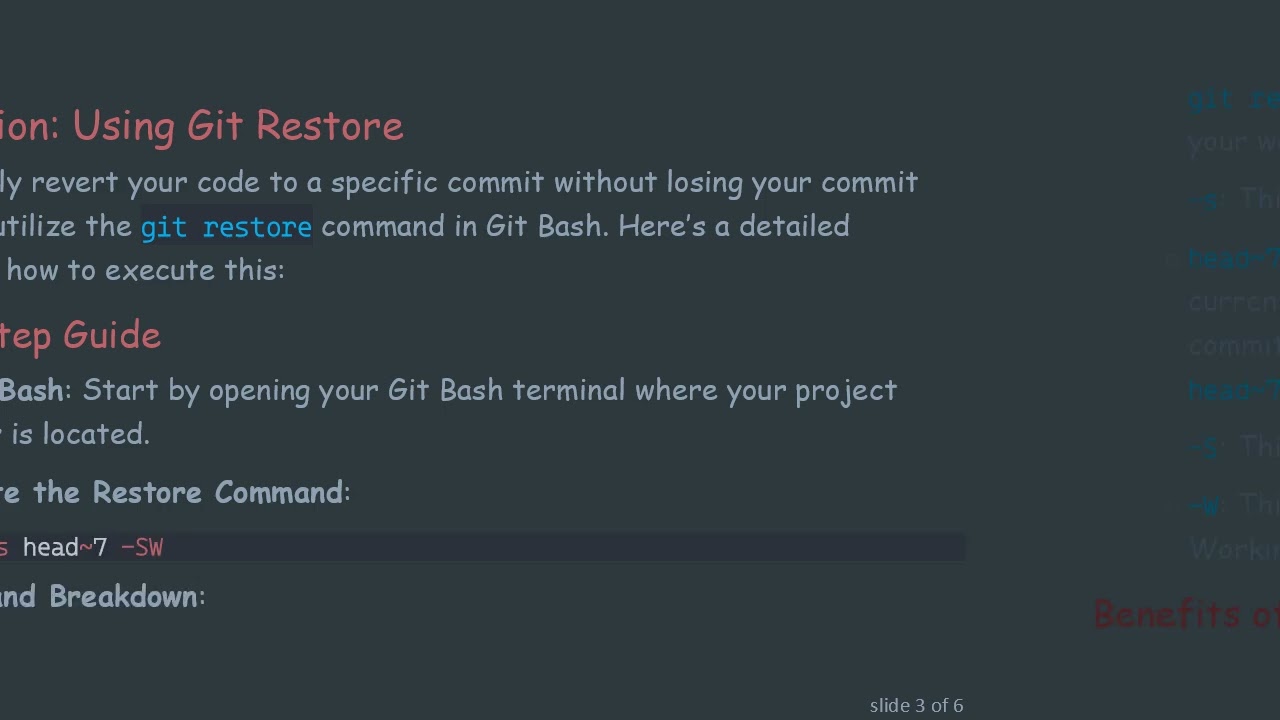
To successfully revert your code to a specific commit without losing your commit logs, you can utilize the git restore command in Git Bash. Here’s a detailed breakdown of how to execute this:
Step-by-Step Guide
Open Git Bash: Start by opening your Git Bash terminal where your project repository is located.
Execute the Restore Command:
[[See Video to Reveal this Text or Code Snippet]]
Command Breakdown:
git restore: This is the primary command that allows you to restore files in your working directory and staging area.
-s: This option specifies the source from which you want to restore files.
head~7: Specifies that you want to restore from the 7th commit before your current HEAD. Since you want to revert to commit 22, identifying how many commits back it is relative to your current position (HEAD) is crucial; thus, head~7 makes sense if you are currently at commit 29.
-S: This option signifies that changes should be restored to the Staging area.
-W: This option specifies that the restoration should also reflect in your Working tree.
Benefits of Using git restore
No Commit Loss: By using git restore, all the commit logs from 23 to 29 will still remain intact in your repository history.
Simplicity: This command is straightforward and can be easily remembered, making your development process more efficient.
Flexibility: You can always switch back to any other commit or continue your development as you need.
Conclusion
Reverting to a previous commit in Git can be daunting, especially when you want to preserve all the commit logs. However, by employing the git restore command, you can efficiently revert your project to a specific point while ensuring that your team's ongoing work and history remain undisturbed. In case bugs arise again in the future, this method will serve you well, allowing for agile problem-solving in your development process.
Say goodbye to the worry of losing historical commit data and embrace this effective Git restoration technique today!
Доступные форматы для скачивания:
Скачать видео mp4
-
Информация по загрузке: