What If a Windows 95 Drive (from a 486 PC) Met a 13th Gen Intel configuration?
Автор: Omores
Загружено: 2024-01-05
Просмотров: 3998
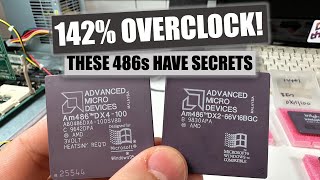
One IDE drive going from a 486 PC to Socket 1700 — what could possibly go wrong? Fast forward nearly 30 years, and with a PCI to IDE/SATA adapter, that very same Windows 95 boot drive powers up on a modern Intel 13th Gen i3-13100F system. Witness the challenges and surprises of running Windows 95A on two vastly different machines using the same 1995 IDE industrial flash module, originally paired with an MSI 4144 motherboard and an AMD DX4/100 CPU.
Chapters:
00:00 Introduction & Windows 95 Setup Overview & 486 Hardware & Flash Drive
00:35 CPU Cooling, Compatibility, and Memory Costs
01:32 Storage Speed: IDE Flash vs Classic Hard Drives
02:27 PCI Radeon 9250: Upgrade for Capture Quality
02:51 Installing Windows 95: The Classic Experience
03:12 Installation Success & Initial Driver Setup
04:08 Improving Visuals & Internet Explorer Updates
04:54 Running Modern Software on Vintage Hardware
05:23 Games, Networking, and More on the 486
06:24 Testing Windows 95 on Intel 13th Gen
07:12 Memory Tweaks & Fixes for Modern Hardware
08:00 BIOS & CPU Speed Hacks to Overcome Errors
10:02 Fix95CPU Patch & Booting Success
10:46 PCI Bus Setup & Driver Installation on Raptor Lake
13:03 SATA Drive Support & Drive Options on Modern PC
14:02 Wrapping Up with Need for Speed Game Demo
15:33 Final Thoughts & Goodbye
More details:
Part I:
The specs: a 1995 AMD 486 CPU on a Socket 3 motherboard and a modern Intel 13th Gen i3 on a Socket 1700 motherboard. The same 1GB Transcend IDE flash module will be used to boot both systems.
Setting up the 486 we have an AMD DX4-100 CPU, 64MB of RAM, and an S3 VGA card, later upgraded to a Radeon 9000 for better video capture. We test the IDE flash module’s speed compared to a typical 1998 hard drive
Windows 95 Installation on the 486: After a smooth installation, we install video drivers we solve some weird display issues by updating with Internet Explorer 5.5, which enhances icon sharpness and software compatibility.
Part II
Testing Windows 95 on Intel 13th Gen: Moving to the 13th Gen setup - we simply connect the IDE drive using a PCI-to-IDE adapter. The first boot fails with memory errors due to the huge RAM difference (64MB vs. 16GB), which can be addressed by modifying system.ini file to limit RAM to 256MB by use MaxPhysPage=20000 line right under [386Enh] section
Patching Compatibility Issues: After that we have to deal with several errors, including a CPU speed issue and memory handling conflicts, but we can use patches like Fix95CPU
Final Configuration and Game Test: With the compatibility patches applied, Windows 95 successfully boots on the 13th Gen system. We have to manually install the PCI bus to enable driver installation so we can use a Radeon 9000 card and test Need for Speed: Porsche Unleashed, showcasing the GPU's Direct3D capabilities on Windows 95.
#Windows95 #RetroComputing #486 #Intel13thGen #TechThrowback #PCMods #NeedForSpeed #OldVsNew #ssd

Доступные форматы для скачивания:
Скачать видео mp4
-
Информация по загрузке: