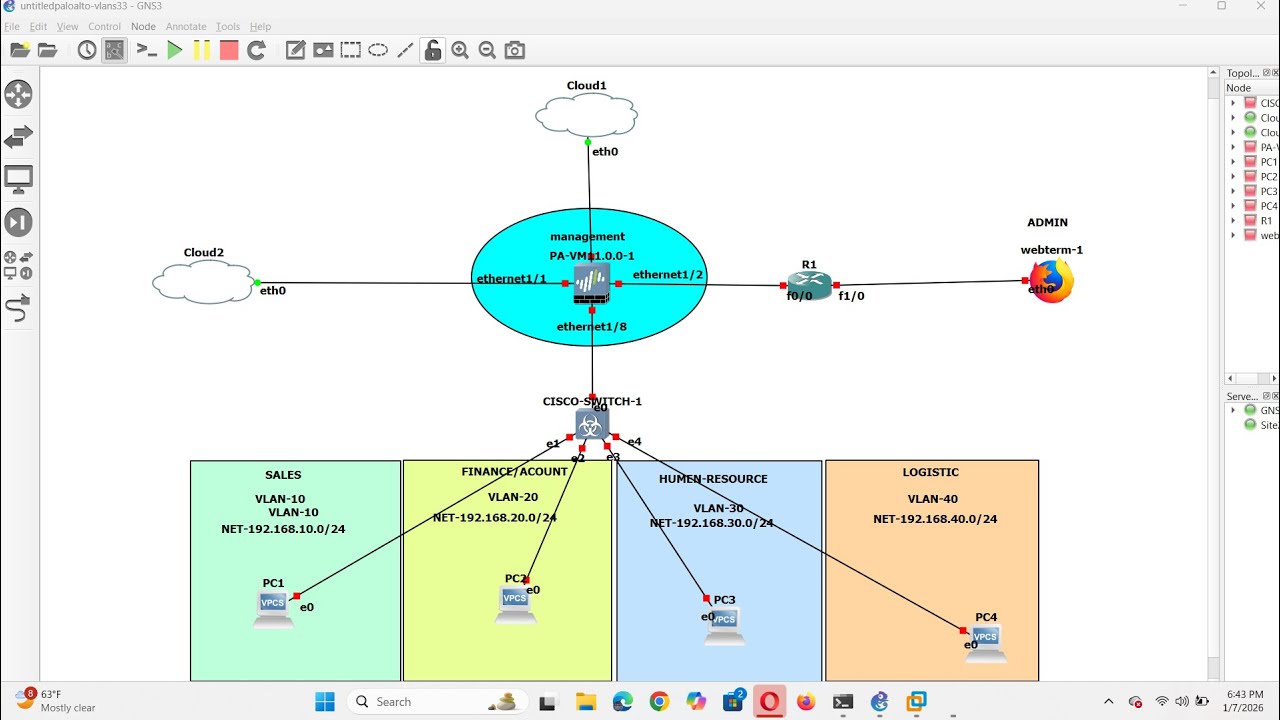
How to configure VLANS on Palo Alto Firewall
Автор: RM-TECH NETWORK AND CONSULTANCY
Загружено: 2026-01-07
Просмотров: 105
This video explains how to configure VLAN on Palo Alto Firewall and setup it connect to the Internet
0:00 Introduction
0:17 Network Zones Add
0:36 Interface interface1/8
0:43 Interface Type: Layer3, Security Zone: LAN
0:53 Subinterface
0:58 Interface Name : ethernet1/2.20, Tag: 20, Security Zone: LAN
2:15 Network Virtual Router Add
2:54 Interface: ethernet1/1, Next Hop : IP Address
3:01 IP Gateway: 192.168.52.1
3:24 Network DHCP Add
3:30 Interface: 1/2.20, Mode: enable
3:54 Gateway : 192.168.20.1, Subnet 255.255.255.0
4:20 Polices NAT Add
5:04 Translation Type: Dynamic IP and Port, Address Type: Interface Address
5:08 Interface : ethernet1/1, IP Address: 10.11.32.140/24 (Cateway WAN)
5:17 Policies Security Click Add
5:49 Destination Zone . WAN
5:56 Service/URL Category: Any
6:06 Commit
Доступные форматы для скачивания:
Скачать видео mp4
-
Информация по загрузке:
![Palo Alto VPN - Site to Site step by step configuration [2024]](https://image.4k-video.ru/id-video/GPANrMczTz4)