How to Obtain the Number of Files in tf.keras.preprocessing.image_dataset_from_directory
Автор: vlogize
Загружено: 2025-09-26
Просмотров: 2
Discover how to easily find the number of files in `tf.keras.preprocessing.image_dataset_from_directory` with this step-by-step guide in TensorFlow.
---
This video is based on the question https://stackoverflow.com/q/63097533/ asked by the user 'Peter P.' ( https://stackoverflow.com/u/13333200/ ) and on the answer https://stackoverflow.com/a/63100139/ provided by the user 'Stat Tistician' ( https://stackoverflow.com/u/2165335/ ) at 'Stack Overflow' website. Thanks to these great users and Stackexchange community for their contributions.
Visit these links for original content and any more details, such as alternate solutions, latest updates/developments on topic, comments, revision history etc. For example, the original title of the Question was: how to obtain the number of files in tf.keras.preprocessing.image_dataset_from_directory
Also, Content (except music) licensed under CC BY-SA https://meta.stackexchange.com/help/l...
The original Question post is licensed under the 'CC BY-SA 4.0' ( https://creativecommons.org/licenses/... ) license, and the original Answer post is licensed under the 'CC BY-SA 4.0' ( https://creativecommons.org/licenses/... ) license.
If anything seems off to you, please feel free to write me at vlogize [AT] gmail [DOT] com.
---
How to Obtain the Number of Files in tf.keras.preprocessing.image_dataset_from_directory
When working with deep learning projects in TensorFlow, particularly in image classification, you often need to manage datasets effectively. One common question that comes up is: How can I find the number of files in a dataset created via tf.keras.preprocessing.image_dataset_from_directory? This crucial information helps in understanding your dataset's size and ensuring that your model training process is set up correctly. In this guide, we will explore how to retrieve this information easily and effectively.
Understanding tf.keras.preprocessing.image_dataset_from_directory
tf.keras.preprocessing.image_dataset_from_directory is a function provided by TensorFlow to load images from a directory into a format suitable for training machine learning models. The function allows you to specify various important parameters such as validation split, image size, batch size, and more. Most importantly, it divides your dataset into subgroups for training and validation.
Example Code
Here’s a quick look at how you might set up your dataset using this function:
[[See Video to Reveal this Text or Code Snippet]]
In the example, if you run the function, it may return something like:
[[See Video to Reveal this Text or Code Snippet]]
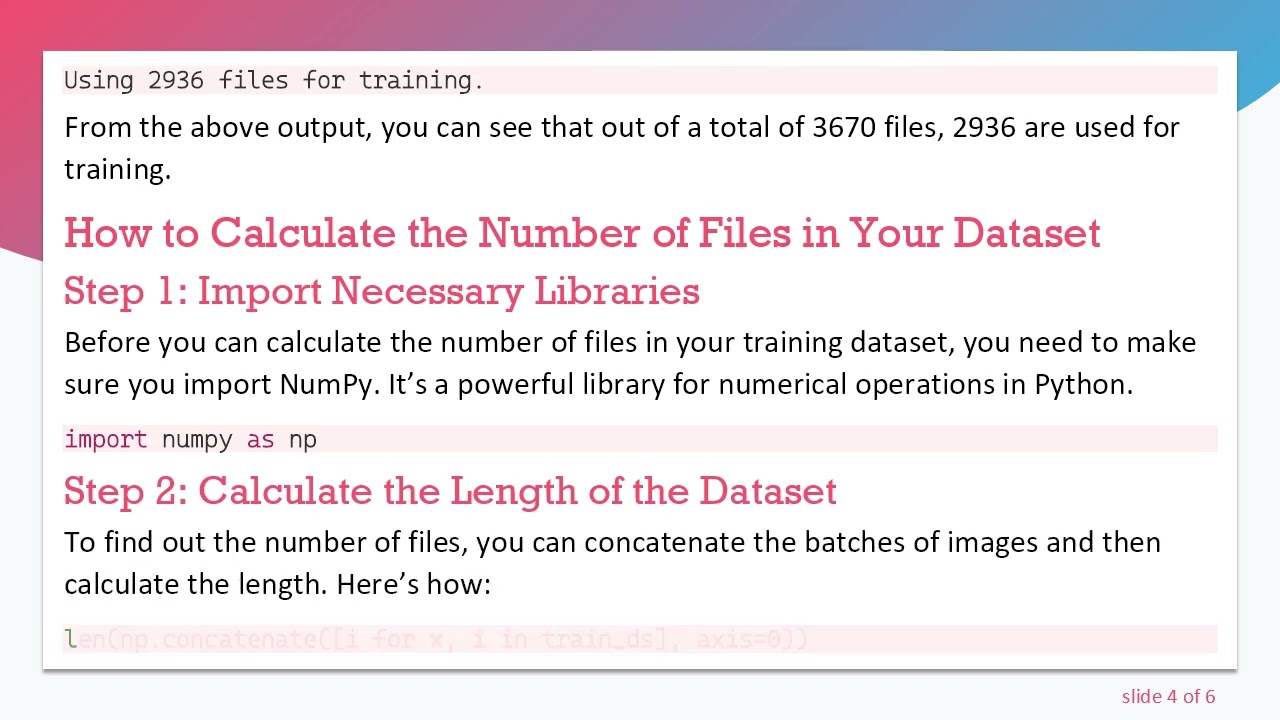
From the above output, you can see that out of a total of 3670 files, 2936 are used for training.
How to Calculate the Number of Files in Your Dataset
Step 1: Import Necessary Libraries
Before you can calculate the number of files in your training dataset, you need to make sure you import NumPy. It’s a powerful library for numerical operations in Python.
[[See Video to Reveal this Text or Code Snippet]]
Step 2: Calculate the Length of the Dataset
To find out the number of files, you can concatenate the batches of images and then calculate the length. Here’s how:
[[See Video to Reveal this Text or Code Snippet]]
Breakdown of the Code
train_ds: This is your dataset created with image_dataset_from_directory.
[i for x, i in train_ds]: This list comprehension iterates over all batches in train_ds and collects the images (ignoring the labels).
np.concatenate(..., axis=0): This function concatenates all collected images along the first axis (i.e., combining all batches into one array).
len(...): This then computes the total number of images/files in your training dataset.
Conclusion
In conclusion, finding the number of files in a dataset created with tf.keras.preprocessing.image_dataset_from_directory is straightforward once you get the hang of it. By following the steps outlined above, you can effectively retrieve and utilize this information to enhance your model training process. Knowing the size of your dataset is fundamental in determining the performance and effectiveness of your machine learning model. Happy coding!
Доступные форматы для скачивания:
Скачать видео mp4
-
Информация по загрузке: