How to Create a Copy of a File with Multiple Ranges of Columns Removed in Python 3
Автор: vlogize
Загружено: 2025-09-16
Просмотров: 0
Learn how to effectively remove multiple ranges of columns from a file in Python 3 using the `cut` function. This guide will walk you through the implementation and best practices for handling fixed-width records.
---
This video is based on the question https://stackoverflow.com/q/62806243/ asked by the user 'Levin' ( https://stackoverflow.com/u/514608/ ) and on the answer https://stackoverflow.com/a/62806655/ provided by the user 'alani' ( https://stackoverflow.com/u/13596037/ ) at 'Stack Overflow' website. Thanks to these great users and Stackexchange community for their contributions.
Visit these links for original content and any more details, such as alternate solutions, latest updates/developments on topic, comments, revision history etc. For example, the original title of the Question was: How to create a copy of a file with multipe ranges of columns removed in python3
Also, Content (except music) licensed under CC BY-SA https://meta.stackexchange.com/help/l...
The original Question post is licensed under the 'CC BY-SA 4.0' ( https://creativecommons.org/licenses/... ) license, and the original Answer post is licensed under the 'CC BY-SA 4.0' ( https://creativecommons.org/licenses/... ) license.
If anything seems off to you, please feel free to write me at vlogize [AT] gmail [DOT] com.
---
How to Create a Copy of a File with Multiple Ranges of Columns Removed in Python 3
Working with fixed-width records in Python can be quite challenging, especially when you want to customize the data you keep by removing multiple ranges of columns. If you're facing this issue, you're not alone. In this guide, we will explore how to effectively create a copy of a file with specific columns removed while still maintaining the integrity of the data.
Understanding the Problem
Imagine you have a file with fixed-width records that are 1600 characters long. Often, you might need to remove certain ranges of columns but keep others. For instance, you may want to retain columns 0-83, 89-1517, and 1526 to the end, while cutting others out of the data. This type of task is not easy to execute using standalone utilities like cut and awk, as they lack the flexibility for intricate column manipulations.
Key Requirements:
Retain specific ranges of columns.
Remove unwanted columns defined by specified numeric ranges.
Have a simple and user-friendly function to manage column cuts.
The Solution: The cut Function
A customized cut function provides an elegant way to achieve the column removal you need. Below, I will guide you through an example implementation of this function, explaining how it works in detail.
Implementation of the Cut Function
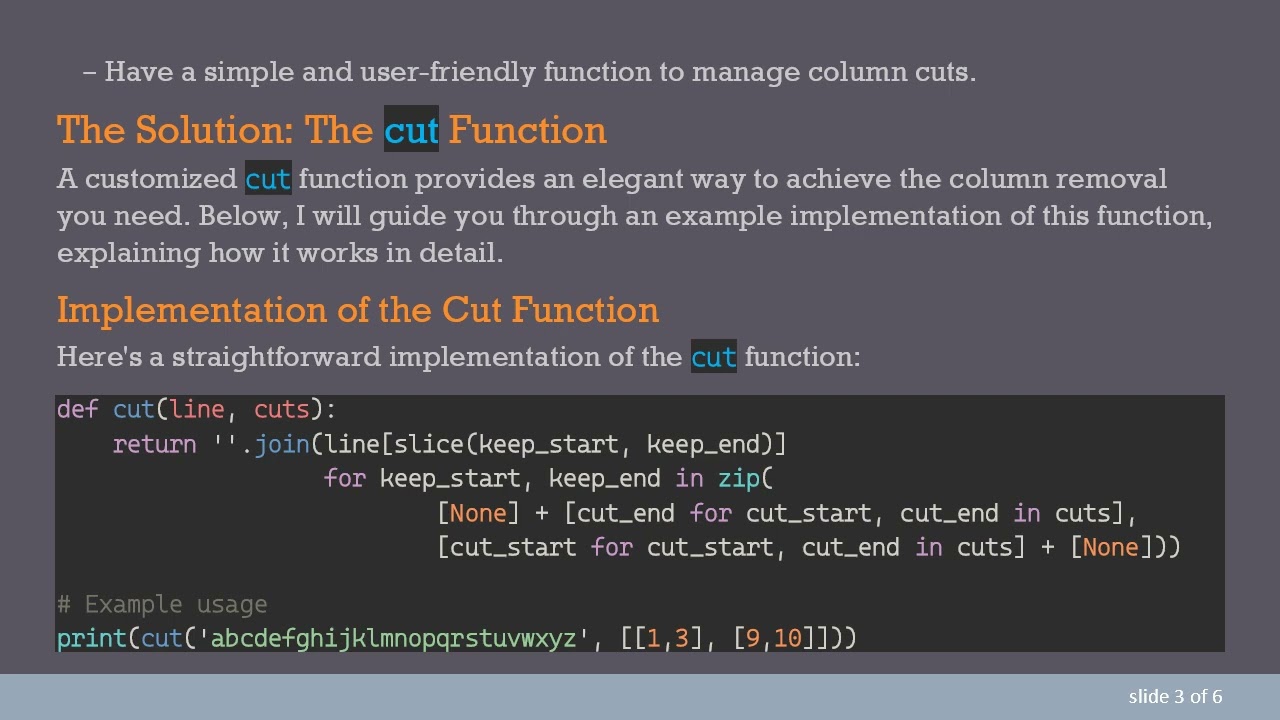
Here's a straightforward implementation of the cut function:
[[See Video to Reveal this Text or Code Snippet]]
This function will output:
[[See Video to Reveal this Text or Code Snippet]]
Explanation of the Code:
Function Parameters:
line: The string from which you want to cut columns.
cuts: A list of ranges indicating which columns to remove. Each range is specified as a list with two elements: [start, end].
How it Works:
The function constructs new slices of the original line, excluding the ranges listed in cuts.
It uses the zip function to create starting and ending points for each slice to retain, allowing you to easily specify what to cut.
Slices:
The keep_start points are generated by adding None at the beginning and the end of the cuts – this essentially tells Python where to start and stop slicing.
Example to Apply the Function
If you want to apply this function to remove certain columns as mentioned (keeping ranges 0-83, 89-1517, and 1526-end), you can use the function as follows:
[[See Video to Reveal this Text or Code Snippet]]
Benefits of This Approach
Flexibility: Easily customize the ranges as needed, making adjustments quick and hassle-free.
Readability: The function is structured simply enough that anyone can understand its purpose without deep dive into complex code.
Future-proofing: Easily adaptable to include overlap detection or other requirements.
Conclusion
By implementing a simple cut function in Python, you can effectively manage columns in fixed-width records. This solution provides the flexibility to specify columns you want to cut in a readable and understandable way. Whether you're working on data cleaning or preparing datasets for more extensive analyses, this method can serve as a valuable tool in your Python toolkit.
Now you can tackle the task of copying files with specific column removals seamlessly in Python!
Доступные форматы для скачивания:
Скачать видео mp4
-
Информация по загрузке: