New Perspectives Access 365/2021 | Module 3: SAM Project 1b | Ridgedale College
Автор: Study With Stewart
Загружено: 2026-01-17
Просмотров: 2
Contact Us
Whatsapp No : +994-401583314
#New Perspectives Access 365/2021 | Module 3: SAM Project 1b
#New_Perspectives_Access_365/2021_Module_3_SAM_Project_1b
• Open the file NP_AC365_2021_3b_FirstLastName_1.accdb, available for download.
• Save the file NP_AC365_2021_3b_FirstLastName_1.accdb as NP_AC365_2021_3b_FirstLastName_2.accdb
o Edit the file name by changing “1” to “2”.
o If you do not see the .accdb file extension, do not type it. The file extension will be added for you automatically.
• With the file NP_AC365_2021_3b_FirstLastName_2.accdb open, ensure that your first and last name is displayed as the first record in the _GradingInfoTable table.
o If the table does not display your name, delete the file and download a new copy.
PROJECT STEPS
1. You are a graduate teaching assistant for Ridgedale College, a private college in the Midwest. To help the college better manage their course scheduling, you have created an Access database and are working on queries to help make reliable decisions.
Create a query based on the Professors and Grants tables in Design View with the following options:
a. Add the ProfFirstName and ProfLastName from the Professors table and the GrantName and AverageAward fields from the Grants table to the design grid in that order.
b. Sort the records in ascending order by ProfLastName.
c. Save the query using ProfGrants the query name.
Open the query in Datasheet View to view the selected data, and then close it.
2. Open the ProfessorAssignments query in Design View and make the following changes to the query:
a. Delete the Time field from the query design grid.
b. Add criteria to select only those records where the ClassNo field value equals CIS162.
c. Save the changes to the ProfessorAssignments query.
Open the query in Datasheet View to view the selected data, and then close it.
3. Open the MondayOr4 query in Design View and add criteria to select only those records where the Credits field value equals 4 or the MeetingDay field value equals M. Save the changes to the query. Open the query in Datasheet View to view 26 selected records, and then close the query.
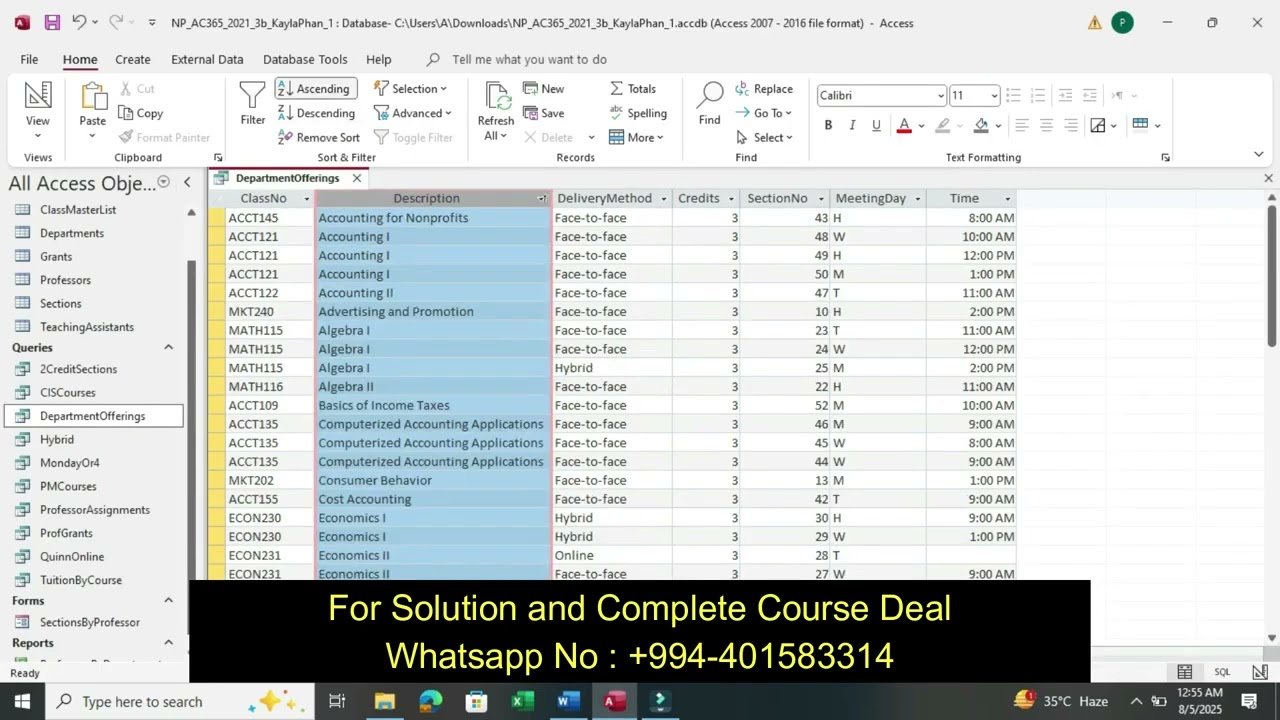
4. Open the DepartmentOfferings query in Design View and make the following changes to the query:
a. Add the DeliveryMethod field from the Sections table to the query design grid immediately after the Description field.
b. Add criteria to select only those records where the Credits field value is less than or equal to 3.
c. Open the query in Datasheet View and sort the records by Description in ascending order.
d. Edit the first record changing the Description field value to Accounting for Nonprofit Organizations as shown in Figure 1.
Save and close the DepartmentOfferings query.
Figure 1: DepartmentOfferings Query in Datasheet View
5. Open the Hybrid query in Design View and make the following changes:
a. Move the Credits field to the first column of the query design grid.
b. Sort the records in descending order by the Credits field and in ascending order by ClassNo.
Save the query. Open the query in Datasheet View as shown in Figure 2. Close the Hybrid query.
Figure 2: Hybrid Query in Datasheet View
6. Open the QuinnOnline query in Design View and add criteria to select only those records where the ProfLastName field value equals Quinn and the DeliveryMethod field value equals Online. Open the QuinnOnline query in Datasheet View, and then save and close the QuinnOnline query.
7. Open the PMCourses query in Design View and add criteria to select only those records where the Time field value is greater than 12:00pm. Open the query in Datasheet View, and then save and close the query.
8. Create a new query in Design View based on the TeachingAssistants and Sections tables with the following options:
a. Add the TeachingAssistants table and the Sections table to the design window.
b. Add the TALastName field from the TeachingAssistants table to the design grid.
c. Add the ClassNo, MeetingDay, and Time fields from the Sections table to the design grid.
d. Save the query, using TASections as the name.
Open the query in Datasheet View to view the selected records and then close it.
9. Open the 2CreditSections query in Design View and add criteria to select only those records where the Credits field value equals 2. Save the query. Open the query in Datasheet View to view the selected records, and then close the 2CreditSections query.
10. Open the TuitionByCourse query in Design View. Modify the query by creating a calculated field. Enter Tuition: [Credits]*110 in the Zoom dialog box of the first empty column in the design grid. Save the query. Open the query in Datasheet View to view the calculated field values, and then close the TuitionByCourse query.
Доступные форматы для скачивания:
Скачать видео mp4
-
Информация по загрузке:




![[ НОВЫЙ 2026 ] Уральские Пельмени | Лучшие Выпуски Сборник | Комедийная группа №1 в России](https://image.4k-video.ru/id-video/VbYFi8rakVQ)




![[ НОВЫЙ 2026 ] Уральские Пельмени | Лучшие Выпуски Сборник | Комедийная группа №1 в России](https://image.4k-video.ru/id-video/c3d1vU9HTlA)