W-9 Collection - Infusionsoft's January '15 Free Campaign of the Month
Автор: Keap
Загружено: 2015-01-23
Просмотров: 886
Download This Campaign in the Infusionsoft Marketplace: http://insft.co/1CBjfBh
Use this campaign to request and collect W-9 tax forms.
"Hello I'm Paul Sokol and this is the overview video for the January 2015 free campaign of the month. This month, we have a W-9 Collection campaign.
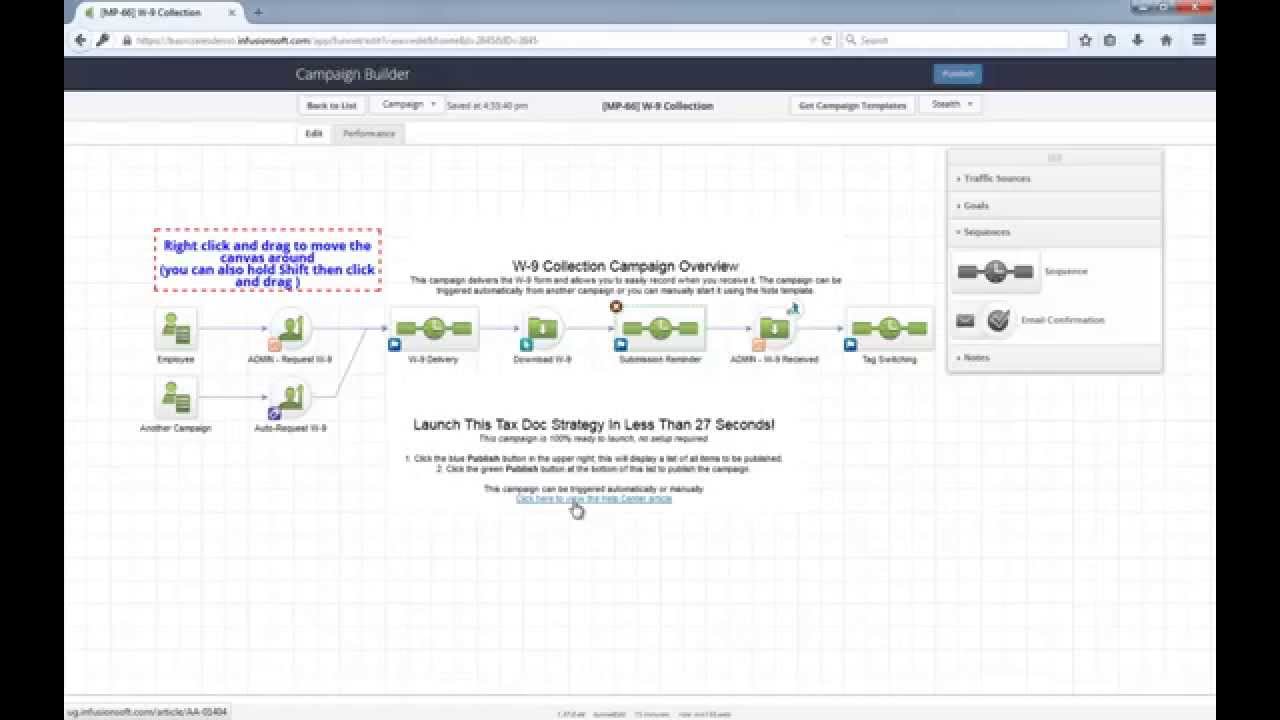
Here's the general idea: Whenever you need to collect a W-9 from one of your contractors, you send them an email with a link to the form on the IRS website. Then, you can easily record when they send it back to you.
And thats it! A simple workflow to systematize how you collect W-9 forms from your contractors.
Also, this campaign 100% ready to go out of the box! All you have to do is install the campaign from the Marketplace, hit Publish and you can start using it immediately.
Let's dig in a little more. Contractors in your database can automatically be started in this W-9 collection process via another campaign that applies this auto start tag. Alternately, an employee can apply this note template to the contractor's contact record to start the campaign as well.
Once someone enters this sequence they are first tagged as "Need W-9". This way, you can easily keep track of these folks with a saved contact search looking for that tag. Then, they will recieve an email driving them to download the W-9 form and return it to you. As you can see, its a really short and to the point email. This link here is already configured to go to the W-9 form on the IRS web site. If they never click on that link, in a week another email goes out reminding them that you still need their W-9.
We'll go over the click behavior in a second, but let's first look at how you tell Infusionsoft that you've received a completed W-9. Whenever that happens, all you have to do is apply the 'ADMIN - W-9 Received' Note Template and thats it. The system will automatically remove the 'W-9 Needed' tag and apply the 'W-9 on File' tag.
Let's go back to the middle part of this workflow. Since filling out and sending back a W-9 is a really quick activity, you should see a reply soon after they click on any of the links to download a W-9. If they do click to download and you don't apply this Note Template within a day then a friendly reminder goes out that following morning. A day should be plenty of time for them to reply and for you to apply the note to their record that you've received it.
Remember, even though this workflow is designed specifically to collect a W-9 form, you can easily make adjustments to this model and collect any type of document that has to be downloaded and returned.
As I mentioned earlier, this campaign is 100% ready to go! After you install this campaign, open it up and click Publish. Then you can start manually applying the start Note Template or incorporate the auto-start tag into your other campaigns. If you need help trigging this workflow, you can always view this Help Center article which will show you everything you need to start using it.
Tell me what you think about this campaign of the month below and let's stop chasing down W-9 forms!"
Read more about this campaign: http://insft.co/1y4geFz
Доступные форматы для скачивания:
Скачать видео mp4
-
Информация по загрузке: