How to Set a Future Price in WooCommerce Based on Custom Fields and Dates
Автор: vlogize
Загружено: 2025-10-11
Просмотров: 0
Discover how to effectively manage future pricing in WooCommerce using custom fields and date ranges with this step-by-step guide.
---
This video is based on the question https://stackoverflow.com/q/68739562/ asked by the user 'Lena Weigler' ( https://stackoverflow.com/u/16629829/ ) and on the answer https://stackoverflow.com/a/68741008/ provided by the user 'Rajeev Singh' ( https://stackoverflow.com/u/16560548/ ) at 'Stack Overflow' website. Thanks to these great users and Stackexchange community for their contributions.
Visit these links for original content and any more details, such as alternate solutions, latest updates/developments on topic, comments, revision history etc. For example, the original title of the Question was: Set WooCommerce Price based on Custom Field and Custom Date (Not Working)
Also, Content (except music) licensed under CC BY-SA https://meta.stackexchange.com/help/l...
The original Question post is licensed under the 'CC BY-SA 4.0' ( https://creativecommons.org/licenses/... ) license, and the original Answer post is licensed under the 'CC BY-SA 4.0' ( https://creativecommons.org/licenses/... ) license.
If anything seems off to you, please feel free to write me at vlogize [AT] gmail [DOT] com.
---
How to Set a Future Price in WooCommerce Based on Custom Fields and Dates
In the world of eCommerce, especially with WooCommerce, having flexible pricing strategies can significantly enhance sales and customer engagement. One unique approach is to set a price based on a custom field and specific date range, essentially creating a "future price" for products. However, if you're facing difficulties in implementing this functionality, you're not alone. Here, we will guide you step-by-step on how to set future prices based on custom fields and custom dates correctly, fixing common issues that may arise.
Understanding the Challenge
The initial goal is straightforward:
Set a new product price that activates on a specified future date.
Allow for this price to revert back to the regular pricing after the designated end date.
However, many users encounter issues with this setup, such as:
Not receiving any errors or warnings.
The product price not updating as expected.
This guide will help you address these challenges and successfully implement a future price strategy in WooCommerce.
Step-by-Step Solution
1. Using the Correct Filter
The first step is to ensure you're using the right filter in your WooCommerce setup. Initially, users might mistakenly use woocommerce_product_get_price, which can cause issues with displaying the future price correctly.
Change this line in your code:
[[See Video to Reveal this Text or Code Snippet]]
To this:
[[See Video to Reveal this Text or Code Snippet]]
This adjustment allows you to change the displayed price of the product effectively.
2. Adjust Your Function
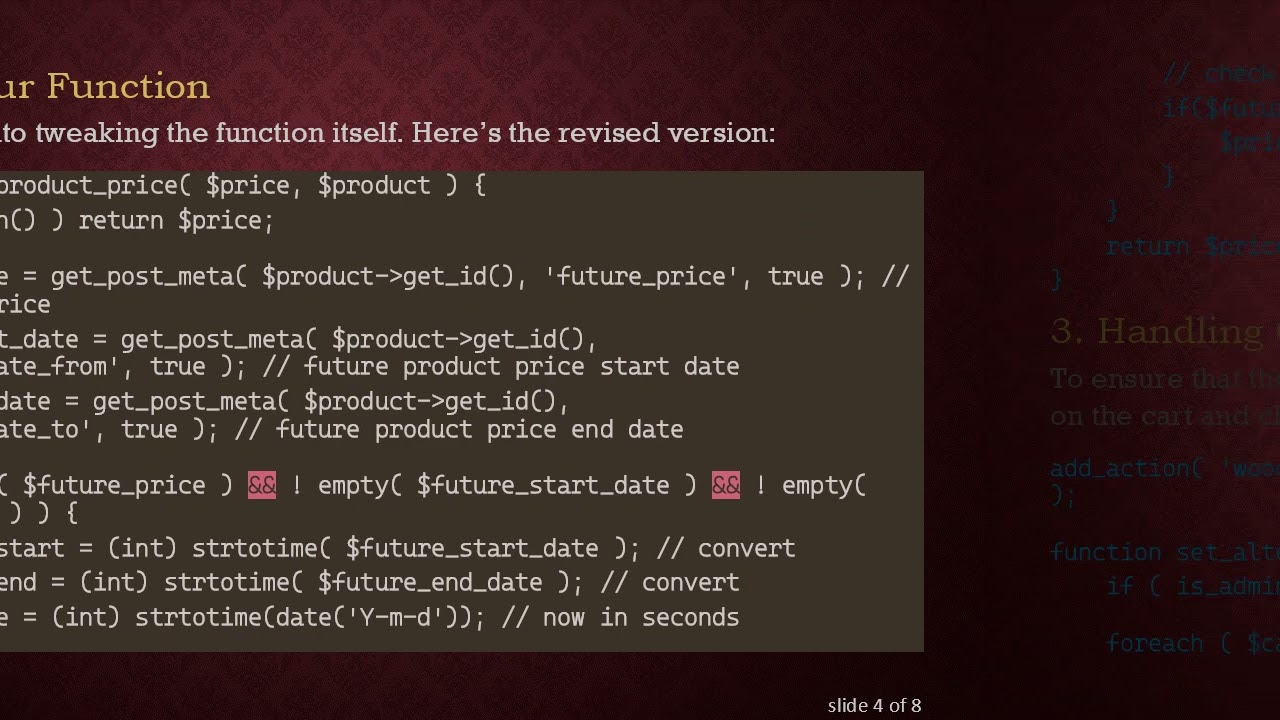
Now, let’s look into tweaking the function itself. Here’s the revised version:
[[See Video to Reveal this Text or Code Snippet]]
3. Handling Cart and Checkout Prices
To ensure that the future price applies throughout the shopping experience, such as on the cart and checkout pages, you need to add another function:
[[See Video to Reveal this Text or Code Snippet]]
4. Testing and Validation
After implementing these changes, ensure to:
Test the new functionality on different dates around your defined future pricing period.
Monitor the transition of prices from regular to future prices in various scenarios (single product view, cart, and checkout).
Conclusion
By following these simple yet effective steps, you can manage future pricing in WooCommerce efficiently. This feature not only gives you greater flexibility in pricing strategies but also enhances the customer shopping experience. If you encounter further difficulties, consider revisiting your code and checking for any missing elements.
By utilizing custom paths for your product prices, you set the groundwork for more sophisticated pricing strategies down the line. Happy selling!
Доступные форматы для скачивания:
Скачать видео mp4
-
Информация по загрузке:

![[2026] Feeling Good Mix - English Deep House, Vocal House, Nu Disco | Emotional / Intimate Mood](https://image.4k-video.ru/id-video/cxLdtvzf2sI)


