How to Child lock on iPad in 2026 | limit your iPad to one app in iPadOS 26
Автор: Free Tech Guide
Загружено: 2026-01-16
Просмотров: 196
Here's How to Child lock for iPad and limit your iPad to one app in iPadOS 26. access only one app at a time on iPad, With limited access. Turn on guided access and Disable buttons, Games, and other apps from home screen on iPad Pro, iPad Air and iPad Mini.
00:00 intro
00:09 Enable Guided Access
01:04 How to Use Guided Access
03:14 Exit from Guided Access
Here’s how to limit your iPad to one app using Guided Access for your child with advanced customization settings.
Go to the Settings app on your iPad, and tap on Accessibility on the right side.
Scroll down to the last section under General, and tap on the Guided Access option.
Turn on the toggle. As you can see, it pops up right away.
First, adjust the passcode settings by setting a passcode for Guided Access or using Face ID to start and end the session. Make sure Face ID is already set up on your iPad.
Next are the time limits. You can set a sound or just keep the default. The alternate option is the Speak toggle, which will speak the remaining Guided Access time before it ends.
You’ll see the Accessibility Shortcut option on the screen when Guided Access is turned on. This option isn’t important right now, so I’m skipping it.
The last setting is Auto-Lock. Your display will lock automatically based on the Auto-Lock setting in Display & Brightness.
The next step is how to use Guided Access with the Child Lock feature.
First, open the app you want to keep on the screen and lock all the other apps.
Then triple-click the top sleep/wake or lock button to start Guided Access. As you can see, the Guided Access started confirmation message will appear, or you can start it using the button in the top-right corner.
Set a passcode for Guided Access and enter the new passcode two times if you didn’t set it up from Settings or if Face ID is not enabled.
Now the app is locked on the screen. Your kid can’t minimize the app or open another app on your iPad.
Your kids can’t turn it off or change it, they can’t make accidental calls, and they can’t open another app without your permission.
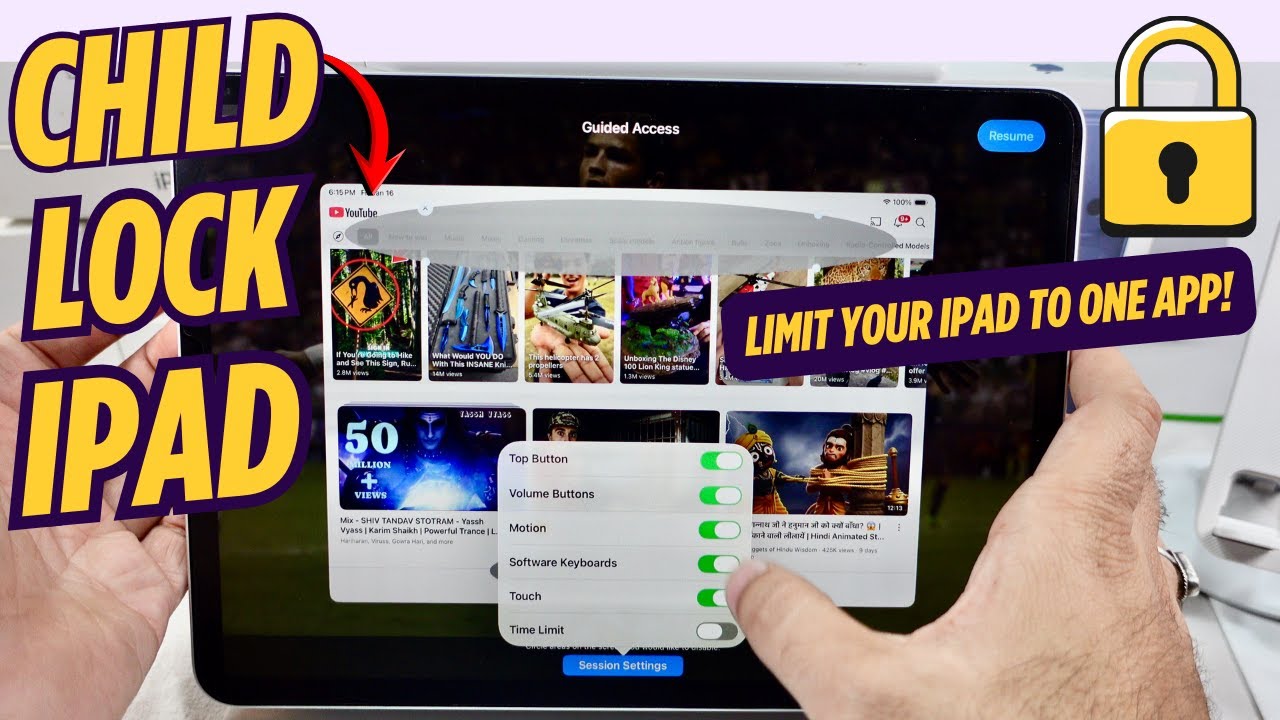
You can customize the app by disabling specific areas of the screen, the side button, the volume buttons, motion, keyboard access, touch input, and by setting a time limit that will automatically lock the iPad.
Again, triple-click the top button to edit Guided Access. Enter the passcode to edit or stop Guided Access, or verify with Face ID if you enabled it in Settings.
Circle the area on the screen to disable that section.
For example, suppose I want to disable button tabs or the upload video option.
That’s it. Resume the session and start using the restrictions on the screen.
Or, if you want to make more advanced settings, tap on Session Settings at the bottom.
Turn off the toggle for the side button to block access to it.
Next is volume button control. Turn off the toggle to block access during Guided Access.
Next, select the Motion option and the Software Keyboard.
To block touch access on the screen during Guided Access, turn off the Touch toggle.
And the last option is Time Limit. Turn on the Time Limit toggle.
Set the duration to end Guided Access automatically. Done.
After the time expires, your iPad will show a screen saying a time limit has been set for Guided Access.
Triple-click to enter the Guided Access passcode.
Tap on Resume to start using Guided Access for kids.
To end Guided Access, triple-click the top sleep/wake button and turn off Guided Access anytime, even if your iPad is locked.
How to Child lock for iPad in 2026,
limit your iPad to one app in iPadOS 26,
How to Child lock for iPad Pro,
How to Child lock for iPad Air,
How to Child lock for iPad Mini,
Guided Access on iPad,
Guided Access in iPadOS,
Disable app access on iPad,
Disable Touch screen on iPad,
Lock the App on Screen,
Setup iPad for Kids,
If you found this video helpful, give it a like!
Need more help? Drop a comment below!
Don’t forget to subscribe for regular updates!
#iPhone, #iOS, #ipad #lock #child
Subscribe on YouTube: https://www.youtube.com/freetechguide...
Доступные форматы для скачивания:
Скачать видео mp4
-
Информация по загрузке: