Популярное

Музыка Кино и Анимация Автомобили Животные Спорт Путешествия Игры Юмор

Интересные видео

2025 Сериалы Трейлеры Новости Как сделать Видеоуроки Diy своими руками

Топ запросов

смотреть а4 schoolboy runaway турецкий сериал смотреть мультфильмы эдисон
dTub
Скачать

Hardware Serial to Serial Communication using Arduino Uno & Mega

Автор: Scott Mon

Загружено: 2015-11-10

Просмотров: 81097

Описание:

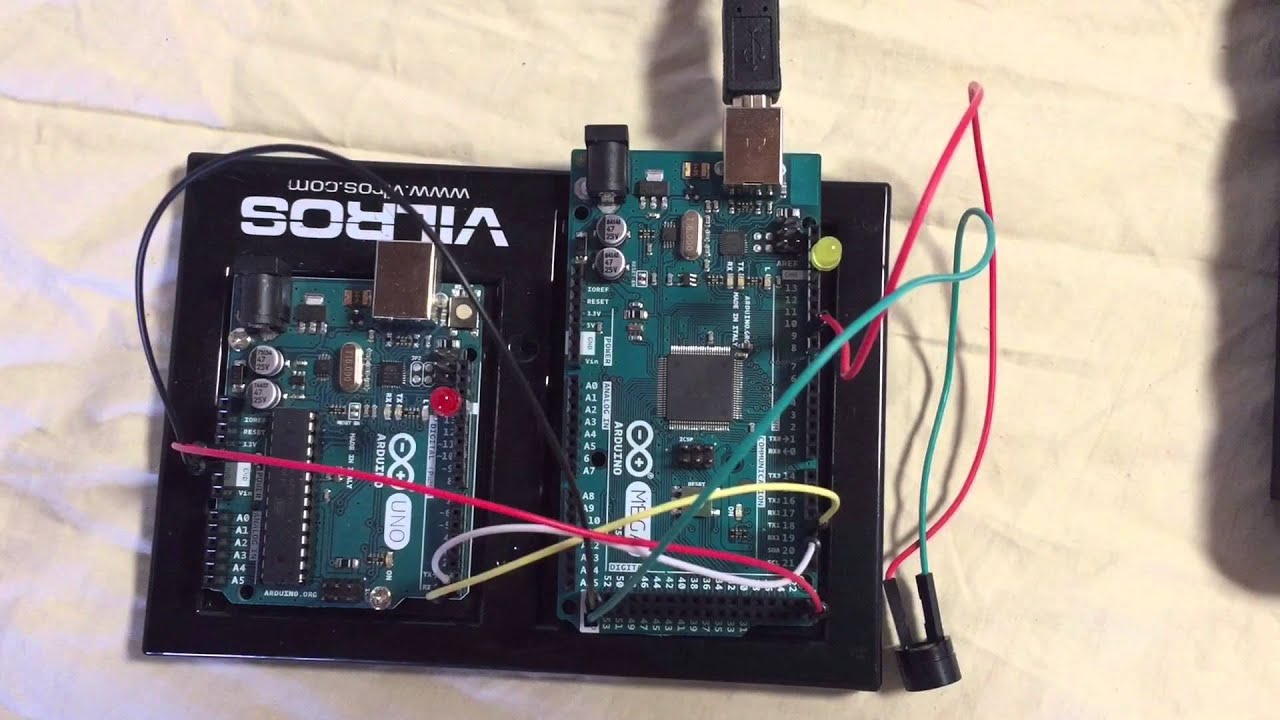
This video clip shows how to connect an Arduino Uno and Arduino Mega using the HARDWARE tx and rx communication configuration. The Mega is the master sending commands to the Uno. After the Uno executes the command it will send an acknowledgement back to the Mega via a buzzer tone connected to pin 9 on the Mega. The Mega Serial Monitor will wait for input from the user and depending on the users menu selection, will process each command option.

Key items to note...
First, the Uno and Mega share power so when the Mega is plugged into the pc BOTH boards are powered up. Second, communication between each board does NOT require an end-of-transmission character. The numeric menu option is broken down into high and low bytes and then reassembled after transmission. Third, the Serial Monitor waits for the user to input a menu option before proceeding. Lastly, the receiver (Uno) sends an acknowledgment back by playing a tone using the buzzer connected to the Mega.

Side note...
I was able to connect 2 USB cables, one to the Uno (on COM5) and one to the Mega (on COM10) which allowed me to view the data being sent and being received after transmission.

Golden rule...
Don't forget to reverse the tx and rx wires when connecting to each board!!


You can download the code here...

https://codebender.cc/user/fish

or here:

http://www.mediafire.com/file/t4cw5me...

and

http://www.mediafire.com/file/18tbqu0...

To view more of my videos please search for "Scott Mon" on YouTube.
Hardware Serial to Serial Communication using Arduino Uno & Mega

Поделиться в:

Доступные форматы для скачивания:

Скачать видео mp4

  • Информация по загрузке:

Скачать аудио mp3

Похожие видео

ATtiny85 и Arduino передача данных  Rx Tx

ATtiny85 и Arduino передача данных Rx Tx

Master UART in 1 Video (Arduino UNO Tutorial)

Master UART in 1 Video (Arduino UNO Tutorial)

4 Port Software Serial to Serial Communication Uno & Mega

4 Port Software Serial to Serial Communication Uno & Mega

10Hz U-blox binary GPS data in 66 lines of code (arduino)

10Hz U-blox binary GPS data in 66 lines of code (arduino)

Arduino Controlled Robotic Arm: Design-Specification-Requirements

Arduino Controlled Robotic Arm: Design-Specification-Requirements

I2C Part 1 - Using 2 Arduinos

I2C Part 1 - Using 2 Arduinos

Arduino GUI Part 1   Communications

Arduino GUI Part 1 Communications

Ford RS gauges with Arduino UNO and DWIN intelligent display (like Nextion displays)

Ford RS gauges with Arduino UNO and DWIN intelligent display (like Nextion displays)

Arduino 2 Arduino Communication VIA Serial Tutorial

Arduino 2 Arduino Communication VIA Serial Tutorial

Почему я перешел с Arduino на ESP — и вам стоит сделать то же самое!

Почему я перешел с Arduino на ESP — и вам стоит сделать то же самое!

Line Following Car with Color Recognition and EasyVR 3 Speech

Line Following Car with Color Recognition and EasyVR 3 Speech

Как летают самолёты на самом деле?

Как летают самолёты на самом деле?

15 лучших проектов Интернета вещей 2025 года 🤯!

15 лучших проектов Интернета вещей 2025 года 🤯!

Serial Communication Control LED Between Two Arduinos

Serial Communication Control LED Between Two Arduinos

Line Following using Arduino Mega and MPU6050 6 DOF Gyro Accelerometer

Line Following using Arduino Mega and MPU6050 6 DOF Gyro Accelerometer

DIY Air Quality Monitor - PM2.5, CO2, VOC, Ozone, Temp & Hum Arduino Meter

DIY Air Quality Monitor - PM2.5, CO2, VOC, Ozone, Temp & Hum Arduino Meter

DWIN Display Tutorials #2 - Transmitting float and int numbers between the display and an Arduino

DWIN Display Tutorials #2 - Transmitting float and int numbers between the display and an Arduino

Connecting Arduino with multiple I2C devices

Connecting Arduino with multiple I2C devices

Arduino Pan and Tilt Camera Mounts.

Arduino Pan and Tilt Camera Mounts.

Using IR Remote Controls with the Arduino

Using IR Remote Controls with the Arduino

© 2025 dtub. Все права защищены.


  • Контакты
  • О нас
  • Политика конфиденциальности


Контакты для правообладателей: infodtube@gmail.com