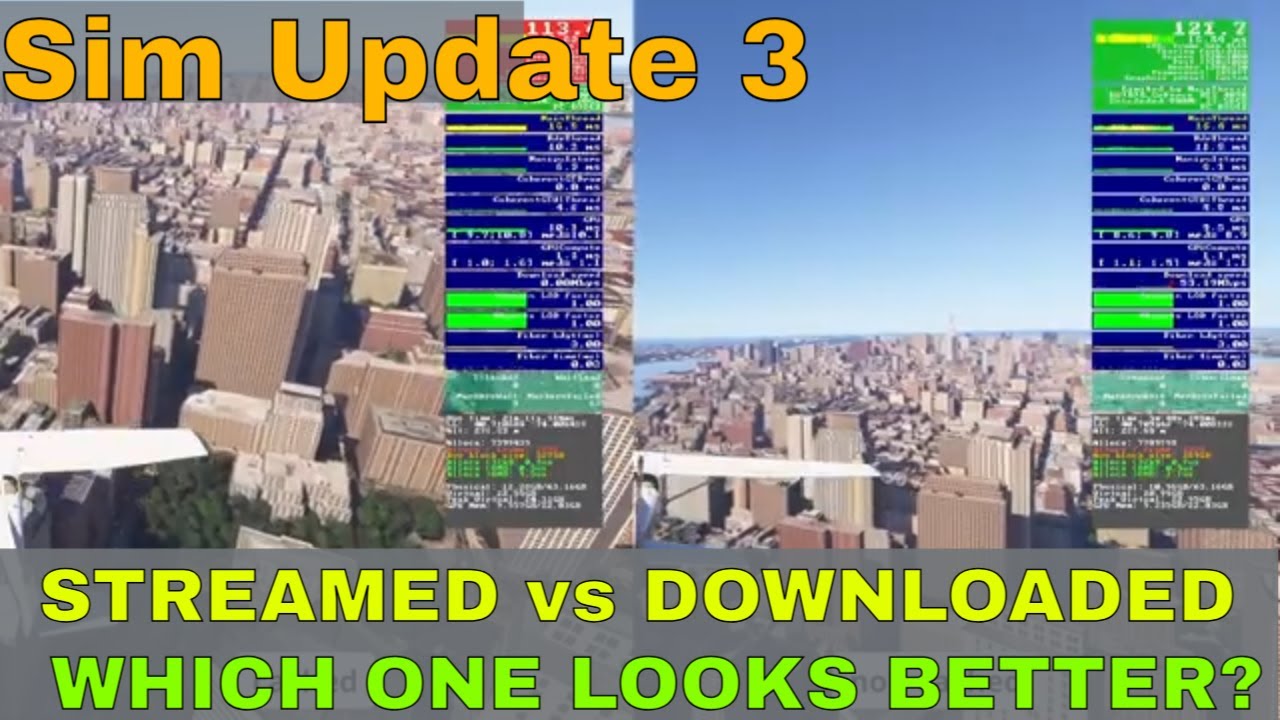
I tested MSFS 2024's Scenery Quality: Streamed vs Downloaded. The difference is ... 👀
Автор: High in the flightsim sky
Загружено: 2025-09-14
Просмотров: 4558
I've always wondered what really gives the best visual quality in Microsoft Flight Simulator 2024. Do you need to pre-download massive offline packs, or is streaming content from the cloud the way to go? I decided to run multiple tests to find the definitive answer.
For this experiment, I took to the skies over two very different, highly-detailed locations: the dense urban jungle of New York City and the dramatic terrain of Gibraltar. I flew the exact same flight paths multiple times, comparing downloaded and streamed content side-by-side, with and without photogrammetry and caching.
🧪 Test Overview
🗽 New York City (NYC)
1️⃣ Streamed 📡 | ❌ Photogrammetry | 🔁 Cached vs Non-Cached
2️⃣ Downloaded 💾 | ❌ Photogrammetry | 🔁 Cached vs Non-Cached
3️⃣ Streamed vs Downloaded 🔄 | ❌ Photogrammetry | ✅ Cached
4️⃣ Streamed 📡 | ✅ Photogrammetry 🗺️ | 🔁 Cached vs Non-Cached
5️⃣ Downloaded 💾 | ✅ Photogrammetry 🗺️ | 🔁 Cached vs Non-Cached
6️⃣ Streamed vs Downloaded 🔄 | ✅ Photogrammetry 🗺️ | ❌ Cached
🏰 Gibraltar
7️⃣ Streamed 📡 | ❌ Photogrammetry | 🔁 Cached vs Non-Cached
8️⃣ Downloaded 💾 | ❌ Photogrammetry | 🔁 Cached vs Non-Cached
9️⃣ Streamed vs Downloaded 🔄 | ✅ Photogrammetry 🗺️ | ❌ Cached
📝Quick breakdown of the terms:
💾Downloaded: Data is already on your PC, which should decrease the data required to be downloaded and theoretically might improve the quality since a lower dependency on the internet.
☁️Streamed: Data is pulled from Microsoft's servers as you fly, saving space but potentially introducing performance and quality issues if your internet connection is slow or inconsistent.
🗂️ Cached: MSFS allows users to create a manual cache or use a rolling cache to store scenery data locally. This helps reduce stutters and loading times in frequently visited areas, especially useful if you have limited bandwidth or a inconsistent internet connection.
🚫 Non-Cached: When caching is disabled, MSFS streams all scenery data live from Bing Maps and Azure servers. This saves disk space but can lead to performance issues if your internet connection isn’t stable or fast enough.
🌍 Photogrammetry: MSFS uses photogrammetry to render real-world cities in high detail using aerial imagery and 3D mapping. While visually stunning, it’s bandwidth-heavy and can cause melted buildings or pop-ins if your connection or system resources are lacking
The results might depending on your system specifications and internet connection. Watch to the end to see which one came out on top! 📈
🖥️System specs
AMD Ryzen 9 7900X3D
64GB Memory DDR5 6000MHz
Gigabyte RTX 4090 Gaming OC
Samsung SSD 900 Pro 2TB
No overclocking configured
🌍Internet speed
1GB up/down fiber
Honestly, the results were not what I expected. If you're chasing the most realistic and immersive scenery possible in MSFS 2024, this is a must-watch.
👇 Did these results surprise you too? Let me know your own experiences in the comments below! And if this video helped you out, a like and subscribe would be amazing!
Do you have a preferred method? Let me know in the comments
📖 Chapters
0:00 - intro
0:29 - intro video
0:51 - how I performed the tests
01:27 - NYC | streamed content | no photogrammetry | cached vs non- cached
04:13 - NYC | downloaded content | no photogrammetry | cached vs non- cached
07:07 - NYC | streamed vs downloaded | no photogrammetry | cached
08:34 - NYC | streamed content | photogrammetry | cached vs non- cached
10:01 - NYC | downloaded content | photogrammetry | cached vs non- cached
11:14 - NYC | streamed vs downloaded | photogrammetry | non-cached
12:32 - Gibraltar | streamed content | no photogrammetry | cached vs non- cached
15:27 - Gibraltar | downloaded content | no photogrammetry | cached vs non- cached
17:54 - Gibraltar | streamed vs downloaded | photogrammetry | non-cached
19:16 - conclusion
20:18 - outro video
🔔 Subscribe
Help support the channel by hitting the Like button 👍 and Subscribe for more MSFS news, previews, and tutorials! See you in the skies!: https://bit.ly/34eNWDP
🔗Other related links
Tutorials playlist: https://bit.ly/3l6fRdL
Website: https://highintheflightsimsky.nl
#FlightSimulator2024 #FlightSim #FS2024
Доступные форматы для скачивания:
Скачать видео mp4
-
Информация по загрузке:









![[MSFS 2024] Amsterdam - Edinburgh | KLM City Hopper | FSS Embraer 190 l VATSIM |](https://imager.clipsaver.ru/bPp65CKwHps/max.jpg)
![Is REX Atmos CORE Good? | A Cinematic Montage | Microsoft Flight Simulator 2024 [Comparison Video]](https://imager.clipsaver.ru/MJWIB1PfXic/max.jpg)
