Enhancing Python Programs with Speech Recognition for User Input
Автор: vlogize
Загружено: 2025-09-16
Просмотров: 1
Discover how to modify your Python code to receive input through voice commands using speech recognition. Learn to enhance user experience with this powerful approach!
---
This video is based on the question https://stackoverflow.com/q/62749452/ asked by the user 'code by Abhishek Bharti' ( https://stackoverflow.com/u/13651138/ ) and on the answer https://stackoverflow.com/a/62769474/ provided by the user 'code by Abhishek Bharti' ( https://stackoverflow.com/u/13651138/ ) at 'Stack Overflow' website. Thanks to these great users and Stackexchange community for their contributions.
Visit these links for original content and any more details, such as alternate solutions, latest updates/developments on topic, comments, revision history etc. For example, the original title of the Question was: How to give input using speech recognition in a element in python
Also, Content (except music) licensed under CC BY-SA https://meta.stackexchange.com/help/l...
The original Question post is licensed under the 'CC BY-SA 4.0' ( https://creativecommons.org/licenses/... ) license, and the original Answer post is licensed under the 'CC BY-SA 4.0' ( https://creativecommons.org/licenses/... ) license.
If anything seems off to you, please feel free to write me at vlogize [AT] gmail [DOT] com.
---
Unlocking Voice Commands in Python: A Guide to Speech Recognition Input
In today's digital world, voice recognition technology is taking relationships between humans and machines to new heights. Gone are the days when we had to input text manually; now we can conveniently use our voices. This post addresses a common challenge that Python developers face when using speech recognition: how to receive user input via voice commands instead of traditional text inputs.
The Problem: Voice Input in Python
When creating interactive applications, allowing users to interact with your program through voice is an appealing feature. For instance, let’s say you want to develop a password creation tool using Python. The tool should prompt the user to specify the desired password length. However, the original implementation requires the user to type the password length, which can detract from the experience.
The question at hand is: How can we modify the Python code so that it can accept voice input for the password length? Let's explore the solution to this challenge!
The Solution: Integrating Voice Input in Your Python Code
The good news is that the solution is straightforward! To allow your program to accept voice input for the password length, we need to modify one line of code in your existing script. Here is the step-by-step breakdown of the implementation:
Step 1: Setup the Speech Recognition Library
First, ensure that you have the required libraries installed: speech_recognition for capturing the voice input and pyttsx3 for text-to-speech capabilities. You can install them using pip:
[[See Video to Reveal this Text or Code Snippet]]
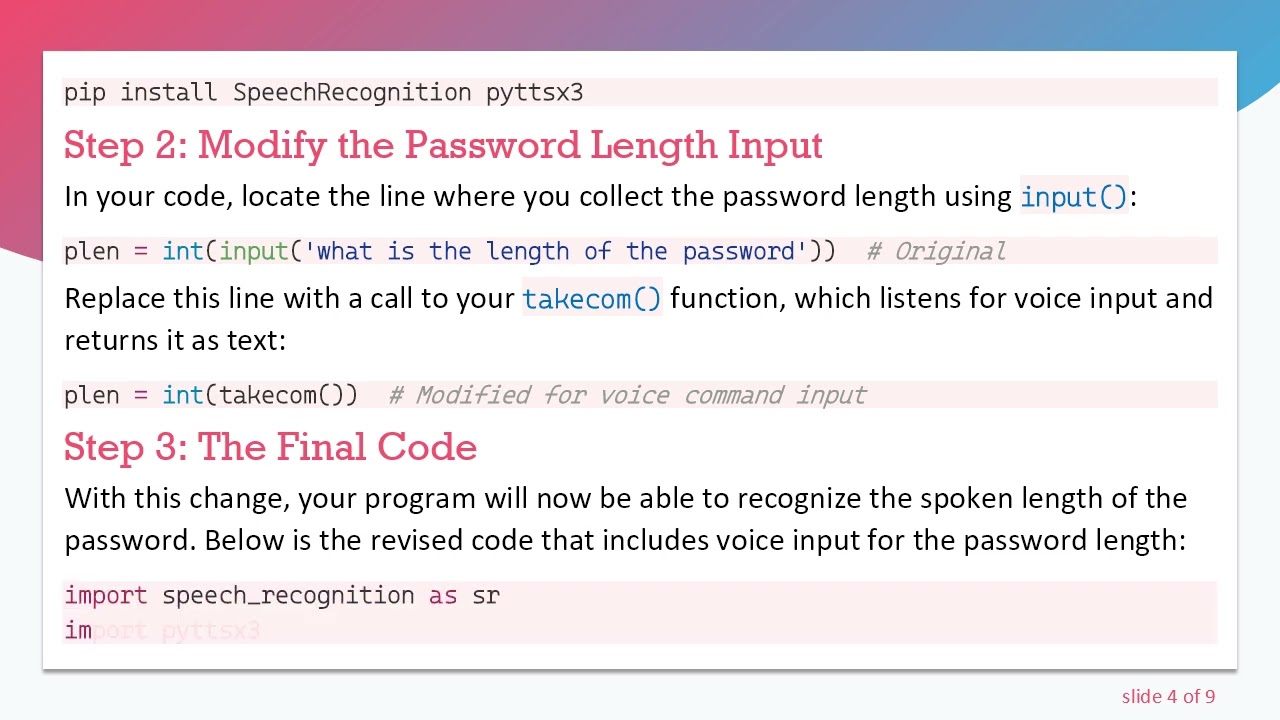
Step 2: Modify the Password Length Input
In your code, locate the line where you collect the password length using input():
[[See Video to Reveal this Text or Code Snippet]]
Replace this line with a call to your takecom() function, which listens for voice input and returns it as text:
[[See Video to Reveal this Text or Code Snippet]]
Step 3: The Final Code
With this change, your program will now be able to recognize the spoken length of the password. Below is the revised code that includes voice input for the password length:
[[See Video to Reveal this Text or Code Snippet]]
Conclusion
Incorporating speech recognition into your Python applications can greatly enhance user experience, making them more interactive and user-friendly. By replacing traditional text inputs with voice commands, you allow users to engage with your program in a more dynamic way. The modification discussed in this post highlights just one of the many possibilities available when integrating voice interaction into software.
Getting started with voice recognition might feel like a challenging task, but with a few simple adjustments, you can unlock a whole new realm of interactivity in your applications. Happy coding!
Доступные форматы для скачивания:
Скачать видео mp4
-
Информация по загрузке:





![Python - Полный Курс по Python [15 ЧАСОВ]](https://image.4k-video.ru/id-video/cfJrtx-k96U)


