How to make an Arduino Light Meter
Автор: Embedded User
Загружено: 2016-04-18
Просмотров: 10364
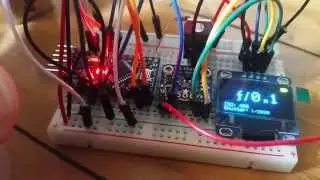
This video show how to make an Arduino Light Meter using an Photoresistor or Light depended resistor(LDR). A 128X64 i2c Oled ssd1306 display is used to display the light intensity in percentage numeral and bar. I used an Arduino UNO 3.3V clone which uses Atmega328P.
Photoresistors are cheap and easily available on ebay, bangood, sparkfun etc. Library used U8Glib: Installed directly from the Library Manager in Arduino IDE.
Connect the photoresistor or LDR between 3.3V and A0 analog input pin of Arduino. Also connect an 12K or 10K resistor between A0 and ground pin of Arduino.
The OLED display VCC is connected to 3.3V of Arduino. Gnd to Gnd of Arduino.
SDA of OLED to SDA or Arduino, SCL of OLED to SCL of Arduino.
Light Meter code: Download/copy and save with .ino extension.
http://www.jaimeferns.in/2016/10/ardu...
Follow me on Twitter : / embedded_user
Previous Videos:
How to connect 128X64 i2c Oled display to Arduino
• How to connect 128X64 i2c Oled display to ...
Nokia 5110 graphical lcd Demo using Arduino
• Nokia 5110 graphical lcd Demo using Arduino
Controlling RGB LEDS with Arduino and TLC5940
• Controlling RGB LEDS with Arduino and TLC5940
Subscribe to my channel
/ @embeddeduser
Music used:
1)"Basement Floor" Kevin MacLeod (incompetech.com)
Licensed under Creative Commons: By Attribution 3.0 License http://creativecommons.org/licenses/b...
2)Ecstatic Wave by Jens Kiilstofte https://machinimasound.com/music/ecst...
Licensed under Creative Commons Attribution 4.0 International (http://creativecommons.org/licenses/b...)

Доступные форматы для скачивания:
Скачать видео mp4
-
Информация по загрузке: