Power Platform Pipelines Explained: Dev → UAT → Prod Deployment Guide
Автор: akshansh sharma
Загружено: 2025-07-26
Просмотров: 805
*Master Power Platform Pipelines: Automated ALM from Development to Production*
In this step‑by‑step video, I walk you through how to **set up and run Power Platform Pipelines**—from creating your hosting environment to executing deployment stages between Dev, UAT, and Prod environments.
You’ll learn how to:
✅ Create a dedicated *hosting environment* and install the Pipelines solution
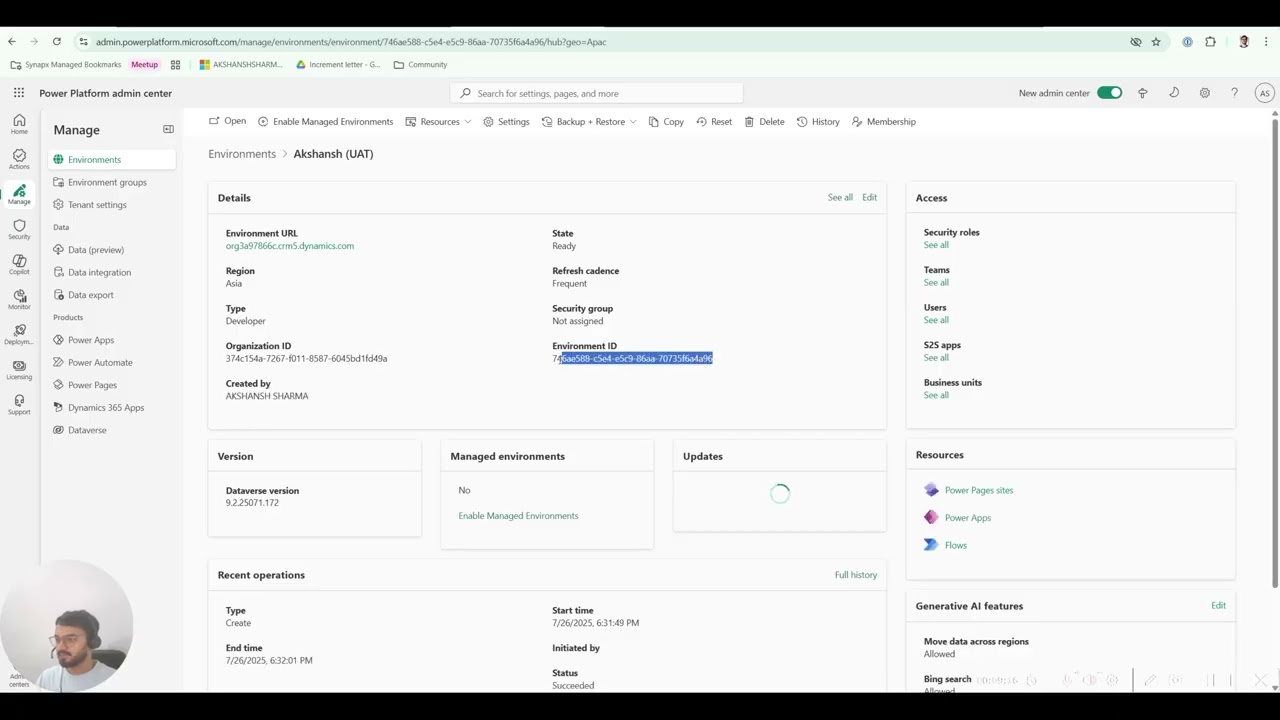
✅ Register Dev, UAT, and Production environments using environment IDs
✅ Enable *cross-geo deployment* for DS-compatible multi-region support
✅ Build a pipeline with stages (Dev → UAT → Prod), including sequential stage dependencies
✅ Manage **security roles**: Deployment Pipeline User & Administrator
✅ Share pipelines with others securely using delegated permissions
✅ Run pipelines with live demo: deploy a solution with environment variables, validations, and scheduling
✅ Best practices: use service principal, approval flows, and connection references
---
⏱ Timestamps:
0:00 – Intro: What are Power Platform Pipelines and why use them
1:20 – Creating your pipeline hosting environment
3:00 – Installing Pipelines app and accessing the Deployment Configuration model-driven app
4:30 – Adding Dev, UAT, and Prod environments (with environment IDs)
6:00 – Enabling cross-geo deployment feature
7:00 – Users, roles & sharing pipelines securely
8:00 – Creating deployment stages: Dev→UAT & UAT→Prod
9:30 – Running your first pipeline: Demo & scheduling
11:00 – Solution deployment: livedata, environment variables & validation
12:15 – Best practice tips: delegated deployment, approvals & service principal
13:00 – Wrap-up & what’s next in the series
---
🔗 Helpful Links:
Official documentation: [Microsoft Learn – Overview of Power Platform Pipelines] :https://learn.microsoft.com/en-us/pow...
---
👍 If this video supercharged your deployment process, please *like**, **subscribe**, and **hit the bell 🔔* to get notified about the next tutorials on delegated deployments, approvals, and advanced ALM strategies.
💬 Let me know in the comments: what pipeline feature do you want me to deep dive into next?
#PowerPlatform #PowerApps #Pipelines #ALM #Deployment #LowCode #CanvasApps
🚀 *Master Power Platform Pipelines: Automated ALM from Development to Production*
In this step‑by‑step video, I walk you through how to **set up and run Power Platform Pipelines**—from creating your hosting environment to executing deployment stages between Dev, UAT, and Prod environments.
You’ll learn how to:
✅ Create a dedicated *hosting environment* and install the Pipelines solution
✅ Register Dev, UAT, and Production environments using environment IDs
✅ Enable *cross-geo deployment* for DS-compatible multi-region support
✅ Build a pipeline with stages (Dev → UAT → Prod), including sequential stage dependencies
✅ Manage **security roles**: Deployment Pipeline User & Administrator
✅ Share pipelines with others securely using delegated permissions
✅ Run pipelines with live demo: deploy a solution with environment variables, validations, and scheduling
✅ Best practices: use service principal, approval flows, and connection references
---
⏱ Timestamps:
0:00 – Intro: What are Power Platform Pipelines and why use them
1:20 – Creating your pipeline hosting environment
3:00 – Installing Pipelines app and accessing the Deployment Configuration model-driven app
4:30 – Adding Dev, UAT, and Prod environments (with environment IDs)
6:00 – Enabling cross-geo deployment feature
7:00 – Users, roles & sharing pipelines securely
8:00 – Creating deployment stages: Dev→UAT & UAT→Prod
9:30 – Running your first pipeline: Demo & scheduling
11:00 – Solution deployment: livedata, environment variables & validation
12:15 – Best practice tips: delegated deployment, approvals & service principal
13:00 – Wrap-up & what’s next in the series
---
🔗 Helpful Links:
Official documentation: [Microsoft Learn – Overview of Power Platform Pipelines] :contentReference[oaicite:1]{index=1}
Step-by-step setup guide: Rajeev Pentyala’s tutorial :contentReference[oaicite:2]{index=2}
Real-world configuration insights: Imaginet & Collab365 blogs :contentReference[oaicite:3]{index=3}
---
👍 If this video supercharged your deployment process, please *like**, **subscribe**, and **hit the bell 🔔* to get notified about the next tutorials on delegated deployments, approvals, and advanced ALM strategies.
💬 Let me know in the comments: what pipeline feature do you want me to deep dive into next?
#PowerPlatform #PowerApps #Pipelines #ALM #Deployment #LowCode #CanvasApps
Доступные форматы для скачивания:
Скачать видео mp4
-
Информация по загрузке: