Excel Tips - Auto Highlight Date Formatting | Projects | Dynamic
Автор: Career Solutions For Today
Загружено: 2025-08-20
Просмотров: 401
📌 YouTube Description
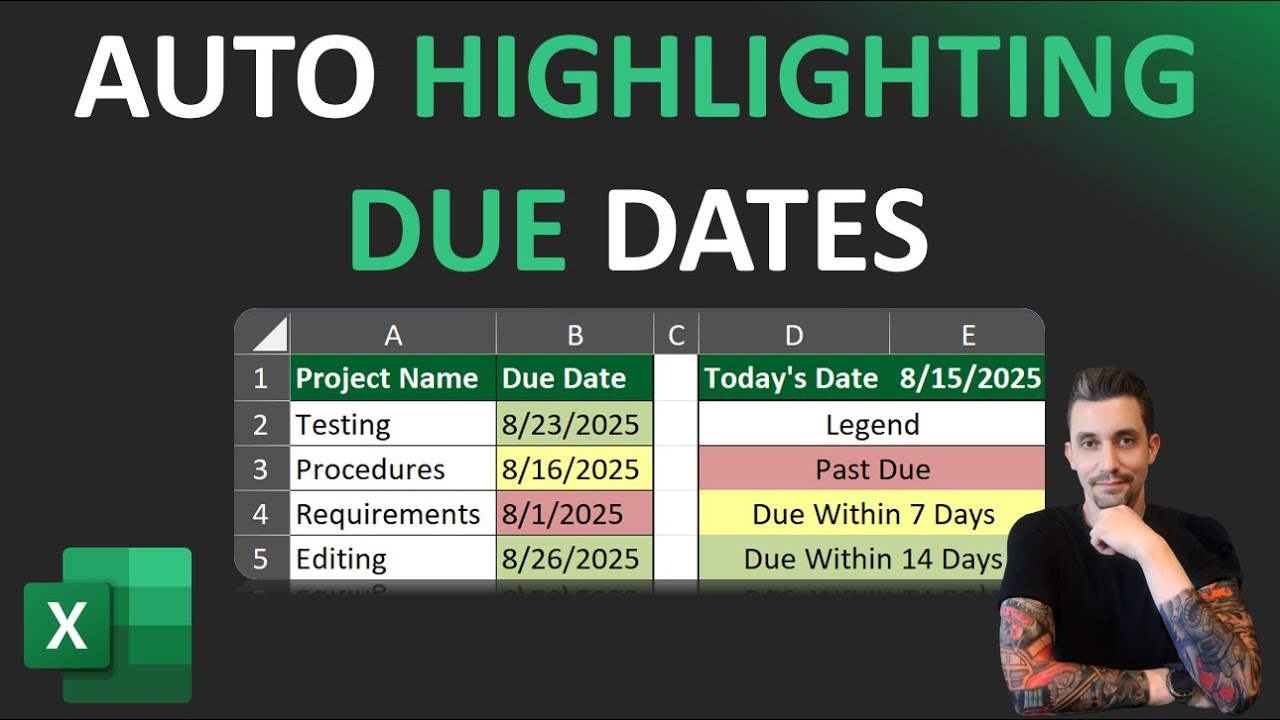
Learn how to automatically highlight due dates in Excel with Conditional Formatting! In this step-by-step tutorial, I’ll show you how to:
✅ Highlight past due dates in red
✅ Highlight tasks due within 7 days in yellow
✅ Highlight tasks due within 14 days in orange
✅ Make it dynamic with cell references, so you can type your own alert days (e.g., 3, 7, 30) and Excel updates automatically
This works in Excel for Windows, Excel for Mac, and Excel Online, and you can easily customize the rules for your own projects, assignments, or invoices.
📊 Perfect for project managers, students, small business owners, and anyone who needs an automatic reminder system in Excel.
Practice workbook: https://docs.google.com/spreadsheets/...
Website with additional resources: www.careersolutionsfortoday.com
👉 Don’t forget to like 👍, subscribe 🔔, and comment with your favorite Excel tricks!
Доступные форматы для скачивания:
Скачать видео mp4
-
Информация по загрузке: